

Interview Settings
Per-posting settings: retakes, timing, scheduling, delivery mode, and feature toggles.Retakes
Control whether candidates can retake the interview and how often.
Where to set posting rules: Interviewer → Settings → Timeline & Completion → Interview Retake Policy (max retakes, cooldown, and admin override). See also Configuring Your AI Interviewer.
Grant one candidate a retake: Candidates → open the person’s profile → Allow Retake in the header (between Download and Nudge). Use this when admin override is on, or to help one person after a technical issue without changing rules for everyone.
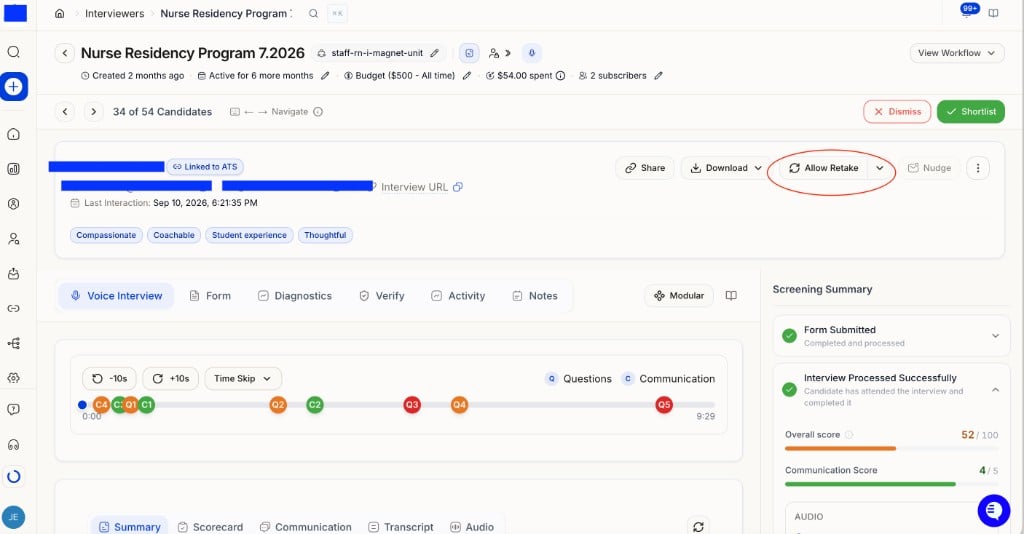
Candidate profile — click Allow Retake to grant that person another attempt.
Timing
Scheduling (Voice/Video)
Delivery Mode
How strictly the AI applies your rubric in the score report:Budget Configuration
On the Dashboard, each role with a budget shows Spend as dollars used / dollars allowed (for example $30 / $100). Only spending after you set that budget counts toward the cap. Hover for what’s left and what’s held for in-progress interviews; red means the cap is used up. Change the cap with the pencil on Spend (Budget Limit dialog). See How to read Spend for a screenshot and full explanation.