Pull every candidate across every posting in one export, then build the exact report you need with a spreadsheet or an AI tool like GPT, Gemini, or Copilot.
If you need reporting across your whole pipeline, do not download candidates posting by posting. A workspace-wide export pulls everyone, across every posting, into one file in a single run.Common use cases:
Recurring ROI or adoption reporting: one weekly file covering every active role
Custom reports: your team needs fields combined in a way the standard report does not cover
Handoffs to IT or analysts: give your internal team the complete dataset and let them build whatever reporting your org needs
Audits: a point-in-time snapshot of all candidate data
Exporting just a handful of candidates from one posting? Use the Download button on the candidate list instead. See Reviewing Candidates.
Path: Sidebar → Compliance → Export log → New export
1
Open the export builder
Go to Compliance → Export log and click New export.
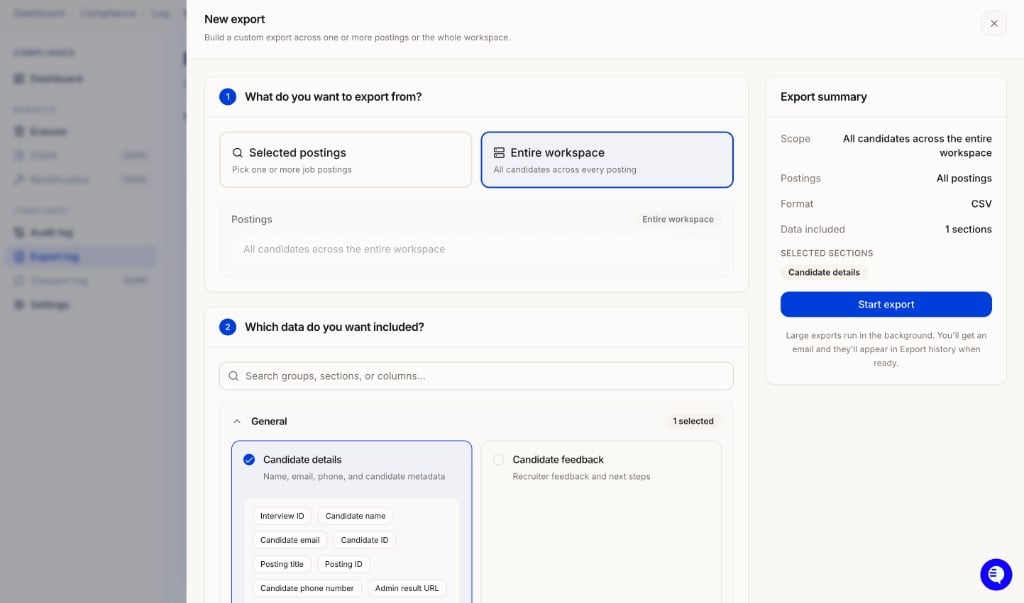
New export: choose Selected postings or Entire workspace, pick your data sections, and start the export.
2
Choose your scope
Option
What it exports
Entire workspace
All candidates across every posting
Selected postings
Pick one or more specific job postings
3
Choose which data to include
Search or browse sections to add. See the section guide below for what to pick.
4
Choose a format
Format
What you get
CSV
Flat spreadsheet, one row per candidate. Best for reporting and AI tools.
Excel
Formatted spreadsheet with section statuses.
JSON
Nested record export with the full data model. Best for IT teams and integrations.
Candidate feedback CSV
Feedback-only spreadsheet.
Everything ZIP
PDF, media, and data files bundled together.
The Export summary panel on the right shows your scope, format, and selected sections, plus a schema preview of the exact columns your file will contain with sample data.
5
Start the export
Click Start export. Large exports run in the background. You get an email when the file is ready, and it also lands in Export History where you can re-download it any time.
Posting-specific sections (Interview questions, Form results) vary by posting. If you are exporting them across multiple postings, use JSON or ZIP format instead of CSV.
Re-running the same report every week? Select the same sections each time so your columns stay consistent and any downstream tooling (spreadsheets, scripts, AI prompts) keeps working without changes.
The export gives you all the raw data. From there, your team or your IT department can shape it into any report format, and AI tools make this fast: upload the CSV and describe the report you want.Example prompts that work well with a workspace export:
“Build a weekly pipeline report with one row per candidate: name, email, posting title, status, date created, form completion date, video interview completion date, match score, and candidate experience score.”
“Summarize adoption by posting: candidates invited, completed, shortlisted, and dismissed, with completion rate per role.”
“Compare average match score and candidate experience score across postings and flag roles below the workspace average.”
This is the workflow most customer IT teams use for recurring reporting: pull the full dataset on a schedule, then run a saved GPT, Gemini, or Copilot prompt against it to regenerate the report.
Exports contain candidate personal data. Before uploading them to any external AI tool, check your organization’s data handling policy, and prefer enterprise instances of these tools where your data is not used for training.
Exports from the app are run on demand. If you want fully hands-off recurring reporting, your IT team can pull the same data programmatically through the HeyMilo Public API on whatever schedule you need, then feed it into the same AI prompts or BI tooling.
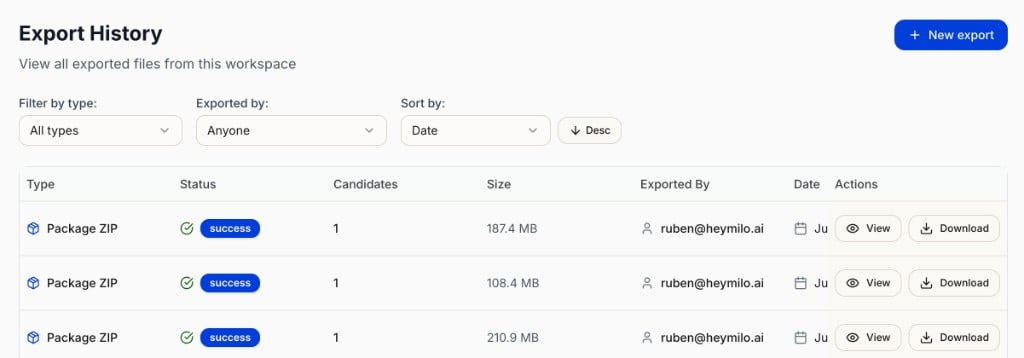
Every export is logged under Compliance → Export log with type, status, candidate count, file size, who ran it, and the date. Use View for the export’s scope and sections, or Download to grab the file again.
Export History showing all exports with type, status, candidate count, size, who exported, and View or Download options.