

Why it’s important (for you and the candidate)
- Trust: Confident, consistent answers feel professional; vague or wrong ones hurt your brand.
- Your time: Less back-and-forth later when candidates already heard the right story in-screening.
- Fairness: Everyone hears the same policy facts, not whatever the model improvises.
- Speed: Recruiters aren’t the bottleneck for the tenth “Is this role hybrid?” of the week.
Where to set it up
Interviewers → Tools → Knowledge Base in the sidebar.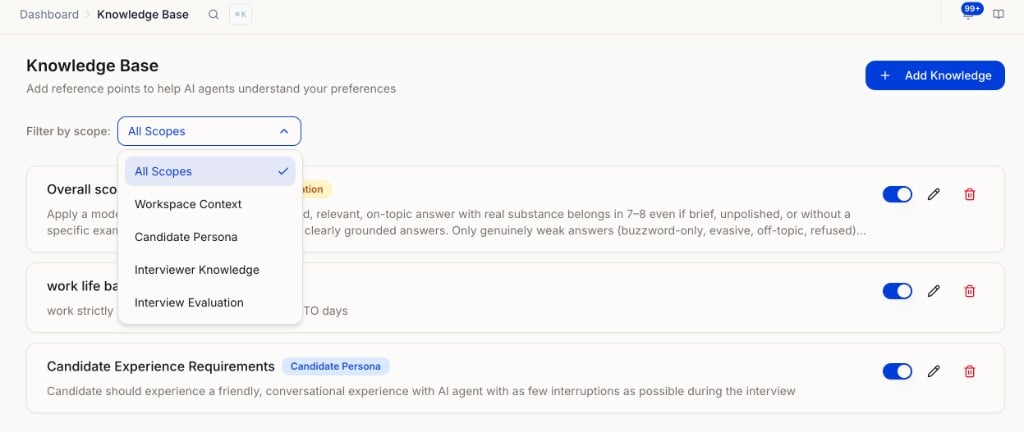
Knowledge Base list with Filter by scope dropdown showing all available scope options.
What to add
Create small, focused items — one topic per entry when you can.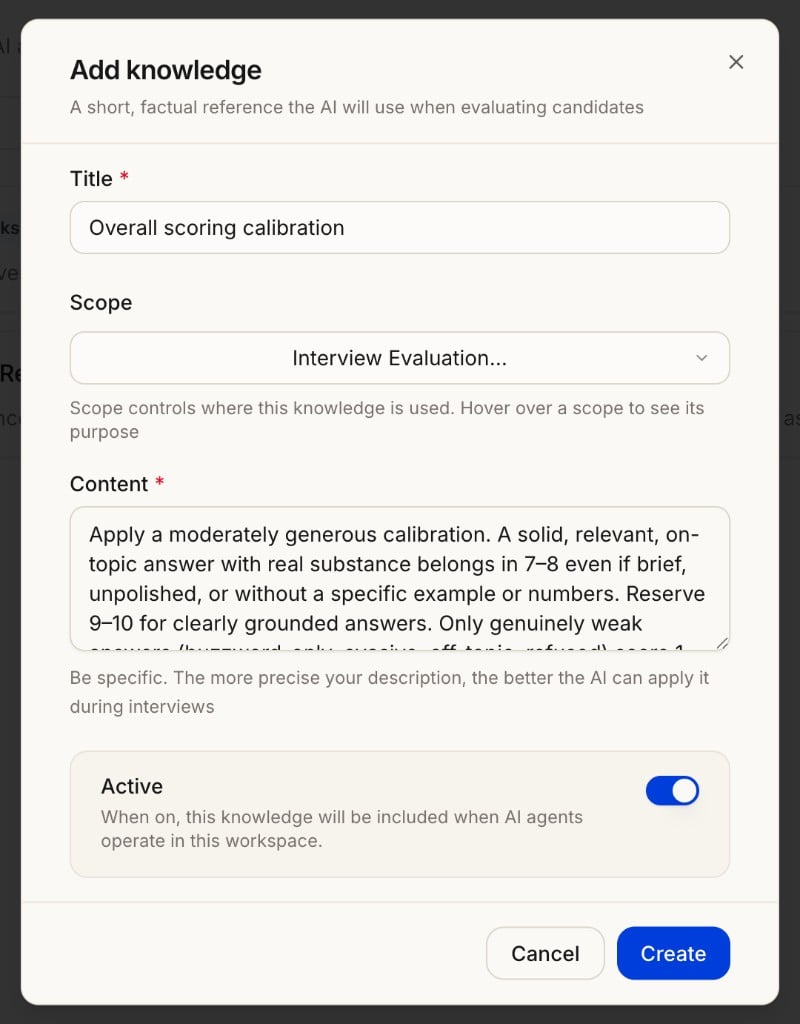
Add knowledge form showing Title, Scope, Content, and Active toggle.
- Title: What you would scan for in a list (e.g. “Remote and hybrid policy,” “Overall scoring calibration”).
- Scope: Controls where this knowledge is applied. Choose the scope that matches what you want the AI to do with it.
- Content: Plain language, as if you’re saying it to a candidate on the phone. If legal or comms approved specific wording, use that. The more precise, the better the AI can apply it.
- Active: On = AI can use it; off = hidden without deleting (great for seasonal or paused entries).
After you’ve added items
- Edit when anything changes: stale answers are worse than missing ones.
- Deactivate what you don’t need right now; delete only what you’ll never use again.
- Filter by scope to find entries quickly as your list grows.
How the AI uses this
During voice/video (and similar flows), when a candidate asks something that matches what you’ve written, the AI pulls from these articles so answers stay grounded in your text. Entries with Interview Evaluation scope apply to how the AI scores answers across your workspace. Reminder: Put accurate, approved information here. The Knowledge Base is not a substitute for policy or legal sign-off on sensitive topics.Next steps
- Adjusting Scoring (Interview Evaluation) — Use Knowledge Base prompts to tune scoring across your workspace
- Configuring Your AI Interviewer — How interviews and context fit together
- What Candidates Experience — What they see and hear
- AI Settings — Other workspace AI defaults