Pull every candidate across every posting in one export, then build the exact report you need with a spreadsheet or an AI tool like GPT, Gemini, or Copilot.
If you need reporting across your whole pipeline, do not download candidates posting by posting. A workspace-wide export pulls everyone, across every posting, into one file in a single run.Common use cases:
Recurring ROI or adoption reporting: one weekly file covering every active role
Custom reports: your team needs fields combined in a way the standard report does not cover
Handoffs to IT or analysts: give your internal team the complete dataset and let them build whatever reporting your org needs
Audits: a point-in-time snapshot of all candidate data
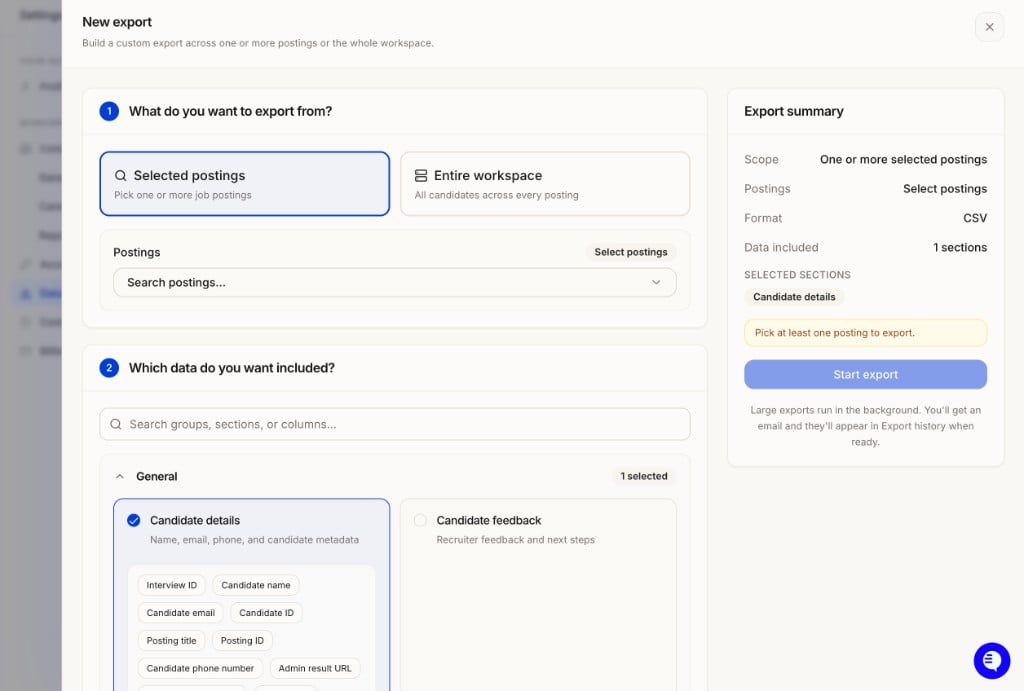
Go to Settings → Data export and click + New export.
New export: choose Selected postings or Entire workspace, pick your data sections, and start the export.
2
Choose your scope
Option
What it exports
Entire workspace
All candidates across every posting
Selected postings
Pick one or more specific job postings
3
Choose which data to include
Search or browse sections to add. See the section guide below for what to pick.
4
Choose a format
Format
What you get
CSV
Flat spreadsheet, one row per candidate. Best for reporting and AI tools.
Excel
Formatted spreadsheet with section statuses.
JSON
Nested record export with the full data model. Best for IT teams and integrations.
Candidate feedback CSV
Feedback-only spreadsheet.
Everything ZIP
PDF, media, and data files bundled together.
The Export summary panel on the right shows your scope, format, and selected sections, plus a schema preview of the exact columns your file will contain with sample data.
5
Start the export
Click Start export. Large exports run in the background. You get an email when the file is ready, and it also lands in the list on Settings → Data export where you can re-download it any time.
Posting-specific sections (Interview questions, Form results) vary by posting. If you are exporting them across multiple postings, use JSON or ZIP format instead of CSV.
Re-running the same report every week? Select the same sections each time so your columns stay consistent and any downstream tooling (spreadsheets, scripts, AI prompts) keeps working without changes.
The export gives you all the raw data. From there, your team or your IT department can shape it into any report format, and AI tools make this fast: upload the CSV and describe the report you want.Example prompts that work well with a workspace export:
“Build a weekly pipeline report with one row per candidate: name, email, posting title, status, date created, form completion date, video interview completion date, match score, and candidate experience score.”
“Summarize adoption by posting: candidates invited, completed, shortlisted, and dismissed, with completion rate per role.”
“Compare average match score and candidate experience score across postings and flag roles below the workspace average.”
This is the workflow most customer IT teams use for recurring reporting: pull the full dataset on a schedule, then run a saved GPT, Gemini, or Copilot prompt against it to regenerate the report.
Exports contain candidate personal data. Before uploading them to any external AI tool, check your organization’s data handling policy, and prefer enterprise instances of these tools where your data is not used for training.
Exports from the app are run on demand. If you want fully hands-off recurring reporting, your IT team can pull the same data programmatically through the v2 Public API on whatever schedule you need, then feed it into the same AI prompts or BI tooling.
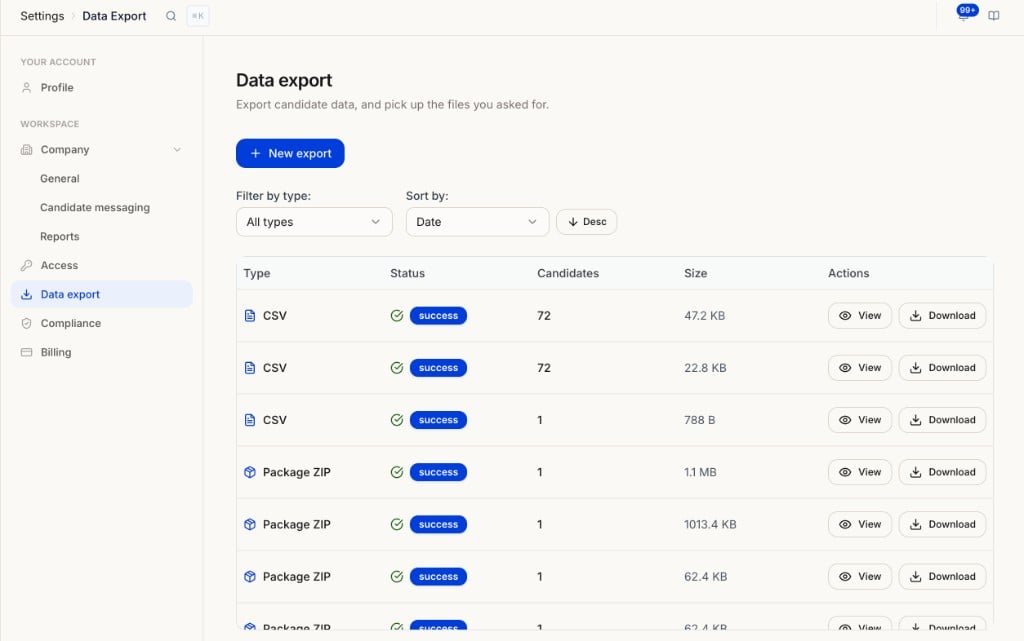
Every export is listed on Settings → Data export with type, status, candidate count, and file size. Use View for the export’s scope and sections, or Download to grab the file again. Filter by type or sort by date to find an older run.
Data export showing all exports with type, status, candidate count, size, and View or Download options.
{"docsConfig":{"theme":"mint","$schema":"https://mintlify.com/docs.json","name":"HeyMilo AI Documentation","colors":{"primary":"#1976d2","light":"#42a5f5","dark":"#1565c0"},"logo":{"light":"https://mintcdn.com/heymilo/1qxCNW6j6jqz7IAZ/images/HeyMilo_Logo_Primary.svg?fit=max\u0026auto=format\u0026n=1qxCNW6j6jqz7IAZ\u0026q=85\u0026s=e66a830eafb646a025265c1f784731ee","dark":"https://mintcdn.com/heymilo/sD7bprECHmd4gxYn/images/HeyMilo_Logo_Full_White.svg?fit=max\u0026auto=format\u0026n=sD7bprECHmd4gxYn\u0026q=85\u0026s=e6f5fcf3c549c76a46269215055d5ee7"},"favicon":"https://mintcdn.com/heymilo/1qxCNW6j6jqz7IAZ/images/HeyMilo_Icon_Primary.png?fit=max\u0026auto=format\u0026n=1qxCNW6j6jqz7IAZ\u0026q=85\u0026s=2bc77c79483508c8925f10e5fc9b9531","navbar":{"links":[{"href":"mailto:hello@heymilo.ai","label":"Support"}],"primary":{"type":"button","label":"Dashboard","href":"https://admin.heymilo.ai"}},"footer":{"socials":{"linkedin":"https://linkedin.com/company/heymilo"}},"icons":{"library":"fontawesome"},"styling":{"eyebrows":"breadcrumbs","latex":true},"integrations":{"posthog":{"apiKey":"phc_oQCWs4B60yvLBlAhHWFtamuaBYWQkymhDWK6b3tLQNg","sessionRecording":false}},"navigation":{"global":{"anchors":[{"anchor":"HeyMilo AI","icon":"house","color":{"light":"#0052FF","dark":"#0052FF"},"href":"https://www.heymilo.ai/"},{"anchor":"HeyMilo Red","icon":"shield-check","color":{"light":"#D62828","dark":"#E63946"},"href":"https://heymilo.red/docs"}]},"pages":[]}},"deployment":{"deploymentMetadataValue":{"subdomain":"heymilo","hasAudioNarration":false,"actualSubdomain":"heymilo","customDomains":["docs.heymilo.ai"],"gitSource":{"type":"github","owner":"heymilo","repo":"pub-docs","deployBranch":"main","contentDirectory":"","isPrivate":true,"mountPath":"","label":""},"chroma":{"liveDeploymentHistoryId":"6adf828516765f5140a18fdc","collectionId":"e9f1034e-eeb1-47c4-a3c9-9bc4d81ddca4","schemaVersion":"v3","latestBuiltDeploymentHistoryId":"6adf828516765f5140a18fdc"},"feedback":{"thumbs":true,"edits":true,"issues":true},"entitlements":{"AI_CHAT":{"status":"ENABLED"},"WEB_MCP":{"status":"ENABLED"},"NARRATION":{"status":"ENABLED"}},"buildId":"6adf85ceb6ccf8efa60c690f","clientVersion":"0.0.3966","searchFilterCounts":[{"language":"default","tag":"API Reference","count":69},{"language":"default","tag":"Public API (v2)","count":67},{"language":"default","tag":"v2 API Reference","count":60},{"language":"default","tag":"Integrations","count":46},{"language":"default","tag":"Deep Dive","count":45},{"language":"default","tag":"Guides","count":21},{"language":"default","tag":"ATS guides","count":18},{"language":"default","tag":"Interviews","count":16},{"language":"default","tag":"Getting Started","count":14},{"language":"default","tag":"Settings \u0026 Admin","count":10}]},"assistantConfig":{},"hasChatPermissions":true,"hasWebMcpPermissions":true,"toggles":[{"name":"kill-isr","enabled":true,"variant":{"name":"disabled","enabled":false,"feature_enabled":true},"impressionData":false},{"name":"agent-mintlify-slack","enabled":true,"variant":{"name":"disabled","enabled":false,"feature_enabled":true},"impressionData":false},{"name":"editor-v7-file-tree","enabled":true,"variant":{"name":"disabled","enabled":false,"feature_enabled":true},"impressionData":false},{"name":"agent-integrations-settings","enabled":true,"variant":{"name":"disabled","enabled":false,"feature_enabled":true},"impressionData":false},{"name":"automations-pr-grouping","enabled":true,"variant":{"name":"disabled","enabled":false,"feature_enabled":true},"impressionData":false},{"name":"custom-prefix","enabled":true,"variant":{"name":"disabled","enabled":false,"feature_enabled":true},"impressionData":false},{"name":"analytics-v7","enabled":true,"variant":{"name":"disabled","enabled":false,"feature_enabled":true},"impressionData":false},{"name":"user-flows-analytics","enabled":true,"variant":{"name":"disabled","enabled":false,"feature_enabled":true},"impressionData":false},{"name":"no-publish-flow","enabled":true,"variant":{"name":"disabled","enabled":false,"feature_enabled":true},"impressionData":false},{"name":"workos-onboarding","enabled":true,"variant":{"name":"disabled","enabled":false,"feature_enabled":true},"impressionData":false},{"name":"llms-txt-v2","enabled":true,"variant":{"name":"disabled","enabled":false,"feature_enabled":true},"impressionData":false},{"name":"pause-universal-search-reconcile","enabled":true,"variant":{"name":"disabled","enabled":false,"feature_enabled":true},"impressionData":false},{"name":"snapshot-serving-live","enabled":true,"variant":{"name":"disabled","enabled":false,"feature_enabled":true},"impressionData":false},{"name":"stripTemperatureMiddleware","enabled":true,"variant":{"name":"disabled","enabled":false,"feature_enabled":true},"impressionData":false},{"name":"per-site-search-delta","enabled":true,"variant":{"name":"disabled","enabled":false,"feature_enabled":true},"impressionData":false},{"name":"support-platform-pylon-zendesk","enabled":true,"variant":{"name":"disabled","enabled":false,"feature_enabled":true},"impressionData":false},{"name":"snapshot-serving","enabled":true,"variant":{"name":"disabled","enabled":false,"feature_enabled":true},"impressionData":false},{"name":"instant-rollback","enabled":true,"variant":{"name":"disabled","enabled":false,"feature_enabled":true},"impressionData":false},{"name":"granular-notifications-server","enabled":true,"variant":{"name":"disabled","enabled":false,"feature_enabled":true},"impressionData":false},{"name":"granular-notifications","enabled":true,"variant":{"name":"disabled","enabled":false,"feature_enabled":true},"impressionData":false},{"name":"editor-private-page-search","enabled":true,"variant":{"name":"disabled","enabled":false,"feature_enabled":true},"impressionData":false},{"name":"automations-fable","enabled":true,"variant":{"name":"disabled","enabled":false,"feature_enabled":true},"impressionData":false},{"name":"fixed-ai-action-pricing","enabled":true,"variant":{"name":"disabled","enabled":false,"feature_enabled":true},"impressionData":false},{"name":"automation-resolve-merge-conflict","enabled":true,"variant":{"name":"disabled","enabled":false,"feature_enabled":true},"impressionData":false},{"name":"scoped-publishing","enabled":true,"variant":{"name":"disabled","enabled":false,"feature_enabled":true},"impressionData":false},{"name":"mintql","enabled":true,"variant":{"name":"disabled","enabled":false,"feature_enabled":true},"impressionData":false},{"name":"page-level-analytics","enabled":true,"variant":{"name":"disabled","enabled":false,"feature_enabled":true},"impressionData":false},{"name":"editor-version-history-v2","enabled":true,"variant":{"name":"disabled","enabled":false,"feature_enabled":true},"impressionData":false},{"name":"editor-nav-generations","enabled":true,"variant":{"name":"disabled","enabled":false,"feature_enabled":true},"impressionData":false},{"name":"billing-page-v2","enabled":true,"variant":{"name":"disabled","enabled":false,"feature_enabled":true},"impressionData":false},{"name":"workspace-projects","enabled":true,"variant":{"name":"disabled","enabled":false,"feature_enabled":true},"impressionData":false},{"name":"assistant-v5","enabled":true,"variant":{"name":"disabled","enabled":false,"feature_enabled":true},"impressionData":false},{"name":"byok-sep-25","enabled":true,"variant":{"name":"disabled","enabled":false,"feature_enabled":true},"impressionData":false},{"name":"fork-pr-previews","enabled":true,"variant":{"name":"disabled","enabled":false,"feature_enabled":true},"impressionData":false},{"name":"revalidation-jwt","enabled":true,"variant":{"name":"disabled","enabled":false,"feature_enabled":true},"impressionData":false},{"name":"vite-origin","enabled":true,"variant":{"name":"disabled","enabled":false,"feature_enabled":true},"impressionData":false},{"name":"editor-agent-model-picker","enabled":true,"variant":{"name":"disabled","enabled":false,"feature_enabled":true},"impressionData":false},{"name":"billing-updated-9-15","enabled":true,"variant":{"name":"disabled","enabled":false,"feature_enabled":true},"impressionData":false},{"name":"hobby-abuse-scan","enabled":true,"variant":{"name":"disabled","enabled":false,"feature_enabled":true},"impressionData":false},{"name":"dashboard-inbox","enabled":true,"variant":{"name":"disabled","enabled":false,"feature_enabled":true},"impressionData":false}],"isAtlas":false,"googleFontsInlined":false},"customCss":[],"page":{"pagePath":"guides/run-and-review/exporting-workspace-data","slug":"/guides/run-and-review/exporting-workspace-data","pageMetadata":{"title":"Workspace Exports \u0026 Custom Reporting","description":"Pull every candidate across every posting in one export, then build the exact report you need with a spreadsheet or an AI tool like GPT, Gemini, or Copilot.","keywords":["export","workspace export","custom report","reporting","ROI reporting","adoption reporting","bulk export","csv export","weekly report","export all candidates"],"href":"/guides/run-and-review/exporting-workspace-data"},"description":{"compiledSource":"\"use strict\";\nconst {jsx: _jsx} = arguments[0];\nconst {useMDXComponents: _provideComponents} = arguments[0];\nfunction _createMdxContent(props) {\n const _components = {\n p: \"p\",\n ..._provideComponents(),\n ...props.components\n };\n return _jsx(_components.p, {\n children: \"Pull every candidate across every posting in one export, then build the exact report you need with a spreadsheet or an AI tool like GPT, Gemini, or Copilot.\"\n });\n}\nfunction MDXContent(props = {}) {\n const {wrapper: MDXLayout} = {\n ..._provideComponents(),\n ...props.components\n };\n return MDXLayout ? _jsx(MDXLayout, {\n ...props,\n children: _jsx(_createMdxContent, {\n ...props\n })\n }) : _createMdxContent(props);\n}\nreturn {\n default: MDXContent\n};\n","frontmatter":{},"scope":{}},"pageType":"default","mdx":{"mdxSource":{"compiledSource":"\"use strict\";const{Fragment:_Fragment,jsx:_jsx,jsxs:_jsxs}=arguments[0];const{useMDXComponents:_provideComponents}=arguments[0];function _createMdxContent(props){const _components={a:`a`,li:`li`,p:`p`,strong:`strong`,tbody:`tbody`,td:`td`,th:`th`,thead:`thead`,tr:`tr`,ul:`ul`,..._provideComponents(),...props.components},{Frame,Heading,Note,OptimizedImage,Step,Steps,Table,Tip,Warning}=_components;if(!Frame)_missingMdxReference(`Frame`,true);if(!Heading)_missingMdxReference(`Heading`,true);if(!Note)_missingMdxReference(`Note`,true);if(!OptimizedImage)_missingMdxReference(`OptimizedImage`,true);if(!Step)_missingMdxReference(`Step`,true);if(!Steps)_missingMdxReference(`Steps`,true);if(!Table)_missingMdxReference(`Table`,true);if(!Tip)_missingMdxReference(`Tip`,true);if(!Warning)_missingMdxReference(`Warning`,true);return _jsxs(_Fragment,{children:[_jsx(`video`,{src:`https://storage.googleapis.com/heymilo-pub-docs/videos/Export%20-%20Workspace%20Wide.mp4`,controls:true}),`\n`,_jsx(Heading,{level:`2`,id:`when-to-use-this`,children:`When to use this`}),`\n`,_jsxs(_components.p,{children:[`If you need reporting across your whole pipeline, do not download candidates posting by posting. A `,_jsx(_components.strong,{children:`workspace-wide export`}),` pulls everyone, across every posting, into one file in a single run.`]}),`\n`,_jsx(_components.p,{children:`Common use cases:`}),`\n`,_jsxs(_components.ul,{children:[`\n`,_jsxs(_components.li,{children:[_jsx(_components.strong,{children:`Recurring ROI or adoption reporting`}),`: one weekly file covering every active role`]}),`\n`,_jsxs(_components.li,{children:[_jsx(_components.strong,{children:`Custom reports`}),`: your team needs fields combined in a way the standard report does not cover`]}),`\n`,_jsxs(_components.li,{children:[_jsx(_components.strong,{children:`Handoffs to IT or analysts`}),`: give your internal team the complete dataset and let them build whatever reporting your org needs`]}),`\n`,_jsxs(_components.li,{children:[_jsx(_components.strong,{children:`Audits`}),`: a point-in-time snapshot of all candidate data`]}),`\n`,_jsxs(_components.li,{children:[_jsx(_components.strong,{children:`Offboarding`}),`: pulling everything you need before your subscription ends — see `,_jsx(_components.a,{href:`/deep-dive/settings-and-admin/offboarding-and-data-retention`,children:`Offboarding, Exports \u0026 Data Retention`})]}),`\n`]}),`\n`,_jsx(Note,{children:_jsxs(_components.p,{children:[`Exporting just a handful of candidates from one posting? Use the `,_jsx(_components.strong,{children:`Download`}),` button on the candidate list instead. See `,_jsx(_components.a,{href:`reviewing-candidates#4-candidate-reports`,children:`Reviewing Candidates`}),`.`]})}),`\n`,_jsx(Heading,{level:`2`,id:`run-a-workspace-wide-export`,children:`Run a workspace-wide export`}),`\n`,_jsxs(_components.p,{children:[_jsx(_components.strong,{children:`Path:`}),` `,_jsx(_components.strong,{children:`Settings → Data export → New export`})]}),`\n`,_jsxs(Steps,{children:[_jsxs(Step,{title:`Open the export builder`,children:[_jsxs(_components.p,{children:[`Go to `,_jsx(_components.strong,{children:`Settings → Data export`}),` and click `,_jsx(_components.strong,{children:`+ New export`}),`.`]}),_jsx(Frame,{caption:`New export: choose Selected postings or Entire workspace, pick your data sections, and start the export.`,children:_jsx(OptimizedImage,{src:`https://mintcdn.com/heymilo/ZCpS4T_L_uQlY0ar/images/settings-data-export-new.png?fit=max\u0026auto=format\u0026n=ZCpS4T_L_uQlY0ar\u0026q=85\u0026s=a8b16edb7e139822a805d42d8b18835f`,alt:`New export builder showing Selected postings and Entire workspace options, a section picker, and the Export summary panel`,className:`mint-mx-auto`,\"data-og-width\":`1024`,width:`1024`,\"data-og-height\":`691`,height:`691`,\"data-path\":`images/settings-data-export-new.png`,\"data-optimize\":`true`,\"data-opv\":`3`,srcset:`https://mintcdn.com/heymilo/ZCpS4T_L_uQlY0ar/images/settings-data-export-new.png?w=280\u0026fit=max\u0026auto=format\u0026n=ZCpS4T_L_uQlY0ar\u0026q=85\u0026s=940fd81914ed37454ceb4aa32eaa2fd8 280w, https://mintcdn.com/heymilo/ZCpS4T_L_uQlY0ar/images/settings-data-export-new.png?w=560\u0026fit=max\u0026auto=format\u0026n=ZCpS4T_L_uQlY0ar\u0026q=85\u0026s=e471ab40e1796e79a61494f9b9c4e8de 560w, https://mintcdn.com/heymilo/ZCpS4T_L_uQlY0ar/images/settings-data-export-new.png?w=840\u0026fit=max\u0026auto=format\u0026n=ZCpS4T_L_uQlY0ar\u0026q=85\u0026s=6e10e926bb331b63be58fc30c53313b5 840w, https://mintcdn.com/heymilo/ZCpS4T_L_uQlY0ar/images/settings-data-export-new.png?w=1100\u0026fit=max\u0026auto=format\u0026n=ZCpS4T_L_uQlY0ar\u0026q=85\u0026s=bbb6a976e566c886a7a8b5707d9f9f0c 1100w, https://mintcdn.com/heymilo/ZCpS4T_L_uQlY0ar/images/settings-data-export-new.png?w=1650\u0026fit=max\u0026auto=format\u0026n=ZCpS4T_L_uQlY0ar\u0026q=85\u0026s=df1ea9084b2316c6332d865e74a5541e 1650w, https://mintcdn.com/heymilo/ZCpS4T_L_uQlY0ar/images/settings-data-export-new.png?w=2500\u0026fit=max\u0026auto=format\u0026n=ZCpS4T_L_uQlY0ar\u0026q=85\u0026s=ae5086a54aeb966da370c9961d0ac469 2500w`})})]}),_jsx(Step,{title:`Choose your scope`,children:_jsxs(Table,{children:[_jsx(_components.thead,{children:_jsxs(_components.tr,{children:[_jsx(_components.th,{children:`Option`}),_jsx(_components.th,{children:`What it exports`})]})}),_jsxs(_components.tbody,{children:[_jsxs(_components.tr,{children:[_jsx(_components.td,{children:_jsx(_components.strong,{children:`Entire workspace`})}),_jsx(_components.td,{children:`All candidates across every posting`})]}),_jsxs(_components.tr,{children:[_jsx(_components.td,{children:_jsx(_components.strong,{children:`Selected postings`})}),_jsx(_components.td,{children:`Pick one or more specific job postings`})]})]})]})}),_jsx(Step,{title:`Choose which data to include`,children:_jsx(_components.p,{children:`Search or browse sections to add. See the section guide below for what to pick.`})}),_jsxs(Step,{title:`Choose a format`,children:[_jsxs(Table,{children:[_jsx(_components.thead,{children:_jsxs(_components.tr,{children:[_jsx(_components.th,{children:`Format`}),_jsx(_components.th,{children:`What you get`})]})}),_jsxs(_components.tbody,{children:[_jsxs(_components.tr,{children:[_jsx(_components.td,{children:_jsx(_components.strong,{children:`CSV`})}),_jsx(_components.td,{children:`Flat spreadsheet, one row per candidate. Best for reporting and AI tools.`})]}),_jsxs(_components.tr,{children:[_jsx(_components.td,{children:_jsx(_components.strong,{children:`Excel`})}),_jsx(_components.td,{children:`Formatted spreadsheet with section statuses.`})]}),_jsxs(_components.tr,{children:[_jsx(_components.td,{children:_jsx(_components.strong,{children:`JSON`})}),_jsx(_components.td,{children:`Nested record export with the full data model. Best for IT teams and integrations.`})]}),_jsxs(_components.tr,{children:[_jsx(_components.td,{children:_jsx(_components.strong,{children:`Candidate feedback CSV`})}),_jsx(_components.td,{children:`Feedback-only spreadsheet.`})]}),_jsxs(_components.tr,{children:[_jsx(_components.td,{children:_jsx(_components.strong,{children:`Everything ZIP`})}),_jsx(_components.td,{children:`PDF, media, and data files bundled together.`})]})]})]}),_jsxs(_components.p,{children:[`The `,_jsx(_components.strong,{children:`Export summary`}),` panel on the right shows your scope, format, and selected sections, plus a `,_jsx(_components.strong,{children:`schema preview`}),` of the exact columns your file will contain with sample data.`]})]}),_jsx(Step,{title:`Start the export`,children:_jsxs(_components.p,{children:[`Click `,_jsx(_components.strong,{children:`Start export`}),`. Large exports run in the background. You get an email when the file is ready, and it also lands in the list on `,_jsx(_components.strong,{children:`Settings → Data export`}),` where you can re-download it any time.`]})})]}),`\n`,_jsx(Heading,{level:`2`,id:`which-sections-to-include`,children:`Which sections to include`}),`\n`,_jsx(_components.p,{children:`Pick sections based on what your report needs. A typical pipeline or ROI report maps like this:`}),`\n`,_jsxs(Table,{children:[_jsx(_components.thead,{children:_jsxs(_components.tr,{children:[_jsx(_components.th,{children:`You want to report on`}),_jsx(_components.th,{children:`Include this section`})]})}),_jsxs(_components.tbody,{children:[_jsxs(_components.tr,{children:[_jsx(_components.td,{children:`Candidate name, email, phone, posting title, report links`}),_jsx(_components.td,{children:_jsx(_components.strong,{children:`General → Candidate details`})})]}),_jsxs(_components.tr,{children:[_jsx(_components.td,{children:`Pipeline status (Shortlisted, Dismissed)`}),_jsxs(_components.td,{children:[_jsx(_components.strong,{children:`General → Candidate feedback`}),` (included as columns)`]})]}),_jsxs(_components.tr,{children:[_jsx(_components.td,{children:`Candidate experience score and feedback notes`}),_jsx(_components.td,{children:_jsx(_components.strong,{children:`General → Candidate feedback`})})]}),_jsxs(_components.tr,{children:[_jsx(_components.td,{children:`Overall match score and summary insights`}),_jsx(_components.td,{children:_jsx(_components.strong,{children:`Voice agent → Scorecard summary`})})]}),_jsxs(_components.tr,{children:[_jsx(_components.td,{children:`Speech score and communication evaluations`}),_jsx(_components.td,{children:_jsx(_components.strong,{children:`Voice agent → Communication`})})]}),_jsxs(_components.tr,{children:[_jsx(_components.td,{children:`Interview transcripts`}),_jsxs(_components.td,{children:[_jsx(_components.strong,{children:`Voice agent → Voice transcript`}),` or `,_jsx(_components.strong,{children:`SMS agent → SMS transcript`})]})]}),_jsxs(_components.tr,{children:[_jsx(_components.td,{children:`Per-question scores`}),_jsx(_components.td,{children:_jsx(_components.strong,{children:`Voice agent → Interview questions`})})]}),_jsxs(_components.tr,{children:[_jsx(_components.td,{children:`Form screening status and results`}),_jsx(_components.td,{children:_jsx(_components.strong,{children:`Form agent → Form results`})})]}),_jsxs(_components.tr,{children:[_jsx(_components.td,{children:`Resume score and eligibility`}),_jsx(_components.td,{children:_jsx(_components.strong,{children:`Resume agent → Resume screening`})})]}),_jsxs(_components.tr,{children:[_jsx(_components.td,{children:`SMS screening results`}),_jsx(_components.td,{children:_jsx(_components.strong,{children:`SMS agent → SMS screening`})})]}),_jsxs(_components.tr,{children:[_jsx(_components.td,{children:`Cheat detection and verification data`}),_jsx(_components.td,{children:_jsx(_components.strong,{children:`Diagnostics \u0026 integrity → Diagnostics`})})]}),_jsxs(_components.tr,{children:[_jsx(_components.td,{children:`Audio, video, resume, and PDF report files`}),_jsxs(_components.td,{children:[_jsx(_components.strong,{children:`General → Media files`}),` (ZIP exports only)`]})]})]})]}),`\n`,_jsx(Note,{children:_jsxs(_components.p,{children:[_jsx(_components.strong,{children:`Posting-specific sections`}),` (Interview questions, Form results) vary by posting. If you are exporting them across multiple postings, use `,_jsx(_components.strong,{children:`JSON`}),` or `,_jsx(_components.strong,{children:`ZIP`}),` format instead of CSV.`]})}),`\n`,_jsx(Tip,{children:_jsx(_components.p,{children:`Re-running the same report every week? Select the same sections each time so your columns stay consistent and any downstream tooling (spreadsheets, scripts, AI prompts) keeps working without changes.`})}),`\n`,_jsx(Heading,{level:`2`,id:`build-custom-reports-with-gpt-gemini-or-copilot`,children:`Build custom reports with GPT, Gemini, or Copilot`}),`\n`,_jsx(_components.p,{children:`The export gives you all the raw data. From there, your team or your IT department can shape it into any report format, and AI tools make this fast: upload the CSV and describe the report you want.`}),`\n`,_jsx(_components.p,{children:`Example prompts that work well with a workspace export:`}),`\n`,_jsxs(_components.ul,{children:[`\n`,_jsx(_components.li,{children:`“Build a weekly pipeline report with one row per candidate: name, email, posting title, status, date created, form completion date, video interview completion date, match score, and candidate experience score.”`}),`\n`,_jsx(_components.li,{children:`“Summarize adoption by posting: candidates invited, completed, shortlisted, and dismissed, with completion rate per role.”`}),`\n`,_jsx(_components.li,{children:`“Compare average match score and candidate experience score across postings and flag roles below the workspace average.”`}),`\n`]}),`\n`,_jsx(_components.p,{children:`This is the workflow most customer IT teams use for recurring reporting: pull the full dataset on a schedule, then run a saved GPT, Gemini, or Copilot prompt against it to regenerate the report.`}),`\n`,_jsx(Warning,{children:_jsx(_components.p,{children:`Exports contain candidate personal data. Before uploading them to any external AI tool, check your organization’s data handling policy, and prefer enterprise instances of these tools where your data is not used for training.`})}),`\n`,_jsx(Heading,{level:`2`,id:`automate-recurring-pulls-with-the-api`,children:`Automate recurring pulls with the API`}),`\n`,_jsxs(_components.p,{children:[`Exports from the app are run on demand. If you want fully hands-off recurring reporting, your IT team can pull the same data programmatically through the `,_jsx(_components.a,{href:`/api-reference/overview`,children:`v2 Public API`}),` on whatever schedule you need, then feed it into the same AI prompts or BI tooling.`]}),`\n`,_jsx(Heading,{level:`2`,id:`export-history-and-governance`,children:`Export history and governance`}),`\n`,_jsxs(_components.p,{children:[`Every export is listed on `,_jsx(_components.strong,{children:`Settings → Data export`}),` with type, status, candidate count, and file size. Use `,_jsx(_components.strong,{children:`View`}),` for the export’s scope and sections, or `,_jsx(_components.strong,{children:`Download`}),` to grab the file again. Filter by type or sort by date to find an older run.`]}),`\n`,_jsx(Frame,{caption:`Data export showing all exports with type, status, candidate count, size, and View or Download options.`,children:_jsx(OptimizedImage,{src:`https://mintcdn.com/heymilo/ZCpS4T_L_uQlY0ar/images/settings-data-export.png?fit=max\u0026auto=format\u0026n=ZCpS4T_L_uQlY0ar\u0026q=85\u0026s=4c8f6c38e10ee9cf86a028f615ab5325`,alt:`Data export page listing past exports`,className:`mint-mx-auto`,\"data-og-width\":`1024`,width:`1024`,\"data-og-height\":`641`,height:`641`,\"data-path\":`images/settings-data-export.png`,\"data-optimize\":`true`,\"data-opv\":`3`,srcset:`https://mintcdn.com/heymilo/ZCpS4T_L_uQlY0ar/images/settings-data-export.png?w=280\u0026fit=max\u0026auto=format\u0026n=ZCpS4T_L_uQlY0ar\u0026q=85\u0026s=9d8b6d25e420f6b6b543635334b88c74 280w, https://mintcdn.com/heymilo/ZCpS4T_L_uQlY0ar/images/settings-data-export.png?w=560\u0026fit=max\u0026auto=format\u0026n=ZCpS4T_L_uQlY0ar\u0026q=85\u0026s=f7f16e2cdba488cfef59815716025a7f 560w, https://mintcdn.com/heymilo/ZCpS4T_L_uQlY0ar/images/settings-data-export.png?w=840\u0026fit=max\u0026auto=format\u0026n=ZCpS4T_L_uQlY0ar\u0026q=85\u0026s=6636f4dd8111fd6ef037375d6858a68f 840w, https://mintcdn.com/heymilo/ZCpS4T_L_uQlY0ar/images/settings-data-export.png?w=1100\u0026fit=max\u0026auto=format\u0026n=ZCpS4T_L_uQlY0ar\u0026q=85\u0026s=0413195301c4576f1a04501174770f3c 1100w, https://mintcdn.com/heymilo/ZCpS4T_L_uQlY0ar/images/settings-data-export.png?w=1650\u0026fit=max\u0026auto=format\u0026n=ZCpS4T_L_uQlY0ar\u0026q=85\u0026s=c88a2be15f1c3238a1f4b655b0a57d0c 1650w, https://mintcdn.com/heymilo/ZCpS4T_L_uQlY0ar/images/settings-data-export.png?w=2500\u0026fit=max\u0026auto=format\u0026n=ZCpS4T_L_uQlY0ar\u0026q=85\u0026s=0977aa2677bdfc9a73f0e1af14f12caa 2500w`})}),`\n`,_jsxs(_components.p,{children:[_jsx(_components.strong,{children:`Help:`}),` `,_jsx(_components.a,{href:`mailto:support@heymilo.ai`,children:_jsx(_components.strong,{children:`support@heymilo.ai`})}),` or in-app chat.`]})]})}function MDXContent(props={}){const{wrapper:MDXLayout}={..._provideComponents(),...props.components};return MDXLayout?_jsx(MDXLayout,{...props,children:_jsx(_createMdxContent,{...props})}):_createMdxContent(props)}return{default:MDXContent};function _missingMdxReference(id,component){throw new Error(`Expected `+(component?`component`:`object`)+\" `\"+id+\"` to be defined: you likely forgot to import, pass, or provide it.\")}","frontmatter":{},"scope":{"config":{},"pageMetadata":{"title":"Workspace Exports \u0026 Custom Reporting","description":"Pull every candidate across every posting in one export, then build the exact report you need with a spreadsheet or an AI tool like GPT, Gemini, or Copilot.","keywords":["export","workspace export","custom report","reporting","ROI reporting","adoption reporting","bulk export","csv export","weekly report","export all candidates"],"href":"/guides/run-and-review/exporting-workspace-data"}}},"mdxSourceWithNoJs":null},"mdxExtracts":{"tableOfContents":[{"title":"When to use this","slug":"when-to-use-this","depth":2,"children":[]},{"title":"Run a workspace-wide export","slug":"run-a-workspace-wide-export","depth":2,"children":[]},{"title":"Which sections to include","slug":"which-sections-to-include","depth":2,"children":[]},{"title":"Build custom reports with GPT, Gemini, or Copilot","slug":"build-custom-reports-with-gpt-gemini-or-copilot","depth":2,"children":[]},{"title":"Automate recurring pulls with the API","slug":"automate-recurring-pulls-with-the-api","depth":2,"children":[]},{"title":"Export history and governance","slug":"export-history-and-governance","depth":2,"children":[]}],"codeExamples":{}},"jsLinks":[],"dynamicCss":".mint-mx-auto {\n margin-left: auto;\n margin-right: auto\n}","subdomain":"heymilo","siteName":"HeyMilo AI Documentation","title":"Workspace Exports \u0026 Custom Reporting - HeyMilo AI Documentation","navMaps":{"firstHrefInVersion":{},"firstHrefInLanguage":{}},"lastModified":"2026-10-20T20:18:14.017Z","originalFileLocation":"guides/run-and-review/exporting-workspace-data.mdx"},"headHtml":"\u003cscript data-mint-head>(function(){var d=document.documentElement,p=null;if(!p){try{p=localStorage.getItem(\"isDarkMode\")}catch(e){}if(p==='true')p='dark';else if(p==='false')p='light';if(p!=='light'\u0026\u0026p!=='dark'\u0026\u0026p!=='system')p=\"system\"}var r=p==='system'?(matchMedia(\"(prefers-color-scheme: dark)\").matches?'dark':'light'):p;d.classList.remove(r==='dark'?'light':'dark');d.classList.add(r);d.setAttribute(\"data-theme-preference\",p)})();\u003c/script>\u003cmeta data-mint-head name=\"description\" content=\"Pull every candidate across every posting in one export, then build the exact report you need with a spreadsheet or an AI tool like GPT, Gemini, or Copilot.\">\u003cmeta data-mint-head name=\"application-name\" content=\"HeyMilo AI Documentation\">\u003cmeta data-mint-head name=\"generator\" content=\"Mintlify\">\u003clink data-mint-head rel=\"icon\" type=\"image/png\" sizes=\"192x192\" href=\"/mintlify-assets/_mintlify/favicons/heymilo/WyW8Dy4eYqnJ2HYo/_generated/favicon/android-chrome-192x192.png\" media=\"(prefers-color-scheme: light)\">\u003clink data-mint-head rel=\"apple-touch-icon\" type=\"image/png\" sizes=\"180x180\" href=\"/mintlify-assets/_mintlify/favicons/heymilo/WyW8Dy4eYqnJ2HYo/_generated/favicon/apple-touch-icon.png\">\u003clink data-mint-head rel=\"icon\" type=\"image/png\" sizes=\"16x16\" href=\"/mintlify-assets/_mintlify/favicons/heymilo/WyW8Dy4eYqnJ2HYo/_generated/favicon/favicon-16x16.png\" media=\"(prefers-color-scheme: light)\">\u003clink data-mint-head rel=\"icon\" type=\"image/png\" sizes=\"32x32\" href=\"/mintlify-assets/_mintlify/favicons/heymilo/WyW8Dy4eYqnJ2HYo/_generated/favicon/favicon-32x32.png\" media=\"(prefers-color-scheme: light)\">\u003clink data-mint-head rel=\"shortcut icon\" type=\"image/x-icon\" href=\"/mintlify-assets/_mintlify/favicons/heymilo/WyW8Dy4eYqnJ2HYo/_generated/favicon/favicon.ico\" media=\"(prefers-color-scheme: light)\">\u003clink data-mint-head rel=\"icon\" type=\"image/png\" sizes=\"192x192\" href=\"/mintlify-assets/_mintlify/favicons/heymilo/WyW8Dy4eYqnJ2HYo/_generated/favicon-dark/android-chrome-192x192.png\" media=\"(prefers-color-scheme: dark)\">\u003clink data-mint-head rel=\"icon\" type=\"image/png\" sizes=\"16x16\" href=\"/mintlify-assets/_mintlify/favicons/heymilo/WyW8Dy4eYqnJ2HYo/_generated/favicon-dark/favicon-16x16.png\" media=\"(prefers-color-scheme: dark)\">\u003clink data-mint-head rel=\"icon\" type=\"image/png\" sizes=\"32x32\" href=\"/mintlify-assets/_mintlify/favicons/heymilo/WyW8Dy4eYqnJ2HYo/_generated/favicon-dark/favicon-32x32.png\" media=\"(prefers-color-scheme: dark)\">\u003clink data-mint-head rel=\"shortcut icon\" type=\"image/x-icon\" href=\"/mintlify-assets/_mintlify/favicons/heymilo/WyW8Dy4eYqnJ2HYo/_generated/favicon-dark/favicon.ico\" media=\"(prefers-color-scheme: dark)\">\u003cmeta data-mint-head property=\"og:title\" content=\"Workspace Exports \u0026amp; Custom Reporting - HeyMilo AI Documentation\">\u003cmeta data-mint-head property=\"og:description\" content=\"Pull every candidate across every posting in one export, then build the exact report you need with a spreadsheet or an AI tool like GPT, Gemini, or Copilot.\">\u003cmeta data-mint-head property=\"og:site_name\" content=\"HeyMilo AI Documentation\">\u003cmeta data-mint-head property=\"og:url\" content=\"https://docs.heymilo.ai/guides/run-and-review/exporting-workspace-data\">\u003cmeta data-mint-head property=\"og:type\" content=\"website\">\u003cmeta data-mint-head property=\"og:image\" content=\"https://heymilo.mintlify.app/_mintlify/api/og/v2?division=Run+%26+review\u0026amp;title=Workspace+Exports+%26+Custom+Reporting\u0026amp;description=Pull+every+candidate+across+every+posting+in+one+export%2C+then+build+the+exact+report+you+need+with+a+spreadsheet+or+an+AI+tool+like+GPT%2C+Gemini%2C+or+Copilot.\u0026amp;theme=93ff494a8b6eda6bf87beecd\u0026amp;signature=f86676d1a390135b4894d177c52e196237c4d8da65fc36e608bdcf6e2c518114\">\u003cmeta data-mint-head property=\"og:image:width\" content=\"1200\">\u003cmeta data-mint-head property=\"og:image:height\" content=\"630\">\u003cmeta data-mint-head name=\"twitter:card\" content=\"summary_large_image\">\u003cmeta data-mint-head name=\"twitter:title\" content=\"Workspace Exports \u0026amp; Custom Reporting - HeyMilo AI Documentation\">\u003cmeta data-mint-head name=\"twitter:description\" content=\"Pull every candidate across every posting in one export, then build the exact report you need with a spreadsheet or an AI tool like GPT, Gemini, or Copilot.\">\u003cmeta data-mint-head name=\"twitter:image\" content=\"https://heymilo.mintlify.app/_mintlify/api/og/v2?division=Run+%26+review\u0026amp;title=Workspace+Exports+%26+Custom+Reporting\u0026amp;description=Pull+every+candidate+across+every+posting+in+one+export%2C+then+build+the+exact+report+you+need+with+a+spreadsheet+or+an+AI+tool+like+GPT%2C+Gemini%2C+or+Copilot.\u0026amp;theme=93ff494a8b6eda6bf87beecd\u0026amp;signature=f86676d1a390135b4894d177c52e196237c4d8da65fc36e608bdcf6e2c518114\">\u003cmeta data-mint-head name=\"twitter:image:width\" content=\"1200\">\u003cmeta data-mint-head name=\"twitter:image:height\" content=\"630\">\u003cmeta data-mint-head name=\"msapplication-config\" content=\"/mintlify-assets/_mintlify/favicons/heymilo/WyW8Dy4eYqnJ2HYo/_generated/favicon/browserconfig.xml\">\u003cmeta data-mint-head name=\"apple-mobile-web-app-title\" content=\"HeyMilo AI Documentation\">\u003cmeta data-mint-head name=\"msapplication-TileColor\" content=\"#1976d2\">\u003clink data-mint-head rel=\"canonical\" href=\"https://docs.heymilo.ai/guides/run-and-review/exporting-workspace-data\">\u003clink data-mint-head rel=\"alternate\" type=\"application/xml\" href=\"/sitemap.xml\">\u003clink data-mint-head rel=\"alternate\" type=\"text/markdown\" href=\"/guides/run-and-review/exporting-workspace-data.md\">\u003cscript data-mint-head type=\"application/ld+json\">{\"@context\":\"https://schema.org\",\"@graph\":[{\"@type\":\"Organization\",\"@id\":\"https://docs.heymilo.ai/#organization\",\"name\":\"HeyMilo AI Documentation\",\"url\":\"https://docs.heymilo.ai\",\"logo\":{\"@type\":\"ImageObject\",\"url\":\"https://mintcdn.com/heymilo/1qxCNW6j6jqz7IAZ/images/HeyMilo_Logo_Primary.svg?fit=max\u0026auto=format\u0026n=1qxCNW6j6jqz7IAZ\u0026q=85\u0026s=e66a830eafb646a025265c1f784731ee\"}},{\"@type\":\"WebSite\",\"@id\":\"https://docs.heymilo.ai#website\",\"name\":\"HeyMilo AI Documentation\",\"url\":\"https://docs.heymilo.ai\",\"publisher\":{\"@id\":\"https://docs.heymilo.ai/#organization\"}},{\"@type\":\"WebPage\",\"@id\":\"https://docs.heymilo.ai/guides/run-and-review/exporting-workspace-data#webpage\",\"url\":\"https://docs.heymilo.ai/guides/run-and-review/exporting-workspace-data\",\"name\":\"Workspace Exports \u0026 Custom Reporting\",\"description\":\"Pull every candidate across every posting in one export, then build the exact report you need with a spreadsheet or an AI tool like GPT, Gemini, or Copilot.\",\"dateModified\":\"2026-10-20T20:18:14.017Z\",\"isPartOf\":{\"@id\":\"https://docs.heymilo.ai#website\"},\"breadcrumb\":{\"@id\":\"https://docs.heymilo.ai/guides/run-and-review/exporting-workspace-data#breadcrumb\"}},{\"@type\":\"BreadcrumbList\",\"@id\":\"https://docs.heymilo.ai/guides/run-and-review/exporting-workspace-data#breadcrumb\",\"itemListElement\":[{\"@type\":\"ListItem\",\"position\":1,\"name\":\"Getting Started\",\"item\":\"https://docs.heymilo.ai/guides/get-started/landing\"},{\"@type\":\"ListItem\",\"position\":2,\"name\":\"Run \u0026 review\",\"item\":\"https://docs.heymilo.ai/integrations/without-ats/inviting-candidates\"},{\"@type\":\"ListItem\",\"position\":3,\"name\":\"Workspace Exports \u0026 Custom Reporting\",\"item\":\"https://docs.heymilo.ai/guides/run-and-review/exporting-workspace-data\"}]},{\"@type\":[\"Article\",\"TechArticle\"],\"@id\":\"https://docs.heymilo.ai/guides/run-and-review/exporting-workspace-data#article\",\"headline\":\"Workspace Exports \u0026 Custom Reporting\",\"name\":\"Workspace Exports \u0026 Custom Reporting\",\"description\":\"Pull every candidate across every posting in one export, then build the exact report you need with a spreadsheet or an AI tool like GPT, Gemini, or Copilot.\",\"url\":\"https://docs.heymilo.ai/guides/run-and-review/exporting-workspace-data\",\"mainEntityOfPage\":{\"@id\":\"https://docs.heymilo.ai/guides/run-and-review/exporting-workspace-data#webpage\"},\"dateModified\":\"2026-10-20T20:18:14.017Z\",\"keywords\":\"export, workspace export, custom report, reporting, ROI reporting, adoption reporting, bulk export, csv export, weekly report, export all candidates\",\"publisher\":{\"@id\":\"https://docs.heymilo.ai/#organization\"},\"isPartOf\":{\"@id\":\"https://docs.heymilo.ai#website\"}}]}\u003c/script>\u003cscript data-mint-head type=\"application/ld+json\">{\"@context\":\"https://schema.org\",\"@type\":\"WebSite\",\"name\":\"HeyMilo AI Documentation\",\"creator\":{\"@type\":\"Organization\",\"name\":\"Mintlify\",\"url\":\"https://mintlify.com\"}}\u003c/script>","siteName":"HeyMilo AI Documentation","nav":{"global":{"anchors":[{"anchor":"HeyMilo AI","icon":"house","color":{"light":"#0052FF","dark":"#0052FF"},"href":"https://www.heymilo.ai/"},{"anchor":"HeyMilo Red","icon":"shield-check","color":{"light":"#D62828","dark":"#E63946"},"href":"https://heymilo.red/docs"}]},"tabs":[{"tab":"Guides","groups":[{"group":"Getting Started","icon":"readme","root":{"title":"Documentation","href":"/guides/get-started/landing"},"expanded":true,"pages":[{"group":"Overview","pages":[{"title":"New to HeyMilo? Start Here (Self-Serve)","href":"/guides/get-started/self-serve-onboarding"},{"title":"Getting Started Checklist","href":"/guides/get-started/getting-started-checklist"},{"title":"What is HeyMilo AI?","href":"/guides/get-started/what-is-heymilo"},{"title":"HeyMilo Blue vs. HeyMilo Red","href":"/guides/get-started/heymilo-blue-and-red"}]},{"group":"Build your interviewer","pages":[{"title":"Log In","href":"/guides/build-your-interviewer/log-in"},{"title":"Interview Types","href":"/guides/build-your-interviewer/interview-types"},{"title":"Creating an Interviewer","href":"/guides/build-your-interviewer/creating-an-interviewer"},{"title":"Configuring Your AI Interviewer","href":"/guides/build-your-interviewer/configuring-your-ai-interviewer"},{"title":"How Scoring Works","href":"/guides/build-your-interviewer/how-scoring-works"}]},{"group":"Run \u0026 review","pages":[{"title":"Inviting Candidates \u0026 Driving Completion","href":"/integrations/without-ats/inviting-candidates"},{"title":"Reviewing Candidates","href":"/guides/run-and-review/reviewing-candidates"},{"title":"What Candidates Experience","href":"/guides/run-and-review/what-candidates-experience"},{"description":"Create scheduling templates so candidates can book interview times with you directly in HeyMilo after they finish asynchronous screening flows.","title":"Candidate Self-Scheduling","href":"/guides/run-and-review/scheduling"},{"title":"Workspace Exports \u0026 Custom Reporting","href":"/guides/run-and-review/exporting-workspace-data"},{"title":"Deleting Candidate Data in Compliance Hub","description":"HeyMilo includes a built-in system for managing candidate data deletion requests, supporting GDPR Article 17 (right to erasure) and general data compliance needs.","href":"/guides/run-and-review/deleting-candidate-data"}]}]},{"group":"Help","icon":"circle-question","root":{"title":"Help","href":"/guides/help/landing"},"expanded":true,"pages":[{"title":"FAQ","href":"/guides/help/faq"},{"group":"Troubleshooting","pages":[{"title":"Troubleshooting","href":"/guides/help/troubleshooting"},{"title":"Voice Interview Reliability","href":"/guides/help/troubleshooting/voice-interview-reliability"}]}]}]},{"tab":"Integrations","pages":[{"title":"Integrations","href":"/integrations/ats-quickstarts"}]},{"tab":"API Reference","pages":[{"title":"API Reference","href":"/api-reference/introduction"}]},{"tab":"Deep Dive","pages":[{"title":"Deep Dive","href":"/deep-dive/dashboard"}]}]},"title":"Workspace Exports \u0026 Custom Reporting - HeyMilo AI Documentation","buildId":"dpl_cadrRc5H9XQiJQbDFN5mcYRs2PAj","deploymentId":"dpl_cadrRc5H9XQiJQbDFN5mcYRs2PAj","dynamics":["07c022d89b","a74be98ba7"],"chunks":["Frame-B0bJ23PC.js","DynamicMarkdown-UGQuxDKp.js","zoom-image-lightbox-B0E5HDf_.js","lightbox-handle-r17bVUz3.js"]}