> ## Documentation Index
> Fetch the complete documentation index at: https://docs.heymilo.ai/llms.txt
> Use this file to discover all available pages before exploring further.
# Adjusting Scoring (Interview Evaluation)
> Use Knowledge Base prompts to adjust how the AI scores candidate answers across your entire workspace — without editing each question individually.
Knowledge Base prompts with Scope set to **Interview Evaluation** can be used to adjust overall candidate scoring on questions answered in their interview. This scoring baseline applies to all interview agents in the workspace. For finer, question-specific scoring tuning, update the answer criteria (what's a 10 and what's a 1) inside the interview agent itself.
To access Knowledge Base prompts, go to **Interviewers → Tools → Knowledge Base** in the sidebar, or use search and type "knowledge base." See [Knowledge Base](knowledge-base) for how to navigate and manage entries.
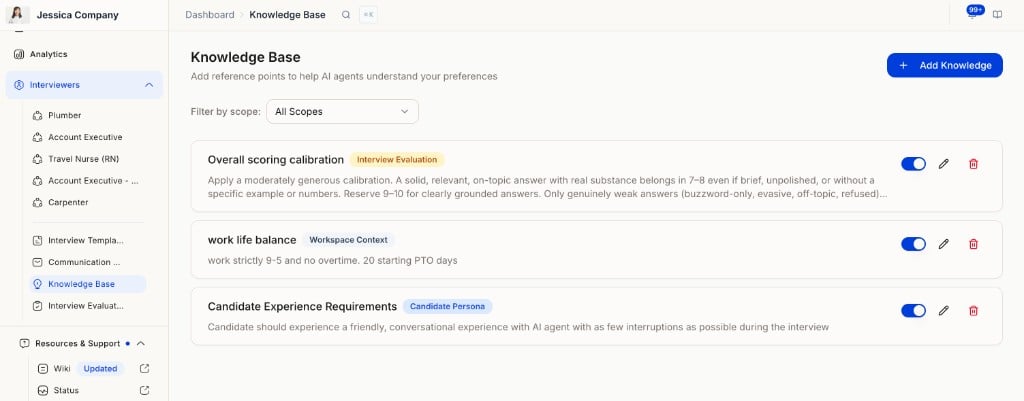 To add a new entry, click **Add Knowledge** and fill in the Title, set Scope to **Interview Evaluation**, paste your prompt into Content, and make sure Active is toggled on.
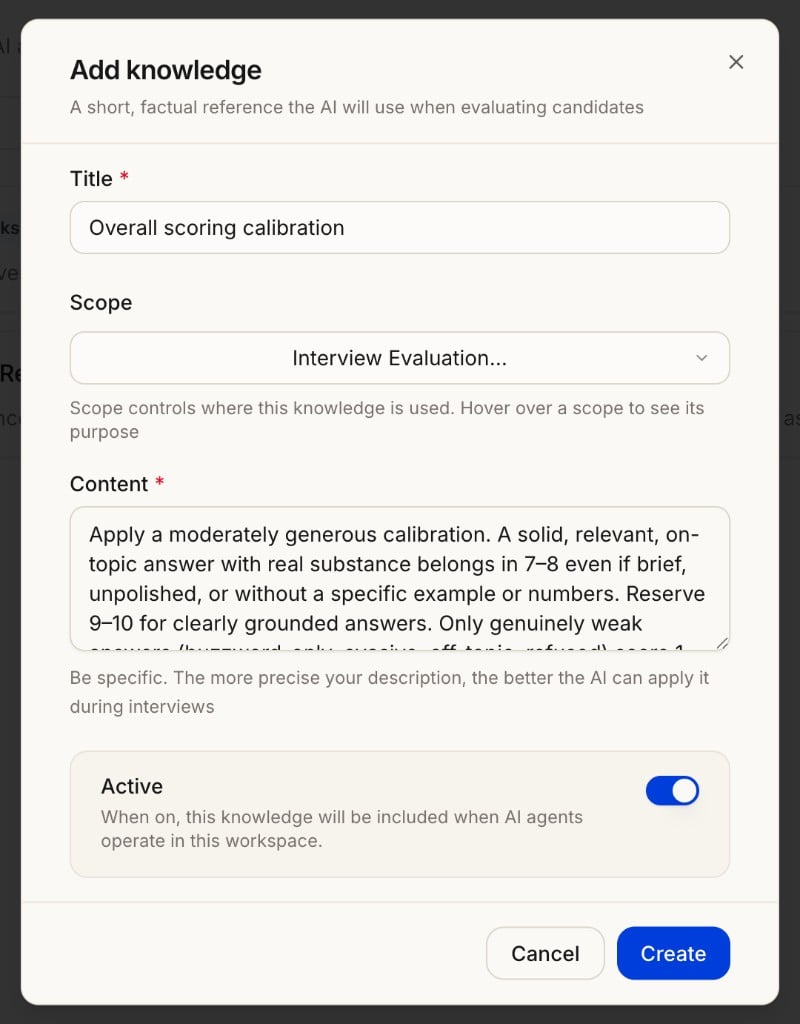 The Knowledge Base prompts referenced in this guide use **Scope = "Interview Evaluation."** These are separate from FAQ-style entries you use to answer candidate questions during interviews.
***
## How to make interview scoring stricter or less strict
### 1. The one thing to know first
All scoring lives in Knowledge Base entries with **Scope = "Interview Evaluation."** These apply to every agent in the workspace. After any edit, click **Reanalyze** on a candidate to see the new score on their existing interview — you do not need a new interview to test scoring changes.
Think of the scale in two parts:
* **The floor (1–3):** genuinely weak answers — buzzwords, evasive, off-topic, refused.
* **The middle and top (4–10):** relevant answers of varying quality.
**Golden rule:** To make scoring less strict, raise the middle/top — never the floor. To make it stricter, tighten the middle/top. Leave the floor alone unless you specifically want weak answers to move.
***
### 2. Your main dial: "Overall scoring calibration"
90% of adjustments should happen in this one entry. It defines what each 1–10 band means. To shift strictness, you widen or narrow the upper bands.
**To make scoring LESS strict** — broaden the high bands so more answers qualify:
> 7–8: A solid, relevant, on-topic answer with real substance, even if brief, unpolished, or without a specific example or numbers. Most genuine, on-point answers belong here.
*(Pulling "relevant but brief" answers up into 7–8 is what lifts scores.)*
**To make scoring MORE strict** — raise the bar for high scores:
> 7–8: A strong, relevant answer that includes a specific example or concrete supporting detail. General or brief answers belong in 5–6.
>
> 9–10: Reserved for answers with a specific example AND a clear outcome or result.
**Rule of thumb:** Move the description of a typical "decent" answer between the 5–6 band (stricter) and the 7–8 band (more lenient). That single change moves overall scores the most.
***
### 3. Supporting levers (use only if the main dial isn't enough)
| Entry | Direction it pushes | When to use it |
| ------------------------------------------------- | ----------------------------- | ---------------------------------------------------------------------------- |
| Overall scoring calibration | Both (main dial) | First choice for any change |
| Buzzword-only and evasive answers | Down (sets the floor) | Only to change how weak answers score |
| Scripted or over-polished answers | Down | If good, articulate candidates score too low — soften it |
| What earns a strong score | Up | To credit more kinds of "grounding" (details, reasoning, not just examples) |
| Calibrate to the role's level | Context | If entry-level candidates are judged too harshly |
| When question type conflicts with its rubric | Up (non-behavioral questions) | If motivation/values/"what you'd bring" questions score low for "no example" |
| Don't penalize depth interviewer didn't probe for | Up | If brief answers are punished when the bot never followed up |
***
### 4. Copy-paste examples
**Make it less strict (lenient calibration):**
```
Apply a generous calibration. A solid, relevant, on-topic answer with real
substance belongs in 7–8 even if brief, unpolished, or without a specific
example or numbers. Reserve 9–10 for clearly grounded answers (example,
concrete details, or strong reasoning) — perfection and metrics are not
required. Only genuinely weak answers (buzzword-only, evasive, off-topic,
refused) score 1–3. Do not default overall fit downward.
```
**Make it stricter (demanding calibration):**
```
Apply a rigorous calibration. Reserve 9–10 for answers with a specific
example AND a clear outcome or result. 7–8 requires a concrete supporting
detail or example. General, brief, or unsupported answers belong in 5–6.
Weak, evasive, or empty answers score 1–3. Do not inflate scores for
fluency or confidence alone.
```
**Soften the floor slightly (if weak-but-relevant answers score too low):**
```
A relevant, on-topic answer with real substance is not a bottom-scoring
answer even if brief — score it mid-range. Reserve 1–3 only for
buzzword-only, evasive, off-topic, or refused answers.
```
***
### 5. Do's and don'ts
* **Do** change one entry at a time, then reanalyze so you know what caused the shift.
* **Do** keep a known weak candidate and a known strong candidate as reference points. After each change, reanalyze both.
* **Don't** raise the floor when trying to be more lenient. Keep the 1–3 band wording (buzzword/evasive/refused) intact — otherwise weak candidates climb too.
* **Don't** stack many new entries. Edit the calibration dial rather than adding more; overlapping entries dilute each other.
* **Remember:** a question's own Evaluation Criteria / Score 1 / Score 5 override the Knowledge Base. If one specific question scores wrong while others are fine, fix it on that question — not in the Knowledge Base. See [Configuring Your AI Interviewer](../../getting-started/log-in/configuring-your-ai-interviewer) for how to update per-question criteria.
***
### 6. Quick verification checklist
After any change:
1. Reanalyze a strong candidate. Did they move in the intended direction?
2. Reanalyze a weak candidate. Did they stay low? If they jumped, the floor was affected — undo the floor change.
3. If both look right, the change is good. If not, adjust the calibration band wording and re-test.
***
## Knowledge Base (Interview Evaluation) — Reference prompts
These are the full prompt texts for each entry. Copy them into your Knowledge Base entries with **Scope = "Interview Evaluation"** and edit the wording as needed using the guide above.
### Overall scoring calibration
```
Apply a moderately generous calibration. The interviewer's scoring has been
running too strict, so anchor the scale so that a solid, relevant answer
lands comfortably in the upper-middle, and reserve low scores for genuinely
weak answers.
Per-question band guide (1–10), unless a question's own evaluation criteria
explicitly define a different bar:
9–10: Directly answers the question with clear, grounded substance — a real
example, concrete accurate details, or clear relevant reasoning. Does NOT
require perfection, metrics, or a polished STAR structure.
7–8: A solid, relevant, on-topic answer with real substance, even if brief,
unpolished, or without a specific example or numbers. Most genuine, on-point
answers belong here.
5–6: On-topic but thin or generic — some relevance but limited substance or
specificity.
3–4: Largely off-target, vague with little relevance, or unsupported claims
only.
1–2: Buzzword-only, evasive, off-topic, refused, or shows no real
understanding.
This calibration raises the middle and upper of the scale; it does NOT raise
the floor — genuinely weak, evasive, or empty answers stay at 1–3. When
judging overall fit (match_score), let it reflect these calibrated question
scores rather than defaulting downward.
```
### Scripted or over-polished answers
```
Being articulate, fluent, well-prepared, or polished is NOT a negative —
do not lower a score simply because an answer sounds smooth or well-structured.
Judge the substance behind it, not the delivery.
Only be cautious when a polished answer is also hollow: generic phrasing that
could apply to any candidate or any company, with no specific details, genuine
reasoning, or personal grounding. In that case, don't award a high score for
delivery alone — score it on the limited substance actually present.
A polished answer that includes concrete details, accurate specifics, genuine
reasoning, or a real example should be scored on its merits like any other
strong answer. Where a question's own evaluation criteria or grading
instructions say otherwise, follow those.
```
### Calibrate to the role's level
```
Judge each answer against what is reasonable for the level and requirements
of the role being interviewed for, as reflected in the question's own
evaluation criteria. Do not hold a junior or entry-level candidate to a
senior standard — for example, don't require deep strategic leadership,
large-scale ownership, or quantified business impact where the role does not
call for it. Likewise, don't over-credit a senior candidate merely for
clearing a junior bar. When unsure of the level, judge whether the answer
would be considered solid by a reasonable hiring manager for that specific role.
```
### Don't penalize depth the interviewer didn't probe for
```
Score the substance the candidate actually provided, not depth the interviewer
never asked for. If a question was not followed up and the answer is on-topic
and relevant but brief, evaluate what was said on its merits rather than
penalizing the candidate for not elaborating on something they were never
prompted to expand on. A lack of follow-up by the interviewer is not evidence
against the candidate.
```
### When question type conflicts with its rubric
```
A question's generated evaluation criteria or Score 1/5 anchors sometimes ask
for things that do not fit the question type — for example, demanding a
"specific example", "STAR structure", or "measurable outcome" on a question
that is really about motivation, company fit, role excitement, self-awareness,
or the strengths a candidate would bring.
When this happens, prioritise the question type over the rubric wording:
For non-behavioral questions (motivation, culture/values fit, why-leaving,
role excitement, development areas, experience overview, and "what
value/strengths would you bring"), do NOT lower the score solely because the
answer lacks a past example, a STAR story, or numbers. Treat any such
requirement in the rubric as not applicable, and score on relevance,
specificity, genuineness, and role-relevant substance instead.
Only behavioral/situational questions ("Describe a time when...", "Tell me
about a time...", "Give an example of...") genuinely require a real past
example, and only those should be penalized for hypothetical-only answers.
This does not lower the floor: buzzword-only, evasive, off-topic, or refused
answers still score low on every question type. The goal is to stop
type-mismatched rubric wording from capping otherwise strong, relevant answers.
```
### Buzzword-only and evasive answers
```
Reserve the bottom of the scale for answers that are genuinely weak:
buzzword-only answers (e.g. "ownership," "accountability," "growth mindset")
with no substance behind them, evasive or off-topic answers, refusals, or
answers showing no real understanding. For these, score low and note what was
missing (e.g. "answer lacked any specific substance").
For behavioral/experience questions, if a candidate's example describes a
related but different situation than what was asked, lower the score and note
the mismatch.
A relevant, on-topic answer that addresses the question with real substance is
NOT a bottom-scoring answer even if it is brief or lacks a polished example —
score it in the mid-range, and reserve low scores for the cases above.
```
### What earns a strong score
```
Use the full scale and score confidently when an answer is grounded in the
substance the question calls for. Grounding can take several forms — a
specific real example, concrete and accurate details (named brands, products,
values, events, actions taken), a described outcome or result, or clear and
relevant reasoning — plus a direct connection to what was asked.
A quantified outcome (metrics, percentages, volumes, timeframes) strengthens
an answer where the question is about measurable results, but is not required
for a strong score, and its absence should not cap an otherwise specific,
relevant answer. Do not hold back high scores for answers that earn them.
Defer to a question's own evaluation criteria when it defines what a strong
answer looks like.
```
***
## Next steps
* [Knowledge Base](knowledge-base) — How to create and manage Knowledge Base entries
* [Configuring Your AI Interviewer](../../getting-started/log-in/configuring-your-ai-interviewer) — Per-question criteria and scoring weights
* [How Scoring Works](../../getting-started/log-in/how-scoring-works) — How overall scores are built and what they mean
* [Interview Evaluation](interview-evaluation) — Language proficiency rubrics
The Knowledge Base prompts referenced in this guide use **Scope = "Interview Evaluation."** These are separate from FAQ-style entries you use to answer candidate questions during interviews.
***
## How to make interview scoring stricter or less strict
### 1. The one thing to know first
All scoring lives in Knowledge Base entries with **Scope = "Interview Evaluation."** These apply to every agent in the workspace. After any edit, click **Reanalyze** on a candidate to see the new score on their existing interview — you do not need a new interview to test scoring changes.
Think of the scale in two parts:
* **The floor (1–3):** genuinely weak answers — buzzwords, evasive, off-topic, refused.
* **The middle and top (4–10):** relevant answers of varying quality.
**Golden rule:** To make scoring less strict, raise the middle/top — never the floor. To make it stricter, tighten the middle/top. Leave the floor alone unless you specifically want weak answers to move.
***
### 2. Your main dial: "Overall scoring calibration"
90% of adjustments should happen in this one entry. It defines what each 1–10 band means. To shift strictness, you widen or narrow the upper bands.
**To make scoring LESS strict** — broaden the high bands so more answers qualify:
> 7–8: A solid, relevant, on-topic answer with real substance, even if brief, unpolished, or without a specific example or numbers. Most genuine, on-point answers belong here.
*(Pulling "relevant but brief" answers up into 7–8 is what lifts scores.)*
**To make scoring MORE strict** — raise the bar for high scores:
> 7–8: A strong, relevant answer that includes a specific example or concrete supporting detail. General or brief answers belong in 5–6.
>
> 9–10: Reserved for answers with a specific example AND a clear outcome or result.
**Rule of thumb:** Move the description of a typical "decent" answer between the 5–6 band (stricter) and the 7–8 band (more lenient). That single change moves overall scores the most.
***
### 3. Supporting levers (use only if the main dial isn't enough)
| Entry | Direction it pushes | When to use it |
| ------------------------------------------------- | ----------------------------- | ---------------------------------------------------------------------------- |
| Overall scoring calibration | Both (main dial) | First choice for any change |
| Buzzword-only and evasive answers | Down (sets the floor) | Only to change how weak answers score |
| Scripted or over-polished answers | Down | If good, articulate candidates score too low — soften it |
| What earns a strong score | Up | To credit more kinds of "grounding" (details, reasoning, not just examples) |
| Calibrate to the role's level | Context | If entry-level candidates are judged too harshly |
| When question type conflicts with its rubric | Up (non-behavioral questions) | If motivation/values/"what you'd bring" questions score low for "no example" |
| Don't penalize depth interviewer didn't probe for | Up | If brief answers are punished when the bot never followed up |
***
### 4. Copy-paste examples
**Make it less strict (lenient calibration):**
```
Apply a generous calibration. A solid, relevant, on-topic answer with real
substance belongs in 7–8 even if brief, unpolished, or without a specific
example or numbers. Reserve 9–10 for clearly grounded answers (example,
concrete details, or strong reasoning) — perfection and metrics are not
required. Only genuinely weak answers (buzzword-only, evasive, off-topic,
refused) score 1–3. Do not default overall fit downward.
```
**Make it stricter (demanding calibration):**
```
Apply a rigorous calibration. Reserve 9–10 for answers with a specific
example AND a clear outcome or result. 7–8 requires a concrete supporting
detail or example. General, brief, or unsupported answers belong in 5–6.
Weak, evasive, or empty answers score 1–3. Do not inflate scores for
fluency or confidence alone.
```
**Soften the floor slightly (if weak-but-relevant answers score too low):**
```
A relevant, on-topic answer with real substance is not a bottom-scoring
answer even if brief — score it mid-range. Reserve 1–3 only for
buzzword-only, evasive, off-topic, or refused answers.
```
***
### 5. Do's and don'ts
* **Do** change one entry at a time, then reanalyze so you know what caused the shift.
* **Do** keep a known weak candidate and a known strong candidate as reference points. After each change, reanalyze both.
* **Don't** raise the floor when trying to be more lenient. Keep the 1–3 band wording (buzzword/evasive/refused) intact — otherwise weak candidates climb too.
* **Don't** stack many new entries. Edit the calibration dial rather than adding more; overlapping entries dilute each other.
* **Remember:** a question's own Evaluation Criteria / Score 1 / Score 5 override the Knowledge Base. If one specific question scores wrong while others are fine, fix it on that question — not in the Knowledge Base. See [Configuring Your AI Interviewer](../../getting-started/log-in/configuring-your-ai-interviewer) for how to update per-question criteria.
***
### 6. Quick verification checklist
After any change:
1. Reanalyze a strong candidate. Did they move in the intended direction?
2. Reanalyze a weak candidate. Did they stay low? If they jumped, the floor was affected — undo the floor change.
3. If both look right, the change is good. If not, adjust the calibration band wording and re-test.
***
## Knowledge Base (Interview Evaluation) — Reference prompts
These are the full prompt texts for each entry. Copy them into your Knowledge Base entries with **Scope = "Interview Evaluation"** and edit the wording as needed using the guide above.
### Overall scoring calibration
```
Apply a moderately generous calibration. The interviewer's scoring has been
running too strict, so anchor the scale so that a solid, relevant answer
lands comfortably in the upper-middle, and reserve low scores for genuinely
weak answers.
Per-question band guide (1–10), unless a question's own evaluation criteria
explicitly define a different bar:
9–10: Directly answers the question with clear, grounded substance — a real
example, concrete accurate details, or clear relevant reasoning. Does NOT
require perfection, metrics, or a polished STAR structure.
7–8: A solid, relevant, on-topic answer with real substance, even if brief,
unpolished, or without a specific example or numbers. Most genuine, on-point
answers belong here.
5–6: On-topic but thin or generic — some relevance but limited substance or
specificity.
3–4: Largely off-target, vague with little relevance, or unsupported claims
only.
1–2: Buzzword-only, evasive, off-topic, refused, or shows no real
understanding.
This calibration raises the middle and upper of the scale; it does NOT raise
the floor — genuinely weak, evasive, or empty answers stay at 1–3. When
judging overall fit (match_score), let it reflect these calibrated question
scores rather than defaulting downward.
```
### Scripted or over-polished answers
```
Being articulate, fluent, well-prepared, or polished is NOT a negative —
do not lower a score simply because an answer sounds smooth or well-structured.
Judge the substance behind it, not the delivery.
Only be cautious when a polished answer is also hollow: generic phrasing that
could apply to any candidate or any company, with no specific details, genuine
reasoning, or personal grounding. In that case, don't award a high score for
delivery alone — score it on the limited substance actually present.
A polished answer that includes concrete details, accurate specifics, genuine
reasoning, or a real example should be scored on its merits like any other
strong answer. Where a question's own evaluation criteria or grading
instructions say otherwise, follow those.
```
### Calibrate to the role's level
```
Judge each answer against what is reasonable for the level and requirements
of the role being interviewed for, as reflected in the question's own
evaluation criteria. Do not hold a junior or entry-level candidate to a
senior standard — for example, don't require deep strategic leadership,
large-scale ownership, or quantified business impact where the role does not
call for it. Likewise, don't over-credit a senior candidate merely for
clearing a junior bar. When unsure of the level, judge whether the answer
would be considered solid by a reasonable hiring manager for that specific role.
```
### Don't penalize depth the interviewer didn't probe for
```
Score the substance the candidate actually provided, not depth the interviewer
never asked for. If a question was not followed up and the answer is on-topic
and relevant but brief, evaluate what was said on its merits rather than
penalizing the candidate for not elaborating on something they were never
prompted to expand on. A lack of follow-up by the interviewer is not evidence
against the candidate.
```
### When question type conflicts with its rubric
```
A question's generated evaluation criteria or Score 1/5 anchors sometimes ask
for things that do not fit the question type — for example, demanding a
"specific example", "STAR structure", or "measurable outcome" on a question
that is really about motivation, company fit, role excitement, self-awareness,
or the strengths a candidate would bring.
When this happens, prioritise the question type over the rubric wording:
For non-behavioral questions (motivation, culture/values fit, why-leaving,
role excitement, development areas, experience overview, and "what
value/strengths would you bring"), do NOT lower the score solely because the
answer lacks a past example, a STAR story, or numbers. Treat any such
requirement in the rubric as not applicable, and score on relevance,
specificity, genuineness, and role-relevant substance instead.
Only behavioral/situational questions ("Describe a time when...", "Tell me
about a time...", "Give an example of...") genuinely require a real past
example, and only those should be penalized for hypothetical-only answers.
This does not lower the floor: buzzword-only, evasive, off-topic, or refused
answers still score low on every question type. The goal is to stop
type-mismatched rubric wording from capping otherwise strong, relevant answers.
```
### Buzzword-only and evasive answers
```
Reserve the bottom of the scale for answers that are genuinely weak:
buzzword-only answers (e.g. "ownership," "accountability," "growth mindset")
with no substance behind them, evasive or off-topic answers, refusals, or
answers showing no real understanding. For these, score low and note what was
missing (e.g. "answer lacked any specific substance").
For behavioral/experience questions, if a candidate's example describes a
related but different situation than what was asked, lower the score and note
the mismatch.
A relevant, on-topic answer that addresses the question with real substance is
NOT a bottom-scoring answer even if it is brief or lacks a polished example —
score it in the mid-range, and reserve low scores for the cases above.
```
### What earns a strong score
```
Use the full scale and score confidently when an answer is grounded in the
substance the question calls for. Grounding can take several forms — a
specific real example, concrete and accurate details (named brands, products,
values, events, actions taken), a described outcome or result, or clear and
relevant reasoning — plus a direct connection to what was asked.
A quantified outcome (metrics, percentages, volumes, timeframes) strengthens
an answer where the question is about measurable results, but is not required
for a strong score, and its absence should not cap an otherwise specific,
relevant answer. Do not hold back high scores for answers that earn them.
Defer to a question's own evaluation criteria when it defines what a strong
answer looks like.
```
***
## Next steps
* [Knowledge Base](knowledge-base) — How to create and manage Knowledge Base entries
* [Configuring Your AI Interviewer](../../getting-started/log-in/configuring-your-ai-interviewer) — Per-question criteria and scoring weights
* [How Scoring Works](../../getting-started/log-in/how-scoring-works) — How overall scores are built and what they mean
* [Interview Evaluation](interview-evaluation) — Language proficiency rubrics