> ## Documentation Index
> Fetch the complete documentation index at: https://docs.heymilo.ai/llms.txt
> Use this file to discover all available pages before exploring further.
> Need accurate answers for candidates about your company? Knowledge Base — what it is, where to set it, and how the AI uses it.
# Knowledge Base
It’s for **facts you want every interview to get right**. It’s **not** a replacement for **Settings → Company Settings** (who you are at a glance) or for the full job description — it’s the **FAQ layer** on top.
### Why it’s important (for you and the candidate)
* **Trust**: Confident, consistent answers feel professional; vague or wrong ones hurt your brand.
* **Your time**: Less back-and-forth later when candidates already heard the right story in-screening.
* **Fairness**: Everyone hears the **same** policy facts, not whatever the model improvises.
* **Speed**: Recruiters aren’t the bottleneck for the tenth “Is this role hybrid?” of the week.
### Where to set it up
**Interviewers → Tools → Knowledge Base** in the sidebar.
 ### What to add
Create **small, focused** items — one topic per entry when you can.
### What to add
Create **small, focused** items — one topic per entry when you can.
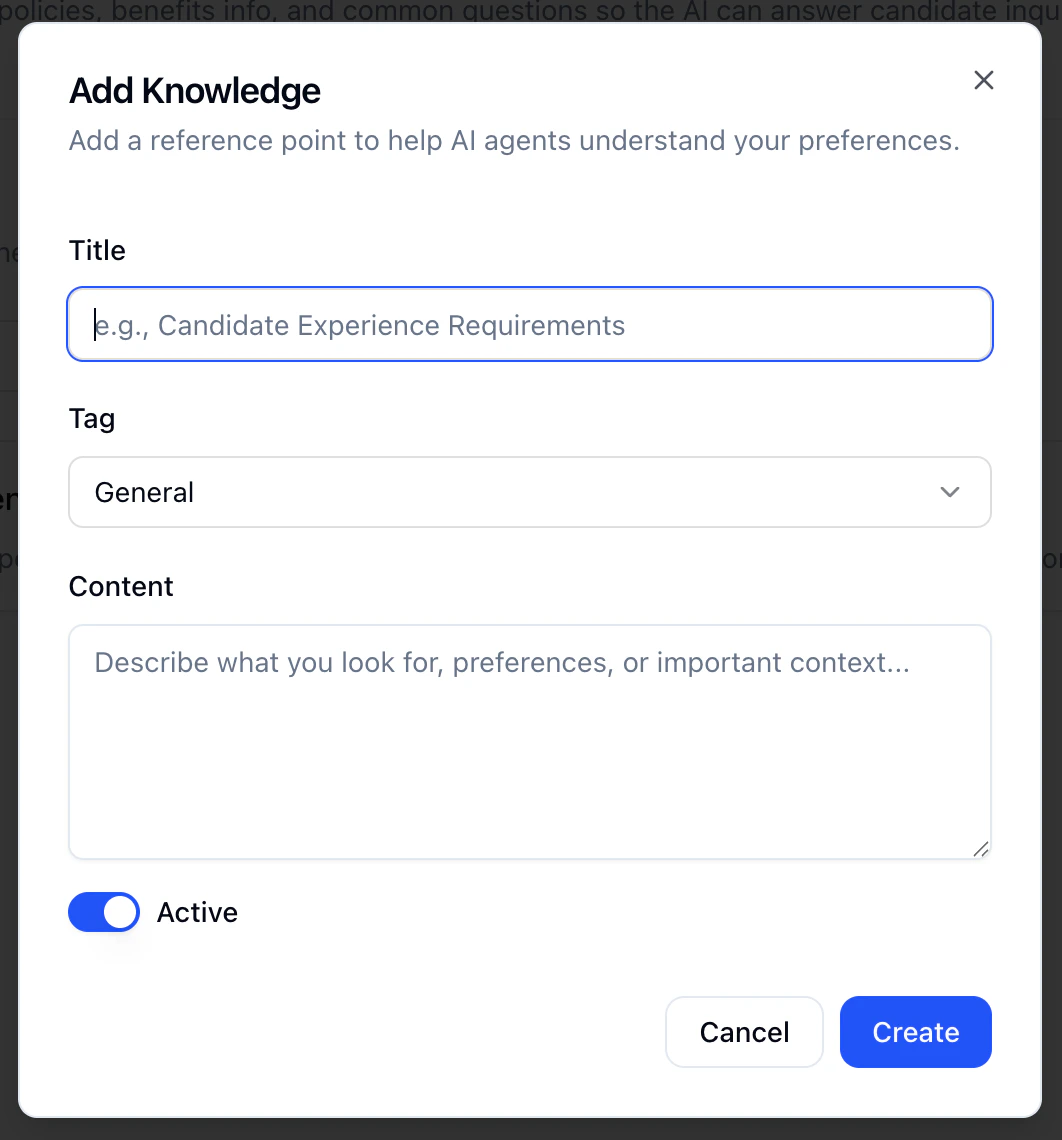 Each item usually has:
* **Title**: What a recruiter would scan for in a list (e.g. “Remote & hybrid policy,” “Benefits — high level”).
* **Tag** helps you stay organized:
* **General**: Company-wide (culture, mission, broad benefits)
* **Candidate**: Questions people ask every cycle
* **Job posting**: Role/team/scope (when you reuse across similar reqs)
* **Interviews**: What happens next, timelines, process
* **Content**: **Plain language**, as if you’re saying it to a candidate on the phone. If legal/comms approved specific wording, use **that**.
* **Active**: On = AI can use it; off = hidden without deleting (great for seasonal or paused programs).
**Start here:** The **five questions** your team answers on **every** screen. Turn those into your first five items.
### After you’ve added items
* **Edit** when anything changes: stale answers are worse than missing ones.
* **Deactivate** what you don’t need right now; **delete** only what you’ll never use again.
* **Use tags** so the list stays scannable as it grows.
### How the AI uses this
During **voice/video** (and similar flows), when a candidate asks something that matches what you’ve written, the AI **pulls from these articles** so answers stay **grounded in your text**.
**Reminder:** Put **accurate, approved** information here. The Knowledge Base is not a substitute for **policy or legal sign-off** on sensitive topics.
### Next steps
* [Configuring Your AI Interviewer](../../getting-started/log-in/configuring-your-ai-interviewer) — How interviews and context fit together
* [What Candidates Experience](../../getting-started/log-in/what-candidates-experience) — What they see and hear
* [AI Settings](.) — Other workspace AI defaults
Each item usually has:
* **Title**: What a recruiter would scan for in a list (e.g. “Remote & hybrid policy,” “Benefits — high level”).
* **Tag** helps you stay organized:
* **General**: Company-wide (culture, mission, broad benefits)
* **Candidate**: Questions people ask every cycle
* **Job posting**: Role/team/scope (when you reuse across similar reqs)
* **Interviews**: What happens next, timelines, process
* **Content**: **Plain language**, as if you’re saying it to a candidate on the phone. If legal/comms approved specific wording, use **that**.
* **Active**: On = AI can use it; off = hidden without deleting (great for seasonal or paused programs).
**Start here:** The **five questions** your team answers on **every** screen. Turn those into your first five items.
### After you’ve added items
* **Edit** when anything changes: stale answers are worse than missing ones.
* **Deactivate** what you don’t need right now; **delete** only what you’ll never use again.
* **Use tags** so the list stays scannable as it grows.
### How the AI uses this
During **voice/video** (and similar flows), when a candidate asks something that matches what you’ve written, the AI **pulls from these articles** so answers stay **grounded in your text**.
**Reminder:** Put **accurate, approved** information here. The Knowledge Base is not a substitute for **policy or legal sign-off** on sensitive topics.
### Next steps
* [Configuring Your AI Interviewer](../../getting-started/log-in/configuring-your-ai-interviewer) — How interviews and context fit together
* [What Candidates Experience](../../getting-started/log-in/what-candidates-experience) — What they see and hear
* [AI Settings](.) — Other workspace AI defaults