> ## Documentation Index
> Fetch the complete documentation index at: https://docs.heymilo.ai/llms.txt
> Use this file to discover all available pages before exploring further.
> Fine-tune how the AI evaluates candidate responses — scoring rules, rubric guidance, and evaluation behavior.
# Interview Evaluation
**Interviewers → Interview Evaluation** is where you set **workspace-wide language proficiency rubrics**: how Milo scores candidates’ **language skills** during interviews, using **1–5 criteria** per category. You can create multiple **templates** per language and choose which one is **active** for that language.
### Where to find it
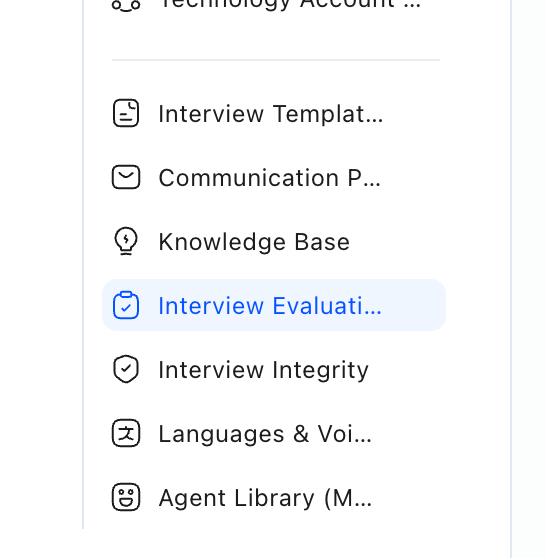
**Sidebar → Interview Evaluation**
 ### What this page controls
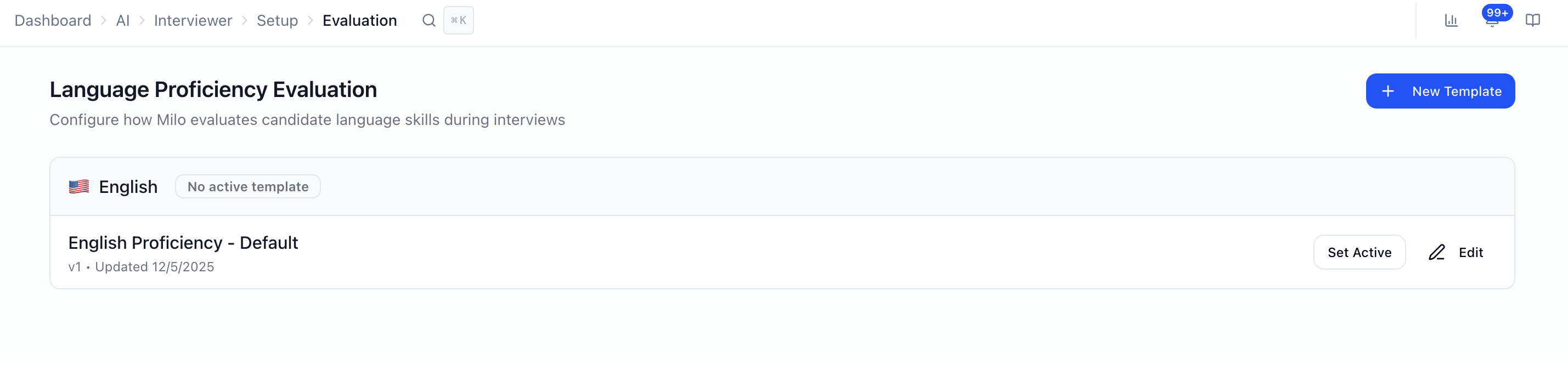 * **Language proficiency** scoring: not job-specific interview questions.
* **Templates** grouped by **language** (e.g. English, Spanish, French, Portuguese, Japanese, Arabic).
* For each template: **proficiency categories** (e.g. grammar, fluency — the exact list comes from your default categories).
* **One active template per language**: the active rubric is what Milo uses for that language’s proficiency evaluation until you switch it.
Per-question rubrics, **weights**, **minimum score to pass**, and **follow-ups** are set **on each interviewer** (workflow steps / questions), not on this page.
### Templates and “active”
* **Language proficiency** scoring: not job-specific interview questions.
* **Templates** grouped by **language** (e.g. English, Spanish, French, Portuguese, Japanese, Arabic).
* For each template: **proficiency categories** (e.g. grammar, fluency — the exact list comes from your default categories).
* **One active template per language**: the active rubric is what Milo uses for that language’s proficiency evaluation until you switch it.
Per-question rubrics, **weights**, **minimum score to pass**, and **follow-ups** are set **on each interviewer** (workflow steps / questions), not on this page.
### Templates and “active”
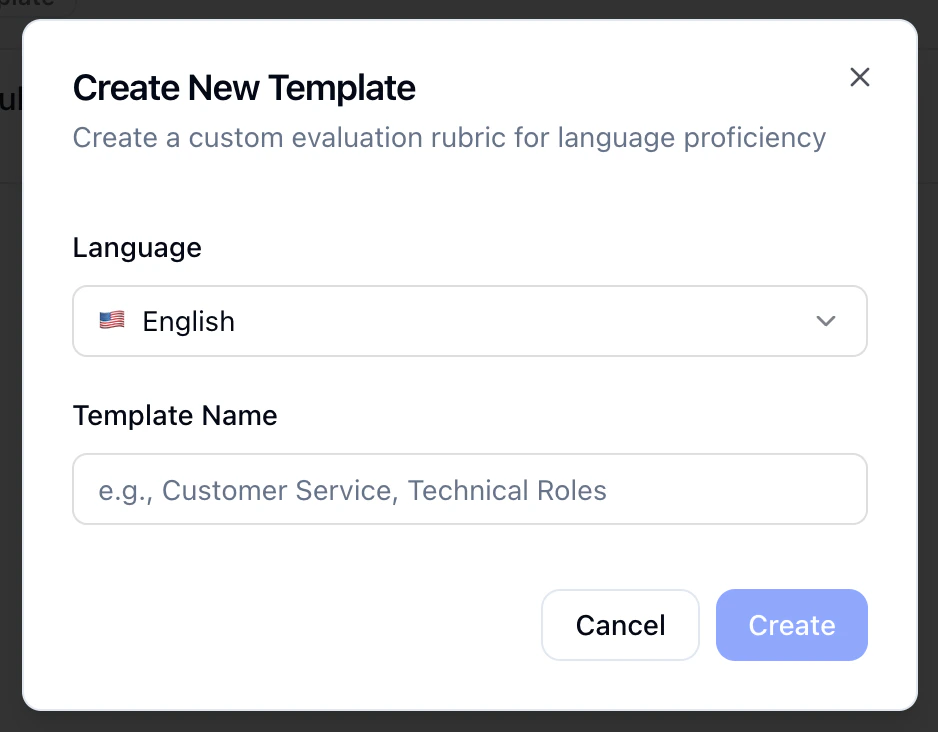 * **New Template**: Pick a **language**, name the template (e.g. “Customer service,” “Technical roles”), and start from the workspace **default categories** and score definitions.
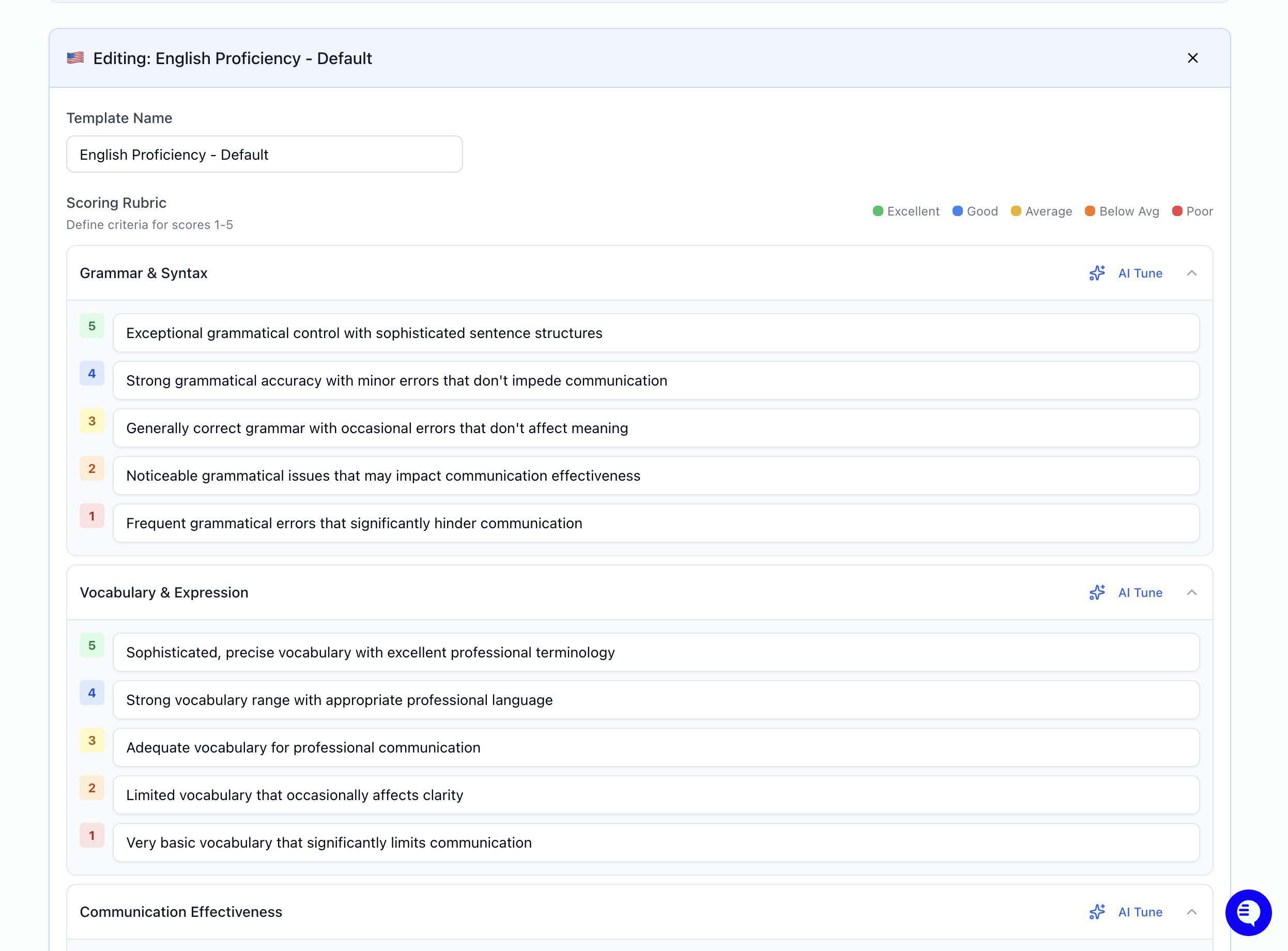
* **Edit**, rename the template and edit the **Scoring Rubric**: expand each **category** and fill in what **1** (weakest) through **5** (strongest) mean for that category.
* **Set Active** / **Deactivate**: Only one template can be **active** per language at a time.
* Saving updates the template (the product may **version** it behind the scenes).
### AI Tune
On each category, **AI Tune** lets you describe how you want criteria adjusted (e.g. stricter for senior roles, more lenient for entry-level). Milo proposes updated **1–5** text for that category; review and **save** when it matches what you want.
* **New Template**: Pick a **language**, name the template (e.g. “Customer service,” “Technical roles”), and start from the workspace **default categories** and score definitions.
* **Edit**, rename the template and edit the **Scoring Rubric**: expand each **category** and fill in what **1** (weakest) through **5** (strongest) mean for that category.
* **Set Active** / **Deactivate**: Only one template can be **active** per language at a time.
* Saving updates the template (the product may **version** it behind the scenes).
### AI Tune
On each category, **AI Tune** lets you describe how you want criteria adjusted (e.g. stricter for senior roles, more lenient for entry-level). Milo proposes updated **1–5** text for that category; review and **save** when it matches what you want.
 ### How this fits with overall candidate scores
* **Language proficiency** rubrics here apply to **how Milo evaluates language** in line with your workspace standards.
* **Role-specific** answers are still judged using **evaluation criteria on each question** when you build voice/video (and similar) steps — see How Scoring Works for the **1–5 anchor** model and how mid scores are inferred.
* **Hard requirements** (yes/no, dealbreakers) use Structured Questions, not this rubric screen.
### FAQ
* **Is this the same as question weights on my posting?** No. Weights and per-question rubrics live on the **interviewer / posting** setup. This page is **language proficiency** templates only.
* **Can I have different rubrics for the same language?** Yes — multiple **templates** per language; only **one** is **active** at a time.
* **Where do I set “minimum score to pass”?** On the **interviewer** configuration for the relevant step (e.g. voice/video questions), not on Interview Evaluation.
### Next steps
* [How Scoring Works ](../../getting-started/log-in/how-scoring-works)— 1–5 system, overrides, what’s in the score report
* [Configuring Your AI Interviewer](../../getting-started/log-in/configuring-your-ai-interviewer) — Per-question criteria, weights, workflow
* [Structured Questions](../../interviews/interviews/structured-questions) — Pass/fail and dealbreakers
* [Languages & Voices](languages-and-voices) — Interview language and voice options
* [Interview Templates](interview-templates) — Reusable full interviewer setups
### How this fits with overall candidate scores
* **Language proficiency** rubrics here apply to **how Milo evaluates language** in line with your workspace standards.
* **Role-specific** answers are still judged using **evaluation criteria on each question** when you build voice/video (and similar) steps — see How Scoring Works for the **1–5 anchor** model and how mid scores are inferred.
* **Hard requirements** (yes/no, dealbreakers) use Structured Questions, not this rubric screen.
### FAQ
* **Is this the same as question weights on my posting?** No. Weights and per-question rubrics live on the **interviewer / posting** setup. This page is **language proficiency** templates only.
* **Can I have different rubrics for the same language?** Yes — multiple **templates** per language; only **one** is **active** at a time.
* **Where do I set “minimum score to pass”?** On the **interviewer** configuration for the relevant step (e.g. voice/video questions), not on Interview Evaluation.
### Next steps
* [How Scoring Works ](../../getting-started/log-in/how-scoring-works)— 1–5 system, overrides, what’s in the score report
* [Configuring Your AI Interviewer](../../getting-started/log-in/configuring-your-ai-interviewer) — Per-question criteria, weights, workflow
* [Structured Questions](../../interviews/interviews/structured-questions) — Pass/fail and dealbreakers
* [Languages & Voices](languages-and-voices) — Interview language and voice options
* [Interview Templates](interview-templates) — Reusable full interviewer setups