> ## Documentation Index
> Fetch the complete documentation index at: https://docs.heymilo.ai/llms.txt
> Use this file to discover all available pages before exploring further.
> Integrating HeyMilo with Workable empowers your recruiters by automating AI candidate engagement and screening across resume review, outreach, and two-way conversational interviews.
# Workable
Every step stays connected, so you can move faster, get deeper insights at the right moments, and spend less time following up manually.
### Agents Supported in Workable
| SMS Agent | Resume Agent | Voice/Video Agent |
| -------------------------------------------------------------------------------------------------------------------------------------------------------------------------------------------------------------------------------------------------------------------------------------- | ------------------------------------------------------------------------------------------------------------------------------------------------------------------------------------------------------------------------------------------------------------------------------------------------------------------------------------ | ----------------------------------------------------------------------------------------------------------------------------------------------------------------------------------------------------------------------------------------------------------------------------------------------------------------------------------------------------------------------------------------------------------------------------------------- |
| ✅ | ✅ | ✅ |
| How does it work?
As soon as candidates apply, they get a text from Milo with your questions. They respond directly in the thread, just like a real conversation. Once they finish, Milo sends over the voice or video interview invite automatically.
| How does it work?
Please be advised that the data is not automatically pulled from ATS. You can add resume screening to your agent workflow once the integration is live and your job is connected. Candidates will then be asked to upload their resume to get screened for fit before moving forward.
| How does it work?
After integration and job posting mapping, when a candidate applies to your Workable job posting, the candidate's email address is pulled from the application form and the candidate is engaged through email to take the voice/video assessment. Once the candidate has completed it, the candidate's detailed assessment report is attached to their profile in the Workable portal.
|
💡**HeyMilo supports SMS screening across all ATS platforms—as long as a valid phone number (with country code) is provided.** Since most ATSs don’t collect phone numbers by default, be sure to make the mobile number a required field in your job post.
Alternatively, you can enable both resume and SMS screening on your HeyMilo job, ensuring candidates are screened even if their phone number or resume isn’t accessible via your ATS.
Here’s how you can add it to your open job listings and start screening candidates with the kind of speed and clarity top recruiting teams rely on to make more hires.
### Follow These Easy Steps to Set Up the HeyMilo Integration with Workable
#### Connect HeyMilo to Workable
You’ll need two things from your Workable account: your **API Token** and your **Subdomain:**
* Log into your Workable account
* Click your profile icon at the top right → select **Integrations**
.png?alt=media)
* Click the → **Generate** new token button
.png?alt=media)
* When prompted, → select the following scopes: `r:jobs` and `r:candidates`
.png?alt=media)
* Click → **Generate** and copy the token right away (This token is only shown once—store it securely.)
* Go to **Company Profile** in your Workable settings
* Your subdomain is the part before `.workable.com` in your account URL (e.g. `yourcompany.workable.com` → `yourcompany`).
.png?alt=media)
* Now, → log into your HeyMilo portal
* Navigate to **Integrations** and select Workable
* → Paste in your Workable **API token** and **Subdomain**
* Click → **Connect**. Once connected, Workable will show up under **Active Integrations**
.png?alt=media)
#### Link a HeyMilo Agent to a Workable Job
Now that the integration is live, you can connect a HeyMilo agent to any open role(s) in Workable using the job’s short code.
* The short code appears → in the job URL (e.g. [https://workable.com/j/shortcode](https://workable.com/j/shortcode)) or under job details.
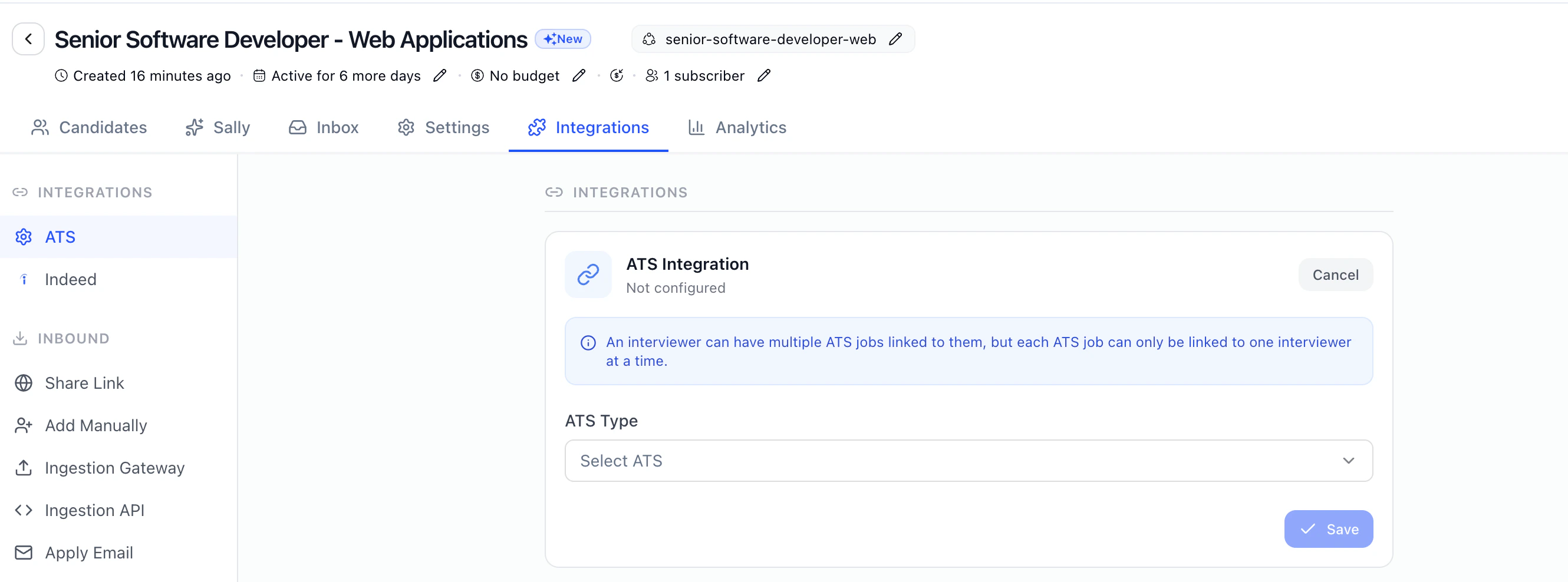 🔁 Note: A single HeyMilo agent can be mapped to multiple Workable jobs, but each job can only be linked to one agent.
#### Start Engaging & Screening Candidates Automatically
Once your job is linked, candidates who apply in Workable will be → automatically engaged and screened through the assigned HeyMilo AI recruiting workflow.
Depending on how your agent is set up, applicants may:
1. Receive personalized outreach via SMS, WhatsApp, or Email
2. Be screened through AI-powered resume review
3. Be invited to complete a voice or video-based AI interview on mobile or browser
You can view real time candidate progress and full screening results → anytime in the HeyMilo portal:
.png?alt=media)
And that’s it—you're ready to go!
Built for high-volume hiring and trusted by leading, fast-moving teams, HeyMilo is the most reliable way to automate early screening while keeping quality front and center.
You get a faster path to final-round ready candidates, and a stronger, more reliable pipeline from day one.
Need help? We’ve got you—our 24/7 multilingual support team is here for both you and your candidates.
### Additional resources
For additional information not covered here, reach out to [support@heymilo.ai](mailto:support@heymilo.ai).
🔁 Note: A single HeyMilo agent can be mapped to multiple Workable jobs, but each job can only be linked to one agent.
#### Start Engaging & Screening Candidates Automatically
Once your job is linked, candidates who apply in Workable will be → automatically engaged and screened through the assigned HeyMilo AI recruiting workflow.
Depending on how your agent is set up, applicants may:
1. Receive personalized outreach via SMS, WhatsApp, or Email
2. Be screened through AI-powered resume review
3. Be invited to complete a voice or video-based AI interview on mobile or browser
You can view real time candidate progress and full screening results → anytime in the HeyMilo portal:
.png?alt=media)
And that’s it—you're ready to go!
Built for high-volume hiring and trusted by leading, fast-moving teams, HeyMilo is the most reliable way to automate early screening while keeping quality front and center.
You get a faster path to final-round ready candidates, and a stronger, more reliable pipeline from day one.
Need help? We’ve got you—our 24/7 multilingual support team is here for both you and your candidates.
### Additional resources
For additional information not covered here, reach out to [support@heymilo.ai](mailto:support@heymilo.ai).