> ## Documentation Index
> Fetch the complete documentation index at: https://docs.heymilo.ai/llms.txt
> Use this file to discover all available pages before exploring further.
> Integrating HeyMilo with RecruitCRM brings full end-to-end conversational AI recruiting directly into your workflows. HeyMilo automatically engages candidates, screens them through your customized pro
# Recruit CRM
### Agents Supported in Recruit CRM
| SMS Agent | Resume Agent | Voice/Video Agent |
| -------------------------------------------------------------------------------------------------------------------------------------------------------------------------------------------------------------------------------------------------------------------------------------------- | ------------------------------------------------------------------------------------------------------------------------------------------------------------------------------------------------------------------------------------------------------------------------------------------------------------------------------------ | ----------------------------------------------------------------------------------------------------------------------------------------------------------------------------------------------------------------------------------------------------------------------------------------------------------------------------------------------------------------------------------------------------------------------------------------------- |
| ✅ | ✅ | ✅ |
| How does it work?
As soon as candidates apply, they get a text from HeyMilo with your questions. They respond directly in the thread, just like a real conversation. Once they finish, HeyMilo sends over the voice or video interview invite automatically.
| How does it work?
Please be advised that the data is not automatically pulled from ATS. You can add resume screening to your agent workflow once the integration is live and your job is connected. Candidates will then be asked to upload their resume to get screened for fit before moving forward.
| How does it work?
After integration and job posting mapping, when a candidate applies to your Recruit CRM job posting, the candidate's email address is pulled from the application form and the candidate is engaged through email to take the voice/video assessment. Once the candidate has completed it, the candidate's detailed assessment report is attached to their profile in the Recruit CRM portal.
|
💡**HeyMilo supports SMS screening across all ATS platforms—as long as a valid phone number (with country code) is provided.** Since most ATSs don’t collect phone numbers by default, be sure to make the mobile number a required field in your job post.
Alternatively, you can enable both resume and SMS screening on your HeyMilo job, ensuring candidates are screened even if their phone number or resume isn’t accessible via your ATS.
### Follow These Easy Steps to Set Up the HeyMilo Integration With Recruit CRM
Watch the video and follow the steps below to learn how to connect HeyMilo in Recruit CRM:
#### **🛠 What you need to get started**
* Admin access to **HeyMilo** for your workspace
* Permission to view **API** settings in **Recruit CRM**
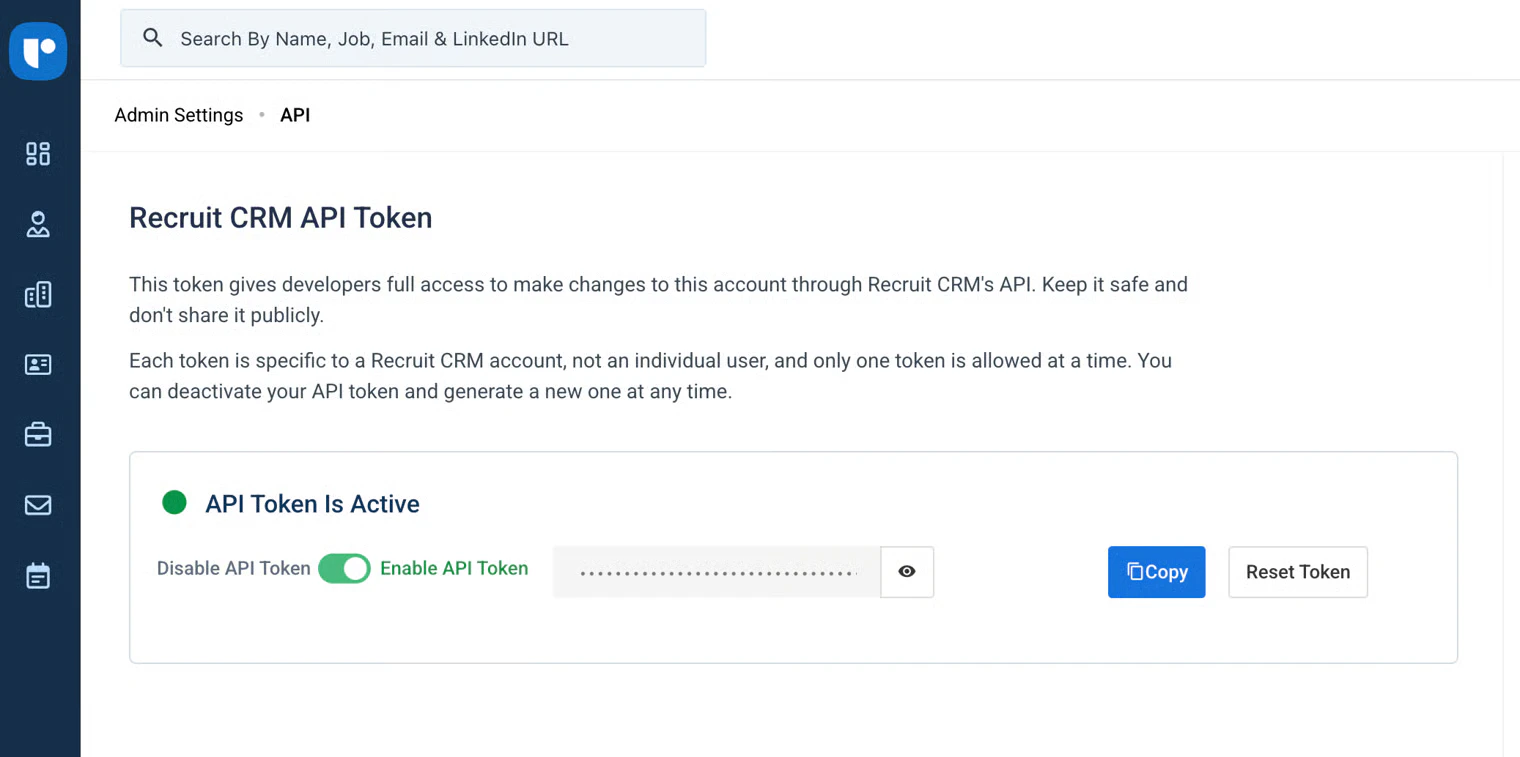
* Your **Recruit CRM API key** (from Recruit CRM **Settings → API**)
### **Part 1 — Add HeyMilo stages to your hiring pipeline (Recruit CRM)**
HeyMilo can move or reflect candidate progress more clearly when your pipeline includes dedicated stages for the AI interview. Add these **before** you go live with mapped jobs.
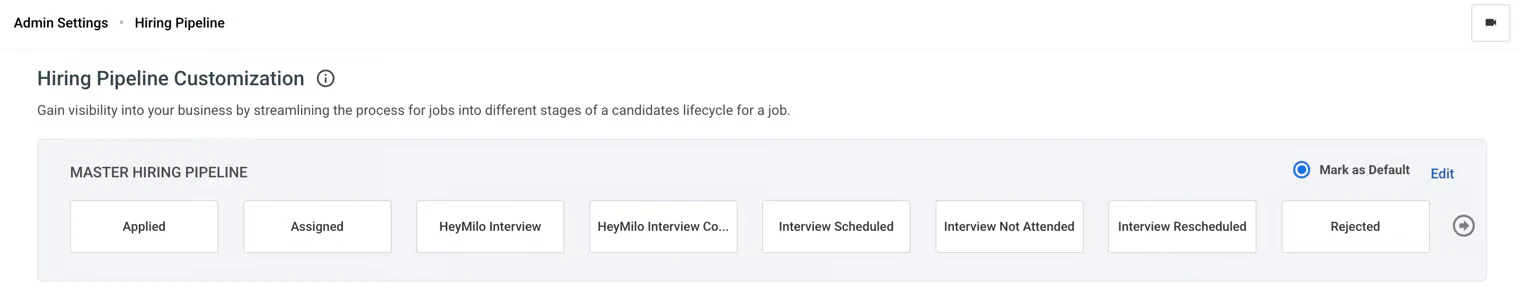 → Hiring Pipeline (or Settings → Hiring Pipeline, depending on your menu labels).
* **HeyMilo Interview**: use when the candidate is invited or in progress with the HeyMilo interview.
* **HeyMilo Interview Completed**: use when the interview is finished and you’re ready for the next human step.
—typically after stages like Applied or Assigned and before final interview / offer steps, matching how your team works.
If you use a **custom hiring pipeline** instead of the master, click **Create New Hiring Pipeline** or edit that pipeline and add the same two stages there.
**Tip:** Keep stage names **consistent** across your org so reporting and automations stay clear.
### Part 2 — Copy your API key from Recruit CRM
→ Hiring Pipeline (or Settings → Hiring Pipeline, depending on your menu labels).
* **HeyMilo Interview**: use when the candidate is invited or in progress with the HeyMilo interview.
* **HeyMilo Interview Completed**: use when the interview is finished and you’re ready for the next human step.
—typically after stages like Applied or Assigned and before final interview / offer steps, matching how your team works.
If you use a **custom hiring pipeline** instead of the master, click **Create New Hiring Pipeline** or edit that pipeline and add the same two stages there.
**Tip:** Keep stage names **consistent** across your org so reporting and automations stay clear.
### Part 2 — Copy your API key from Recruit CRM
 ### Part 3 — Connect Recruit CRM in HeyMilo
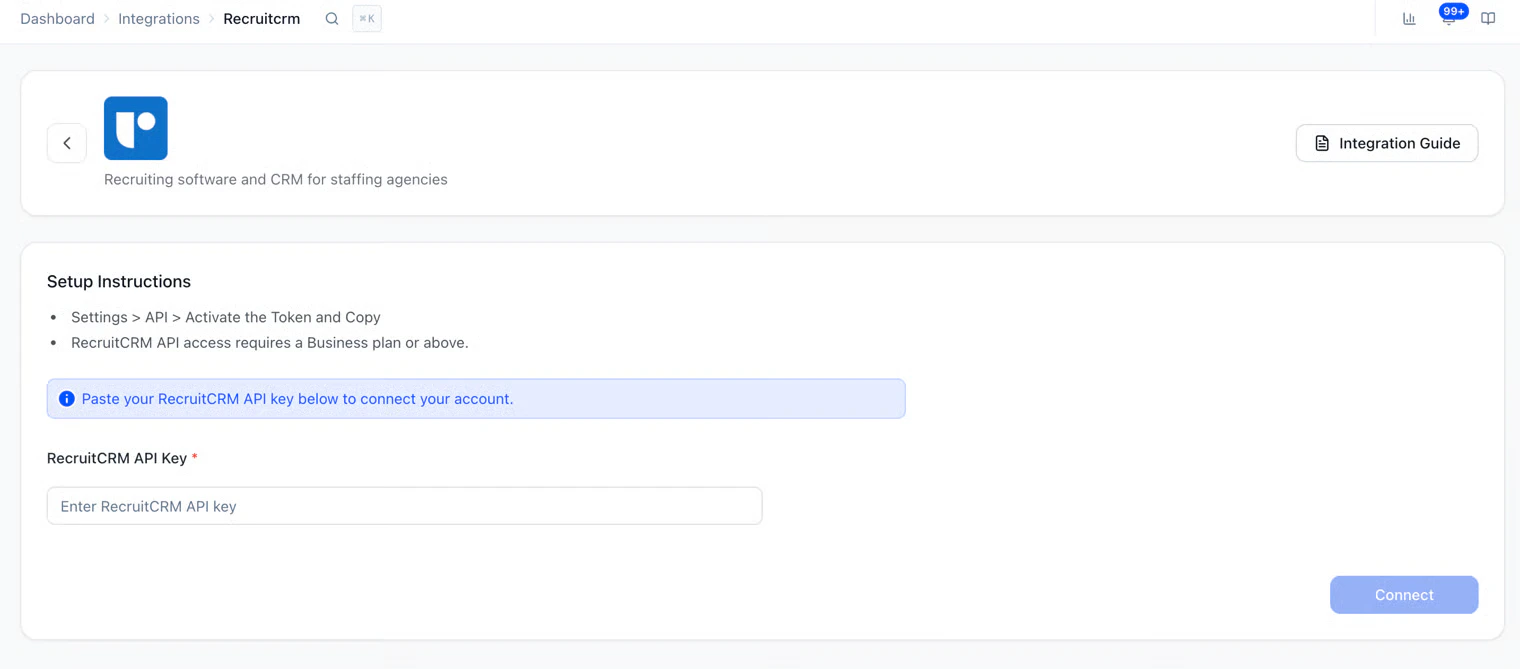 If the connection fails, double-check the key with no extra spaces, confirm your Recruit CRM user can use the API, and try again.
### Part 4 — Map a HeyMilo agent to a Recruit CRM job
If the connection fails, double-check the key with no extra spaces, confirm your Recruit CRM user can use the API, and try again.
### Part 4 — Map a HeyMilo agent to a Recruit CRM job
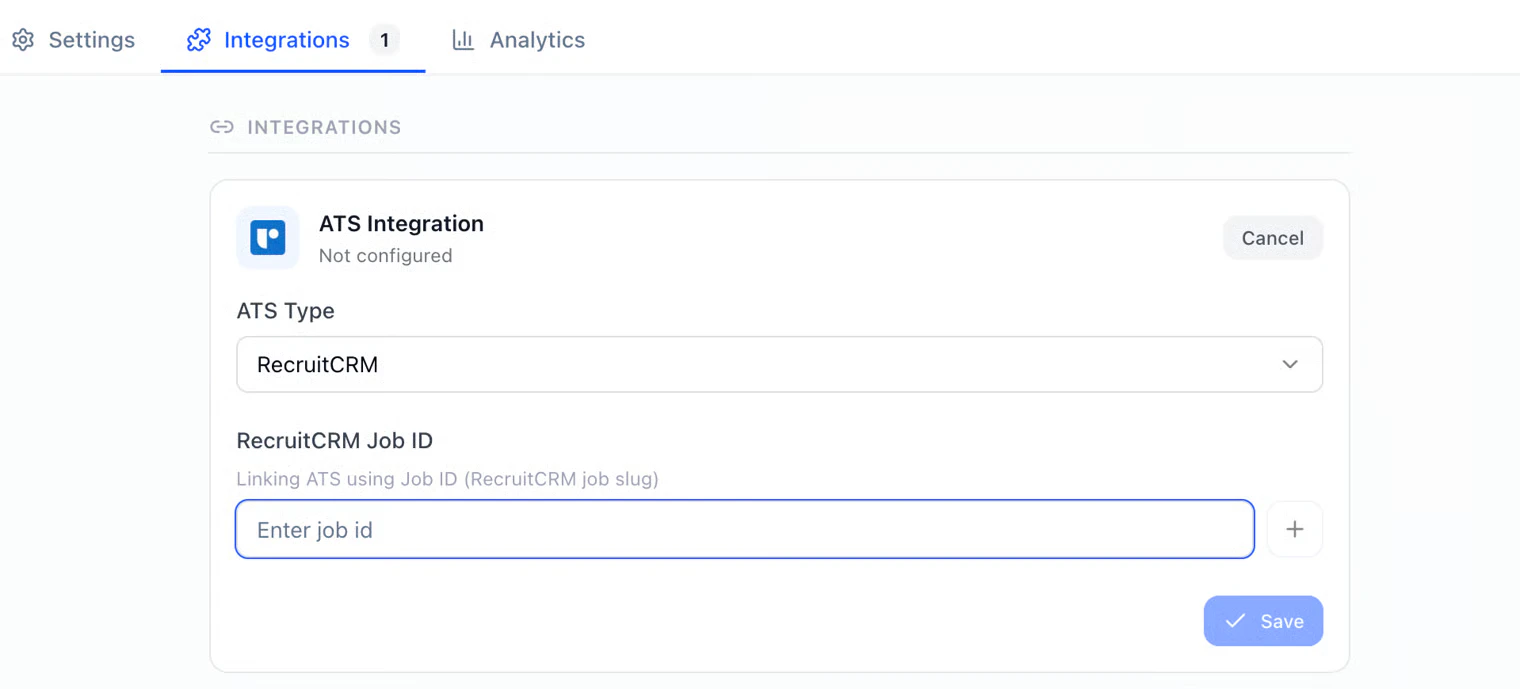
 Until this mapping exists, HeyMilo may not know which Recruit CRM job each interview belongs to.
### Part 5 — Review results and how recruiting teams use it
Until this mapping exists, HeyMilo may not know which Recruit CRM job each interview belongs to.
### Part 5 — Review results and how recruiting teams use it
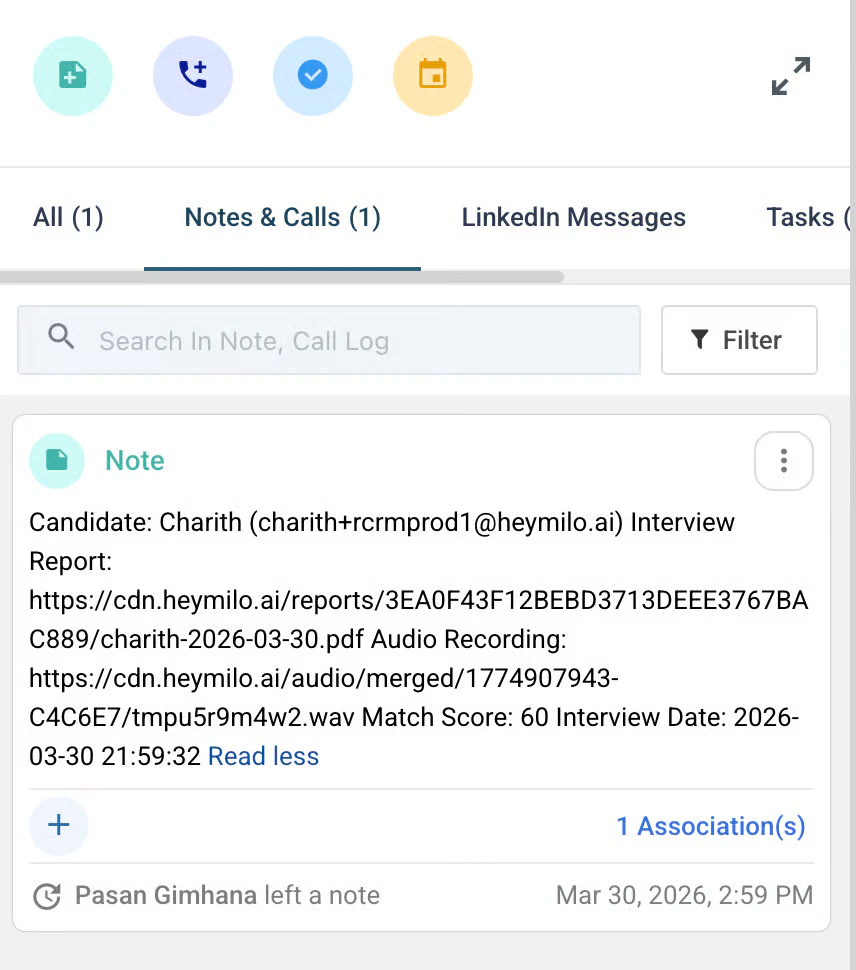 * **Candidates** apply (or are added) on the **mapped job** in Recruit CRM. Move them into **HeyMilo Interview** when you’re ready for the AI step, and into **HeyMilo Interview Complete** when they’re done—**if** your process uses those stages manually or via automation.
* HeyMilo **invites** them to complete the interview per your agent settings (email, and SMS if configured).
* The candidate report appears in **Notes**. Review interview status and the full candidate report: question-by-question responses, evaluation, audio links, highlights, lowlights, and full transcription.
* **Recruiters** can also review **scores, highlights, transcript, and recording** in **HeyMilo** where your workflow uses it.
### Troubleshooting
* **Can’t find API in Recruit CRM:** Your role may need admin rights, or API access may be a plan feature—check with Recruit CRM support.
* **HeyMilo says invalid key:** Regenerate or recopy the key from **Settings → API** with no trailing spaces.
* **Candidates not appearing in HeyMilo:** Confirm **job mapping** is saved and the candidate is on **that job** in Recruit CRM.
* **Stages missing:** Return to **Part 1** and confirm **HeyMilo Interview** and **HeyMilo Interview Complete** exist on the pipeline attached to the job.
### Additional resources
For additional information not covered here, reach out to [support@heymilo.a](mailto:support@heymilo.ai)
* **Candidates** apply (or are added) on the **mapped job** in Recruit CRM. Move them into **HeyMilo Interview** when you’re ready for the AI step, and into **HeyMilo Interview Complete** when they’re done—**if** your process uses those stages manually or via automation.
* HeyMilo **invites** them to complete the interview per your agent settings (email, and SMS if configured).
* The candidate report appears in **Notes**. Review interview status and the full candidate report: question-by-question responses, evaluation, audio links, highlights, lowlights, and full transcription.
* **Recruiters** can also review **scores, highlights, transcript, and recording** in **HeyMilo** where your workflow uses it.
### Troubleshooting
* **Can’t find API in Recruit CRM:** Your role may need admin rights, or API access may be a plan feature—check with Recruit CRM support.
* **HeyMilo says invalid key:** Regenerate or recopy the key from **Settings → API** with no trailing spaces.
* **Candidates not appearing in HeyMilo:** Confirm **job mapping** is saved and the candidate is on **that job** in Recruit CRM.
* **Stages missing:** Return to **Part 1** and confirm **HeyMilo Interview** and **HeyMilo Interview Complete** exist on the pipeline attached to the job.
### Additional resources
For additional information not covered here, reach out to [support@heymilo.a](mailto:support@heymilo.ai)