> ## Documentation Index
> Fetch the complete documentation index at: https://docs.heymilo.ai/llms.txt
> Use this file to discover all available pages before exploring further.

> Add HeyMilo as an assessment partner in Greenhouse to seamlessly conduct end-to-end, AI-powered interview flows in your job’s interview plan.

# Greenhouse

### Agents Supported in Greenhouse

| SMS Agent                                                                                                                                                                                                                                                                              | Resume Agent                                                                                                                                                                                                                                                                                                               | Voice/Video Agent                                                                                                                                                                                                                                                                                                                                                                                                                             |
| -------------------------------------------------------------------------------------------------------------------------------------------------------------------------------------------------------------------------------------------------------------------------------------- | -------------------------------------------------------------------------------------------------------------------------------------------------------------------------------------------------------------------------------------------------------------------------------------------------------------------------- | --------------------------------------------------------------------------------------------------------------------------------------------------------------------------------------------------------------------------------------------------------------------------------------------------------------------------------------------------------------------------------------------------------------------------------------------- |
| ✅                                                                                                                                                                                                                                                                                      | ✅                                                                                                                                                                                                                                                                                                                          | ✅                                                                                                                                                                                                                                                                                                                                                                                                                                             |
| <p><strong>How does it work?</strong></p>  <p>As soon as candidates apply, they get a text from Milo with your questions. They respond directly in the thread, just like a real conversation. Once they finish, Milo sends over the voice or video interview invite automatically.</p> | <p><strong>How does it work?</strong><br />Resumes from Greenhouse are now automatically ingested into HeyMilo for screening. Once your integration is live and your job is connected, candidates who apply through Greenhouse will have their resumes pulled directly and screened for fit—no manual upload required.</p> | <p><strong>How does it work?</strong></p>  <p>After integration and job posting mapping, when a candidate applies to your Greenhouse job posting, the candidate's email address is pulled from the application form and the candidate is engaged through email to take the voice/video assessment. Once the candidate has completed it, the candidate's detailed assessment report is attached to their profile in the Greenhouse portal.</p> |

<Note>
  💡**HeyMilo supports SMS screening across all ATS platforms—as long as a valid phone number (with country code) is provided.** Since most ATSs don’t collect phone numbers by default, be sure to make the mobile number a required field in your job post.

  Alternatively, you can enable both resume and SMS screening on your HeyMilo job, ensuring candidates are screened even if their phone number or resume isn’t accessible via your ATS.
</Note>

HeyMilo's integration with Greenhouse Recruiting allows you to seamlessly add HeyMilo's assessment to a job's interview plan.

Watch this video, click through the interactive demo, and follow the steps below to learn how to connect HeyMilo in Greenhouse:

<video className="w-full aspect-video rounded-xl" src="https://storage.googleapis.com/heymilo-pub-docs/videos/Greenhouse.mp4" controls preload="metadata" />

*How to connect HeyMilo to Greenhouse*

<iframe className="w-full aspect-video rounded-xl" src="https://app.storylane.io/share/jbipygept6m7" allowFullScreen />

### Enable The Integration

To configure the integration, you’ll need to create a Harvest API key.

Follow the steps in [this article](https://support.greenhouse.io/hc/en-us/articles/5888163769883) to create the key, and verify that the permissions below are selected when configuring the HeyMilo integration.

<Steps>
  <Step title="Credentials">
    In the Create New Credential box, make the following selections:

    * API Type: Harvest
    * Partner: HeyMilo or Unlisted Vendor
    * Description: HeyMilo Harvest API Key
  </Step>

  <Step title="Permissions">
    Verify that the following permissions are selected for the HeyMilo integration:

    Examples:

    * Activity Feed
      * Post: Add Note to Activity Feed
    * Applications
      * Get: Retrieve Application
      * Get: List Applications
      * Patch: Update Application
    * Candidates
      * Get: Retrieve Candidate
      * Get: List Candidates
      * Patch: Edit Candidate
    * Jobs
      * Get: Retrieve Job
      * Get: List Jobs
    * Users
      * Get: List Users
  </Step>

  <Step title="Connect Greenhouse to HeyMilo">
    * When you access your HeyMilo Dashboard. From the side panel you can go to **Integrations**
  </Step>

  <Step title="After that if you scroll down, you can see Greenhouse under Available Integrations">
    <Frame caption="Integrations in HeyMilo">
      ![](https://110840537-files.gitbook.io/~/files/v0/b/gitbook-x-prod.appspot.com/o/spaces%2FbKCgmPgkC7X1VTl62ocK%2Fuploads%2FTH5YxR6rZP1Ml7QsCzoC%2Fbnrenrenbg.jpeg?alt=media\&token=9ffb1466-0fdc-4414-b33e-c2bc7fe95817)
    </Frame>
  </Step>

  <Step title="Once you click on “Connect Now” you will be directed to the Greenhouse Integration page">
    * In which, there is an input field to put your **Harvest API Key**
  </Step>

  <Step title="When you input a valid API Key and Connect, we will validate the API Key, and if it is successful, you will see a toast with “Greenhouse Integration Successful”">
    <Frame caption="Integration successful">
      ![](https://110840537-files.gitbook.io/~/files/v0/b/gitbook-x-prod.appspot.com/o/spaces%2FbKCgmPgkC7X1VTl62ocK%2Fuploads%2Fgit-blob-3448f525befcd9d757eebd360ad520a3a569b14c%2Funnamed%20\(25\).png?alt=media)
    </Frame>
  </Step>

  <Step title="Once you complete the integration, HeyMilo will automatically generate an Assessment API Key for your workspace">
    * Follow the steps in [this article](https://support.greenhouse.io/hc/en-us/articles/5888163696923) to provide that API Key to the Greenhouse technical support team and add the assessment stage in your interview plans

    <Frame caption="Integration connected">
      ![](https://110840537-files.gitbook.io/~/files/v0/b/gitbook-x-prod.appspot.com/o/spaces%2FbKCgmPgkC7X1VTl62ocK%2Fuploads%2FEnzG4L80ZtLwm7s04yTN%2Fbgfebgrbre.jpeg?alt=media\&token=3da60742-899e-4c68-b934-8ea0e08eb23e)
    </Frame>
  </Step>
</Steps>

### Use the Integration With Greenhouse Recruiting

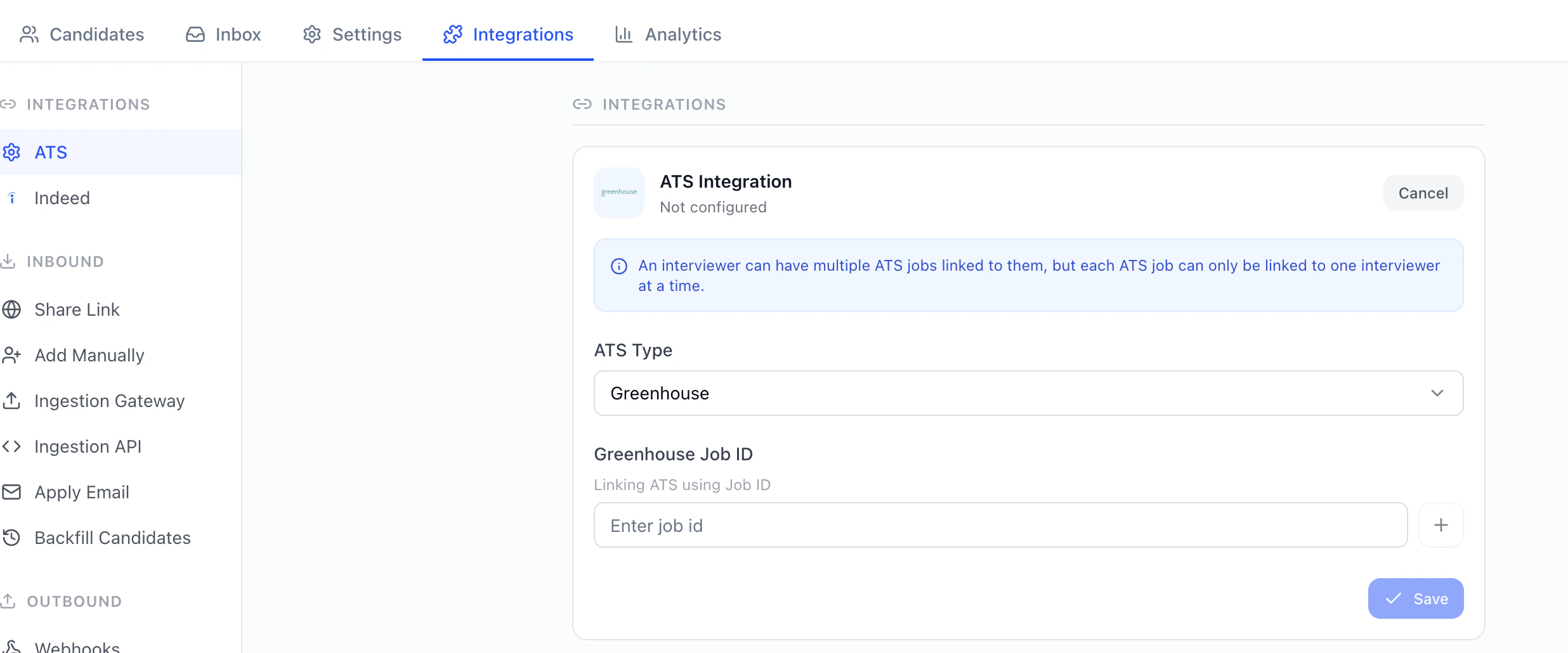
Once the HeyMilo integration is enabled for your organization, you will be able to link a HeyMilo agent to a job in Greenhouse
<Steps>
  <Step title="Simply copy the Job ID from Greenhouse into the HeyMilo agent configuration">
    <img src="https://mintcdn.com/heymilo/GUqqy-Fdke2xB5E9/images/Screenshot-2026-05-12-at-1.32.37-PM.png?fit=max&auto=format&n=GUqqy-Fdke2xB5E9&q=85&s=8a4c93ced30d12a977b33c4e540d8795" alt="Screenshot 2026 05 12 At 1 32 37 PM" width="2472" height="1030" data-path="images/Screenshot-2026-05-12-at-1.32.37-PM.png" />
  </Step>

  <Step title="You will be able to add the HeyMilo assessment as an interview stage for the job">
    <Frame caption="Add Stage">
      ![](https://110840537-files.gitbook.io/~/files/v0/b/gitbook-x-prod.appspot.com/o/spaces%2FbKCgmPgkC7X1VTl62ocK%2Fuploads%2Fgit-blob-187a11202c7f644bfe8b08d6fd7cbdf368108053%2Funnamed%20\(17\).png?alt=media)
    </Frame>
  </Step>

  <Step title="You can send an assessment to a candidate by selecting the Send Test button next to the interview stage for each candidate. Alternatively this can be automated, so that each time a candidate is moved to the HeyMilo stage, they are sent the HeyMilo assessment">
    * When the test is sent to candidates, an email with the screening link will be sent by HeyMilo

    <Frame caption="Candidate notes">
      ![](https://110840537-files.gitbook.io/~/files/v0/b/gitbook-x-prod.appspot.com/o/spaces%2FbKCgmPgkC7X1VTl62ocK%2Fuploads%2Fgit-blob-a57a83106d260057e1fbfc11bec470e908865ca4%2Funnamed%20\(28\).png?alt=media)
    </Frame>
  </Step>

  <Step title="Once the candidate has finished the HeyMilo screening, the Candidate notes will contain a link to view the candidate’s screening results">
    <Frame caption="View candidate PDF report">
      ![](https://110840537-files.gitbook.io/~/files/v0/b/gitbook-x-prod.appspot.com/o/spaces%2FbKCgmPgkC7X1VTl62ocK%2Fuploads%2Fgit-blob-fe5aa38998b5c6ab82d6de0ea2835cd1206443c9%2Funnamed%20\(19\).png?alt=media)
    </Frame>
  </Step>

  <Step title="Clicking View Report will show a detailed summary of the candidate’s screening results">
    <Frame caption="Candidate PDF report">
      ![](https://110840537-files.gitbook.io/~/files/v0/b/gitbook-x-prod.appspot.com/o/spaces%2FbKCgmPgkC7X1VTl62ocK%2Fuploads%2Fgit-blob-cb716a416cfaf73b3083258f65b62b45049bf54c%2Funnamed%20\(20\).png?alt=media)
    </Frame>
  </Step>
</Steps>

### Additional resources

For additional information not covered here, reach out to [support@heymilo.ai](mailto:support@heymilo.ai).
