> ## Documentation Index
> Fetch the complete documentation index at: https://docs.heymilo.ai/llms.txt
> Use this file to discover all available pages before exploring further.
# Deleting Candidate Data in Compliance Hub
> HeyMilo includes a built-in system for managing candidate data deletion requests, supporting GDPR Article 17 (right to erasure) and general data compliance needs.
**Where to find it:** Sidebar → Compliance
## How deletion requests work
There are two ways a deletion request can be created.
### Candidate-initiated
Candidates can request deletion of their own data directly from their interview experience page.
Here is what they go through:
1. At the bottom of their interview page, the candidate clicks **My Data**. This opens the **Privacy and communications** page, where they can also manage reminder email preferences.
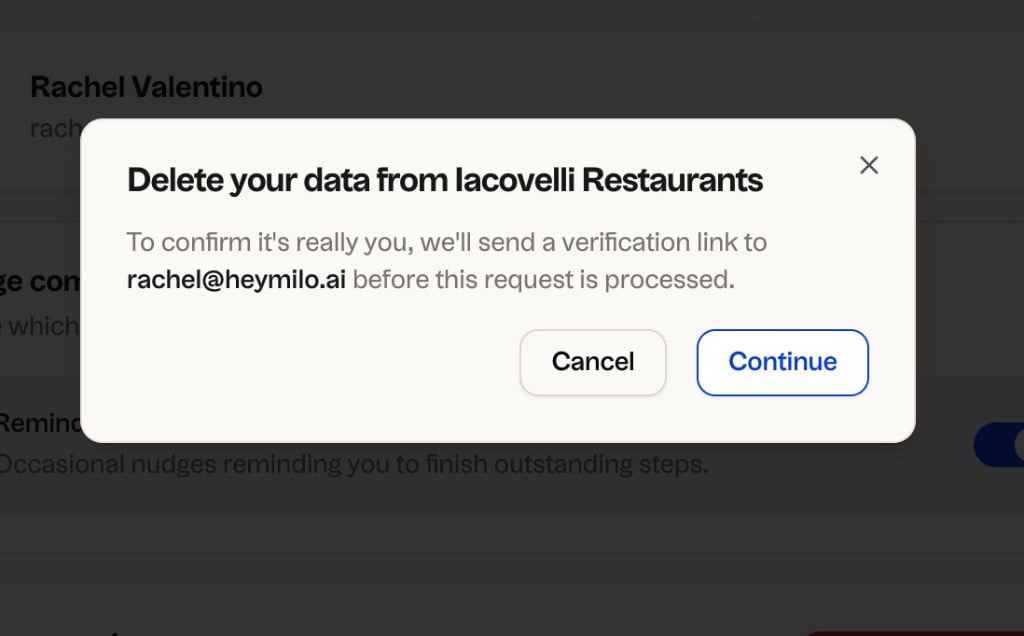
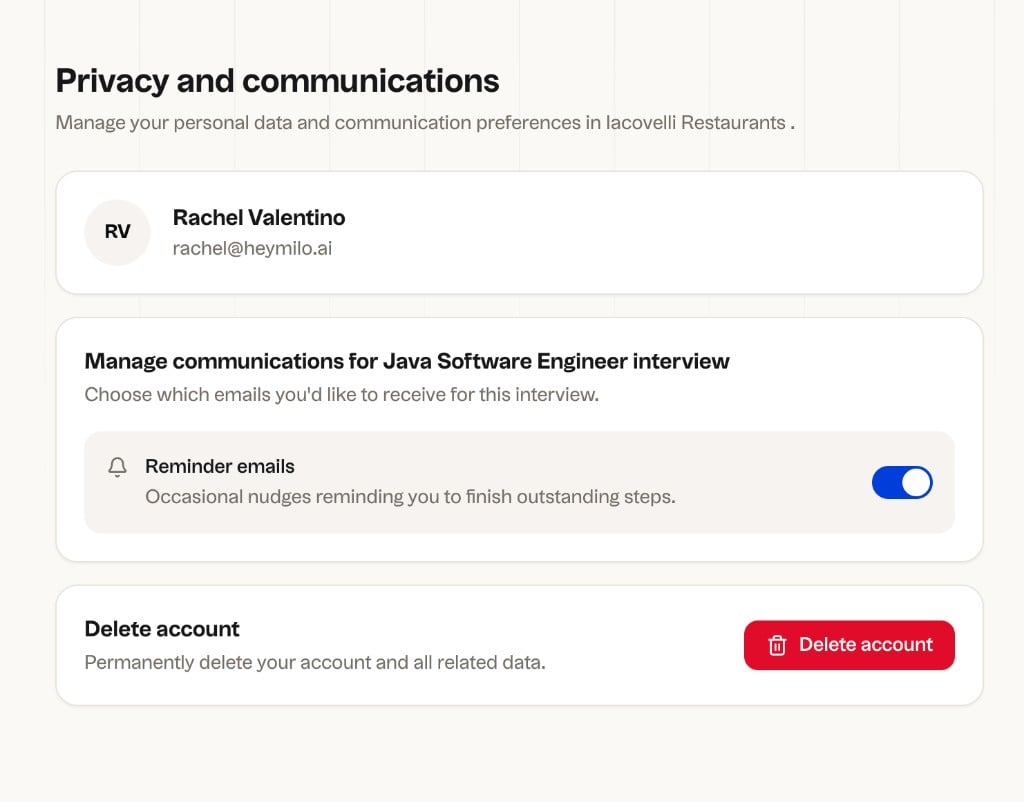 2. They click **Delete account**. A confirmation dialog appears explaining that a verification link will be sent to their email address. They click **Continue**.
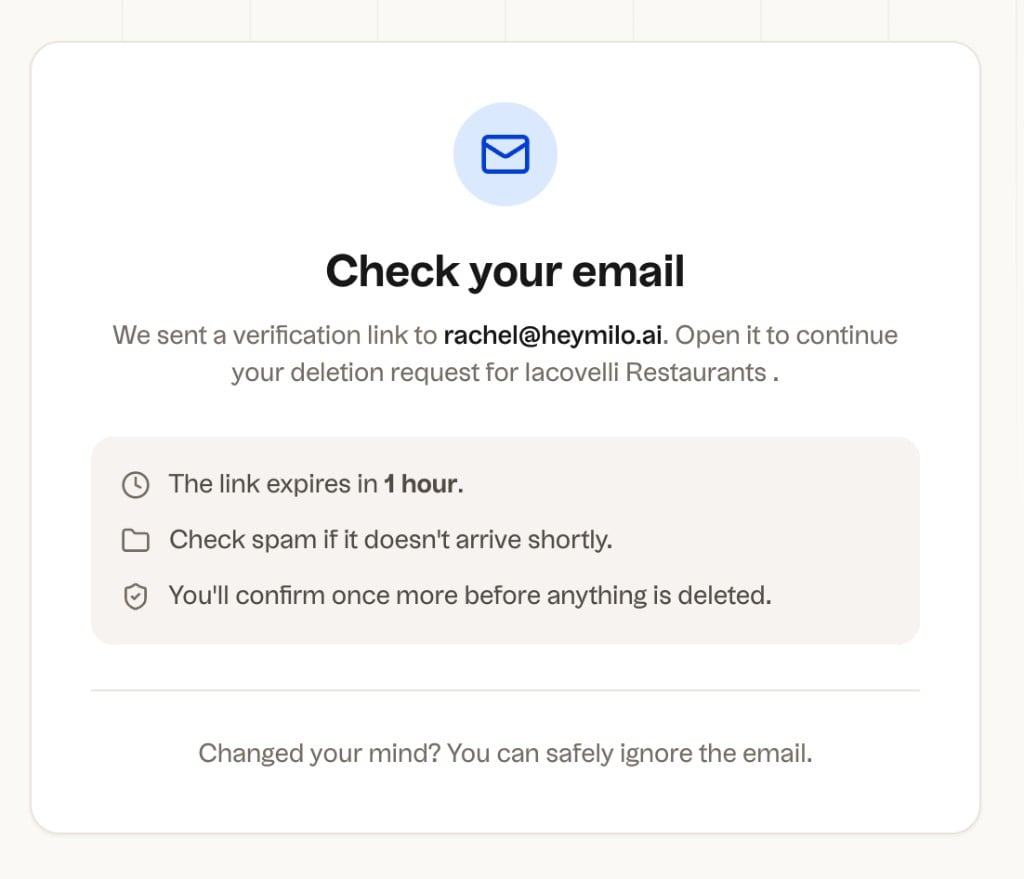
 3. A **Check your email** screen appears. The verification link expires in 1 hour. If it doesn't arrive, check spam.
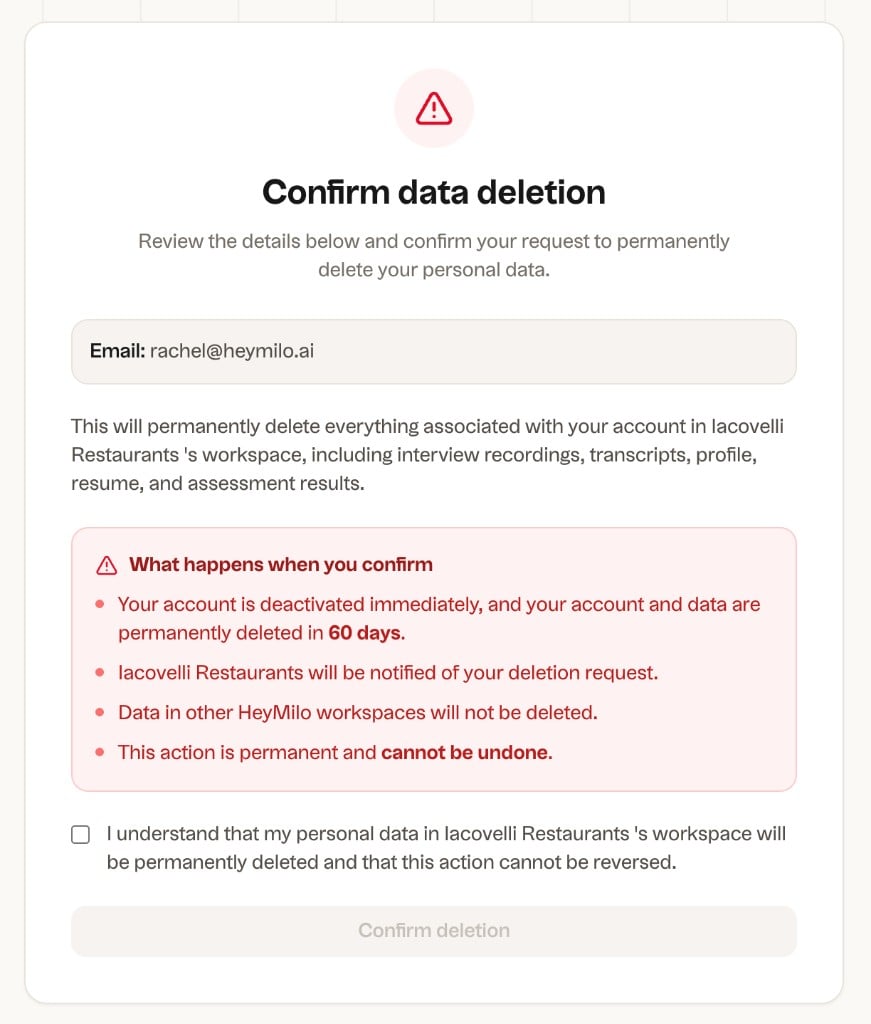
 4. The candidate clicks **Verify deletion request** in the email. A final **Confirm data deletion** page shows exactly what will be deleted. They check the acknowledgment box and click **Confirm deletion**.
 5. A confirmation screen appears with their **Request ID** and **Scheduled deletion date**. The candidate's account is deactivated immediately. Their data is permanently deleted by the scheduled date.
### Admin-initiated
Admins can trigger a deletion directly from a candidate's profile. An optional audit note or reason can be added for record-keeping.
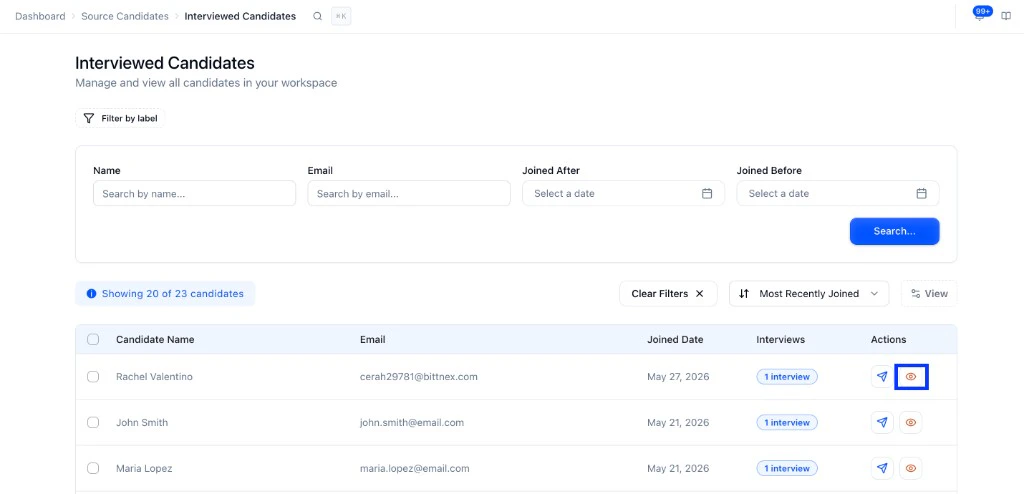
**Path:** Sidebar → Source Candidates → Interviewed Candidates → open a candidate profile.
5. A confirmation screen appears with their **Request ID** and **Scheduled deletion date**. The candidate's account is deactivated immediately. Their data is permanently deleted by the scheduled date.
### Admin-initiated
Admins can trigger a deletion directly from a candidate's profile. An optional audit note or reason can be added for record-keeping.
**Path:** Sidebar → Source Candidates → Interviewed Candidates → open a candidate profile.
 ## What gets deleted
Once confirmed and processed, everything associated with the candidate is removed from the workspace:
* Interview recordings and transcripts
* Profile information and resume
* Assessment scores
**Workspace scope:** Deletion applies only to the workspace where the request was made. If your organization uses multiple HeyMilo workspaces, each must be handled separately.
**ATS note:** Deleting data in HeyMilo does not remove it from your connected ATS. If a candidate has requested full erasure, handle that in your ATS separately.
## What you see on the recruiter side
Once a deletion request is confirmed, the candidate is marked **Deactivated** in your candidate list. They stay visible with that tag until the deletion is fully processed, then they are removed entirely. The candidate can no longer access their interview pages or application link once deactivated.
## What gets deleted
Once confirmed and processed, everything associated with the candidate is removed from the workspace:
* Interview recordings and transcripts
* Profile information and resume
* Assessment scores
**Workspace scope:** Deletion applies only to the workspace where the request was made. If your organization uses multiple HeyMilo workspaces, each must be handled separately.
**ATS note:** Deleting data in HeyMilo does not remove it from your connected ATS. If a candidate has requested full erasure, handle that in your ATS separately.
## What you see on the recruiter side
Once a deletion request is confirmed, the candidate is marked **Deactivated** in your candidate list. They stay visible with that tag until the deletion is fully processed, then they are removed entirely. The candidate can no longer access their interview pages or application link once deactivated.
 ## Compliance dashboard
The Compliance section gives you a full picture of all deletion activity in your workspace. Find it in the sidebar under **Compliance**.
### Dashboard
The dashboard is your overview of all privacy and data governance activity.
## Compliance dashboard
The Compliance section gives you a full picture of all deletion activity in your workspace. Find it in the sidebar under **Compliance**.
### Dashboard
The dashboard is your overview of all privacy and data governance activity.
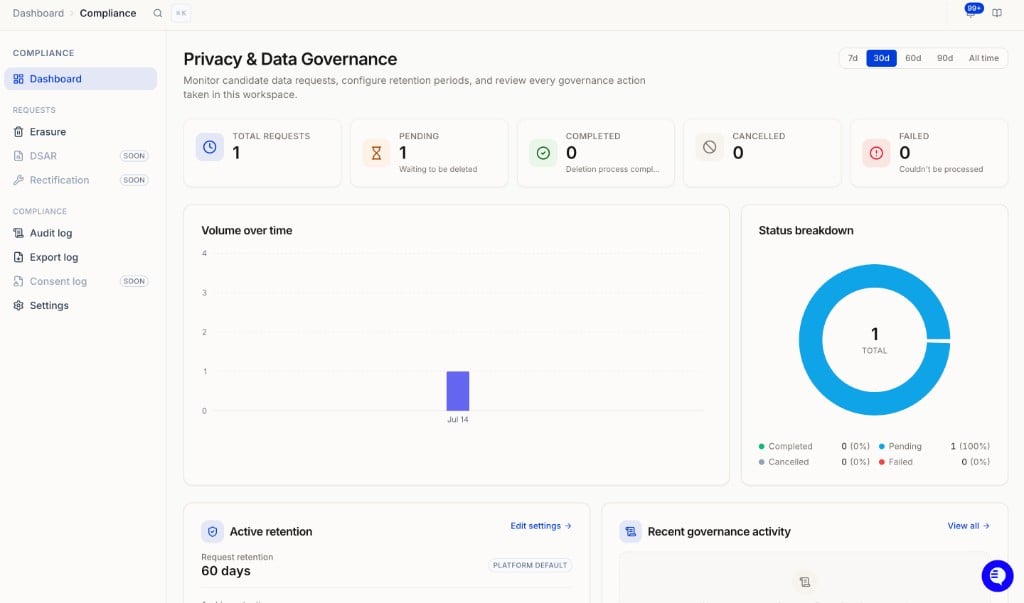 It shows:
* **Total requests** with a breakdown by status: Pending, Completed, Cancelled, Failed
* **Volume over time** chart filterable by 7d, 30d, 60d, 90d, or all time
* **Status breakdown** donut chart
* **Active retention** widget showing your current request and archive retention windows with a shortcut to edit settings
* **Recent governance activity** log
* **Recent erasure requests** with quick access to details
### Erasure requests
Under **Compliance → Requests → Erasure** you can see every deletion request.
It shows:
* **Total requests** with a breakdown by status: Pending, Completed, Cancelled, Failed
* **Volume over time** chart filterable by 7d, 30d, 60d, 90d, or all time
* **Status breakdown** donut chart
* **Active retention** widget showing your current request and archive retention windows with a shortcut to edit settings
* **Recent governance activity** log
* **Recent erasure requests** with quick access to details
### Erasure requests
Under **Compliance → Requests → Erasure** you can see every deletion request.
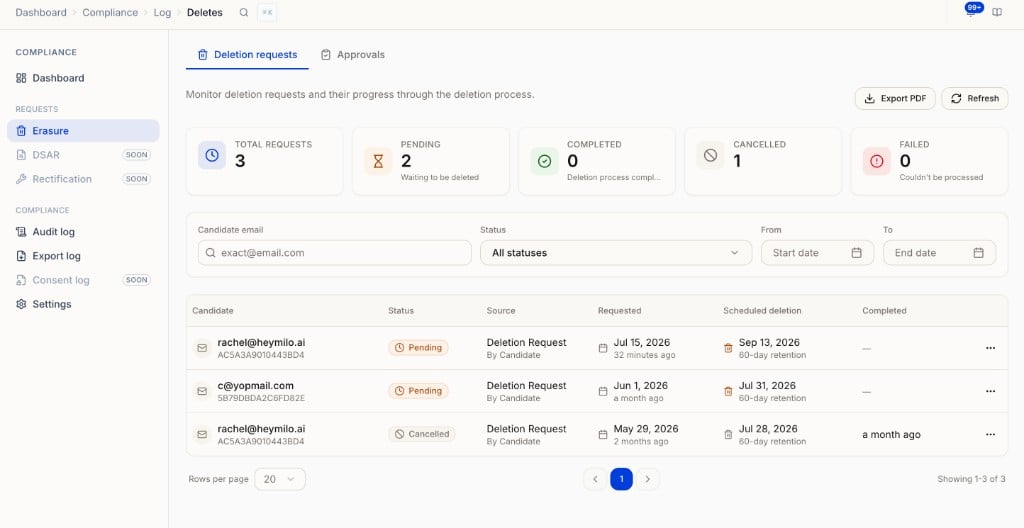 Each row shows:
* Candidate email and ID
* Status (Pending, Completed, Cancelled, Failed)
* Source (candidate-initiated or admin-initiated)
* Requested date and scheduled deletion date
* Completed date
Filter by email, status, and date range. Use **Export PDF** to download the log for audit or legal purposes.
**Deletion statuses**
| Status | What it means |
| ------------- | --------------------------------------------------------- |
| **Pending** | Confirmed and queued. Can still be cancelled by an admin. |
| **Completed** | Data has been permanently deleted. |
| **Cancelled** | The request was cancelled before processing began. |
| **Failed** | Could not be processed. Contact support if this appears. |
### Approvals
The Approvals tab is for reviewing candidates flagged by your retention policy before their deletion is scheduled.
Each row shows:
* Candidate email and ID
* Status (Pending, Completed, Cancelled, Failed)
* Source (candidate-initiated or admin-initiated)
* Requested date and scheduled deletion date
* Completed date
Filter by email, status, and date range. Use **Export PDF** to download the log for audit or legal purposes.
**Deletion statuses**
| Status | What it means |
| ------------- | --------------------------------------------------------- |
| **Pending** | Confirmed and queued. Can still be cancelled by an admin. |
| **Completed** | Data has been permanently deleted. |
| **Cancelled** | The request was cancelled before processing began. |
| **Failed** | Could not be processed. Contact support if this appears. |
### Approvals
The Approvals tab is for reviewing candidates flagged by your retention policy before their deletion is scheduled.
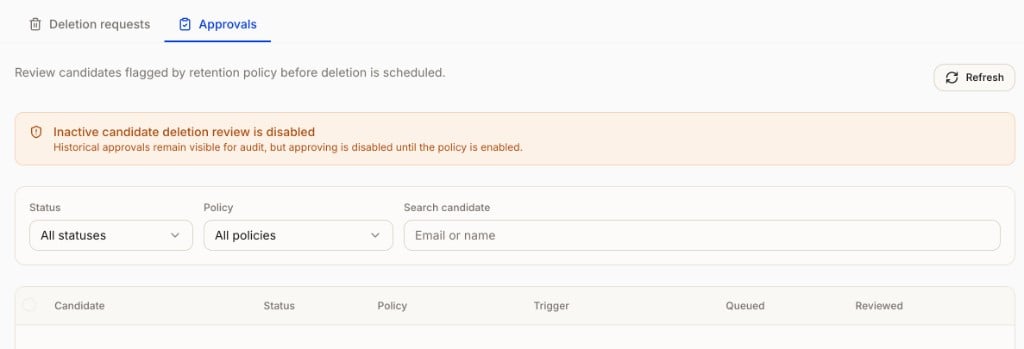 This tab is only active if you have the **Delete inactive candidates** policy enabled under Compliance → Settings → Retention. Until then, the tab shows a notice that approving is disabled, but historical approvals remain visible for audit.
### Audit log
Tracks every governance action taken in the workspace, such as retention setting changes. Useful for compliance reviews and audits.
### Export log
Shows a full history of all data exports from your workspace, and is where you kick off a new workspace-wide export.
This tab is only active if you have the **Delete inactive candidates** policy enabled under Compliance → Settings → Retention. Until then, the tab shows a notice that approving is disabled, but historical approvals remain visible for audit.
### Audit log
Tracks every governance action taken in the workspace, such as retention setting changes. Useful for compliance reviews and audits.
### Export log
Shows a full history of all data exports from your workspace, and is where you kick off a new workspace-wide export.
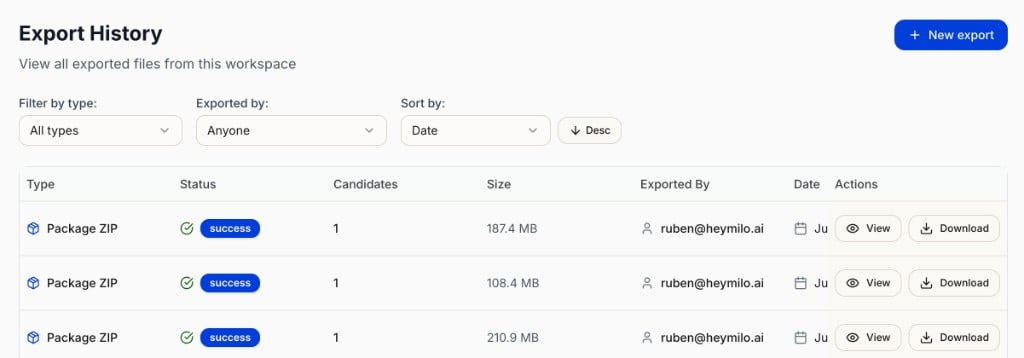 Each row shows the export type (Package ZIP, CSV, PDF ZIP), status, number of candidates, file size, who exported it, and the date. Use **View** or **Download** to access any previous export.
#### Running a workspace-wide export
This is the fastest way to pull data across all candidates and all postings at once, a common request for reporting or audits.
Click **New export** to open the export builder.
Each row shows the export type (Package ZIP, CSV, PDF ZIP), status, number of candidates, file size, who exported it, and the date. Use **View** or **Download** to access any previous export.
#### Running a workspace-wide export
This is the fastest way to pull data across all candidates and all postings at once, a common request for reporting or audits.
Click **New export** to open the export builder.
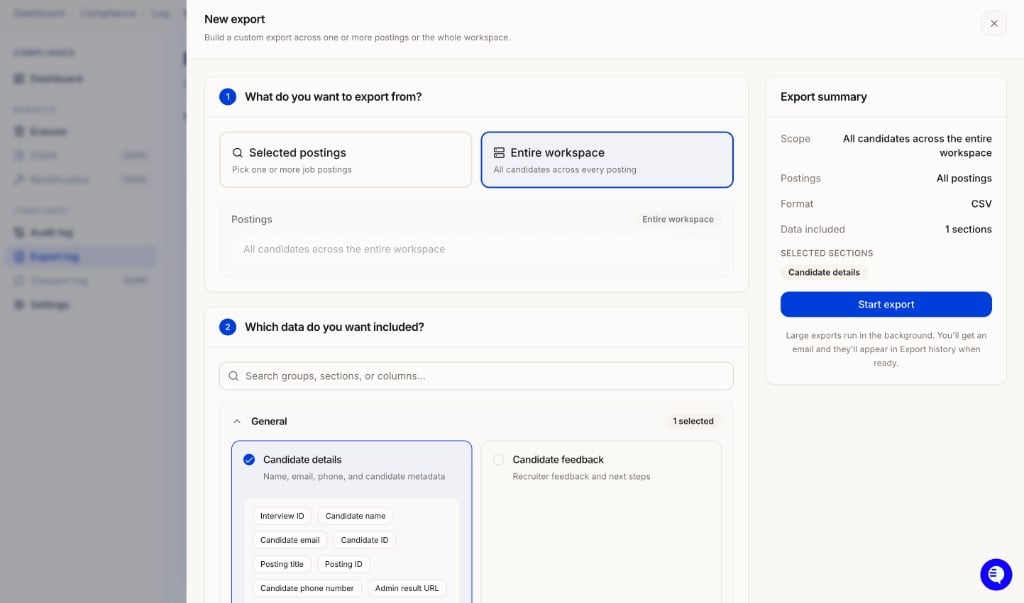 **Step 1: Choose your scope**
| Option | What it exports |
| --------------------- | -------------------------------------- |
| **Selected postings** | Pick one or more specific job postings |
| **Entire workspace** | All candidates across every posting |
**Step 2: Choose which data to include**
Search or browse sections to add. Examples:
* **General:** Candidate details (name, email, phone, candidate metadata, posting title, IP address, location), Candidate feedback
* **Voice Agent:** Scorecard summary, Communication score, Voice transcript, Interview questions
* **Resume Agent:** Resume screening results
* **SMS Agent:** SMS screening results
* **Diagnostics & Integrity:** Cheat detection, verification, and device metadata
The **Export summary** panel on the right shows your scope, format (CSV), and selected sections before you start.
Click **Start export**. Large exports run in the background. You will get an email when it is ready and it will appear in Export History.
## Retention settings
Under **Compliance → Settings → Retention**, configure how long HeyMilo holds data before deletion is processed.
**Step 1: Choose your scope**
| Option | What it exports |
| --------------------- | -------------------------------------- |
| **Selected postings** | Pick one or more specific job postings |
| **Entire workspace** | All candidates across every posting |
**Step 2: Choose which data to include**
Search or browse sections to add. Examples:
* **General:** Candidate details (name, email, phone, candidate metadata, posting title, IP address, location), Candidate feedback
* **Voice Agent:** Scorecard summary, Communication score, Voice transcript, Interview questions
* **Resume Agent:** Resume screening results
* **SMS Agent:** SMS screening results
* **Diagnostics & Integrity:** Cheat detection, verification, and device metadata
The **Export summary** panel on the right shows your scope, format (CSV), and selected sections before you start.
Click **Start export**. Large exports run in the background. You will get an email when it is ready and it will appear in Export History.
## Retention settings
Under **Compliance → Settings → Retention**, configure how long HeyMilo holds data before deletion is processed.
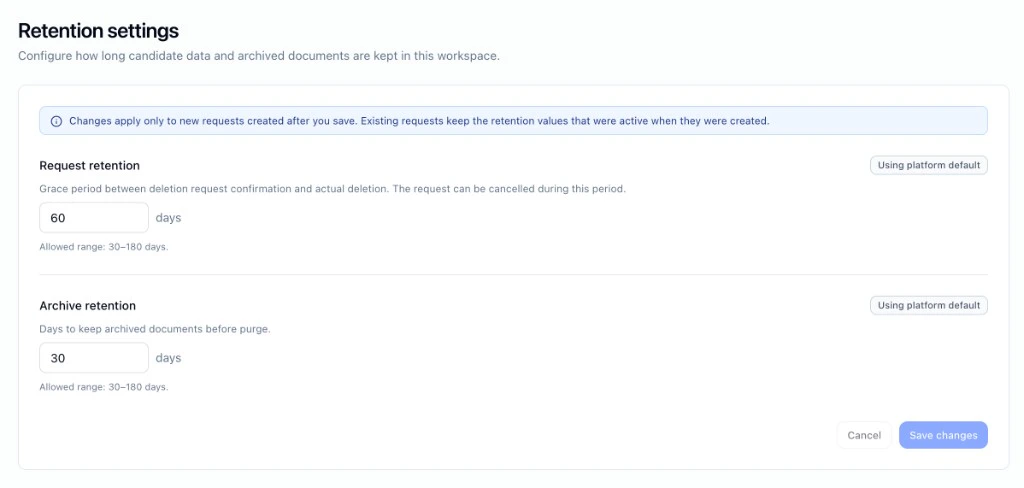 | Setting | What it does | Default | Range |
| ------------------------------ | ---------------------------------------------------------------------------------------------------------------------------------------------------------- | ------- | -------------- |
| **Delete inactive candidates** | When a candidate has been rejected or knocked out of every interview in the workspace for long enough, flag them for deletion review in the Approvals tab. | Off | On/Off |
| **Request retention** | Grace period between when a deletion is confirmed and when data is actually deleted. The request can be cancelled during this window. | 60 days | 30 to 180 days |
| **Archive retention** | How long archived documents are kept before being purged. | 30 days | 30 to 180 days |
Changes to retention settings apply to new requests only. Existing pending requests keep the retention values that were active when they were created.
## Notifications and contacts
Under **Compliance → Settings → Notifications and contacts**, configure who is responsible for candidate privacy and how they are notified.
| Setting | What it does | Default | Range |
| ------------------------------ | ---------------------------------------------------------------------------------------------------------------------------------------------------------- | ------- | -------------- |
| **Delete inactive candidates** | When a candidate has been rejected or knocked out of every interview in the workspace for long enough, flag them for deletion review in the Approvals tab. | Off | On/Off |
| **Request retention** | Grace period between when a deletion is confirmed and when data is actually deleted. The request can be cancelled during this window. | 60 days | 30 to 180 days |
| **Archive retention** | How long archived documents are kept before being purged. | 30 days | 30 to 180 days |
Changes to retention settings apply to new requests only. Existing pending requests keep the retention values that were active when they were created.
## Notifications and contacts
Under **Compliance → Settings → Notifications and contacts**, configure who is responsible for candidate privacy and how they are notified.
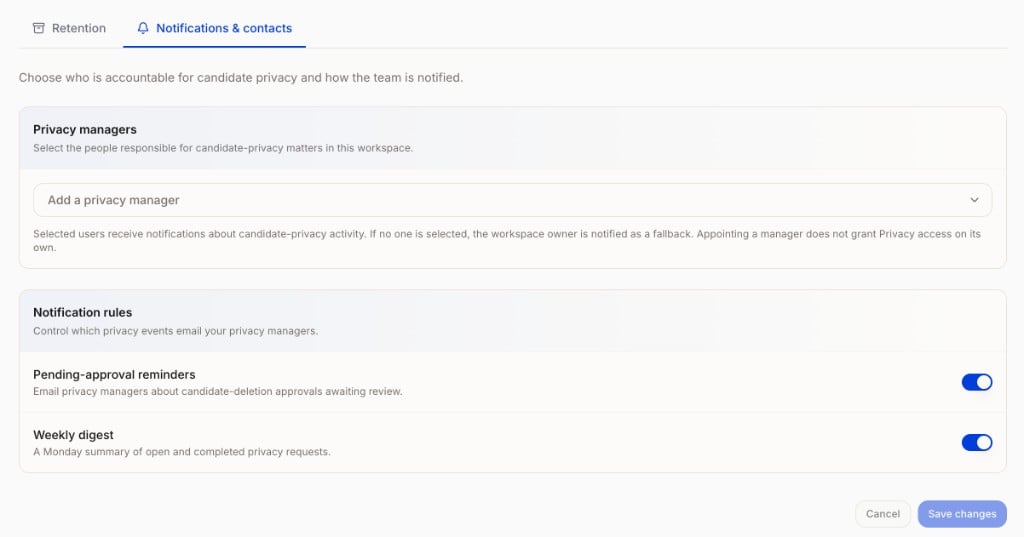 * **Privacy managers:** Select the people responsible for privacy matters in your workspace. Selected users receive notifications about privacy activity. If no one is selected, the workspace owner is notified as a fallback. Appointing a manager does not grant Privacy access on its own.
* **Pending-approval reminders:** Email privacy managers about deletion approvals awaiting review.
* **Weekly digest:** A Monday summary of open and completed privacy requests.
## A few things to note
* Deletion cannot be reversed once processing begins.
* If a deletion request already exists for a candidate's email, the system surfaces the existing request instead of creating a duplicate.
* Data in other HeyMilo workspaces is not affected by a deletion request made in one workspace.
* **Privacy managers:** Select the people responsible for privacy matters in your workspace. Selected users receive notifications about privacy activity. If no one is selected, the workspace owner is notified as a fallback. Appointing a manager does not grant Privacy access on its own.
* **Pending-approval reminders:** Email privacy managers about deletion approvals awaiting review.
* **Weekly digest:** A Monday summary of open and completed privacy requests.
## A few things to note
* Deletion cannot be reversed once processing begins.
* If a deletion request already exists for a candidate's email, the system surfaces the existing request instead of creating a duplicate.
* Data in other HeyMilo workspaces is not affected by a deletion request made in one workspace.