> ## Documentation Index
> Fetch the complete documentation index at: https://docs.heymilo.ai/llms.txt
> Use this file to discover all available pages before exploring further.
> Configure questions and scoring for every stage — Resume, Form, SMS, Voice/Video, and AI Scenario Assessment.
# Configuring Your AI Interviewer
This is where you decide **what qualifies a candidate** and **how HeyMilo evaluates them** at each stage.
## What you can customize (all stages)
For every question or criterion you can:
* Edit the wording
* Choose how it’s evaluated (scored vs pass/fail)
* Assign weight (how much it affects the overall score)
* Mark it as a **dealbreaker** (auto-disqualify if not met)
* Control follow-up behavior (voice/SMS)
* Reorder questions or criteria to control flow
HeyMilo can generate questions and criteria from your job description; you choose what to keep, change, or replace.
## Reordering and weights
* **Reorder:** Drag and drop questions or criteria to change the order candidates see. Put dealbreakers first to filter early; group related topics together.
* **Weights**: Higher weight = the question matters more in the final score. You don’t need to make everything high weight; many teams use the defaults. See [How Scoring Works](how-scoring-works).
## Resume Screening
Configure **Required Qualifications** (auto-disqualifiers) and **Evaluation Criteria** (scored items like relevance and experience). You can enforce a minimum score so only candidates who meet your threshold advance.
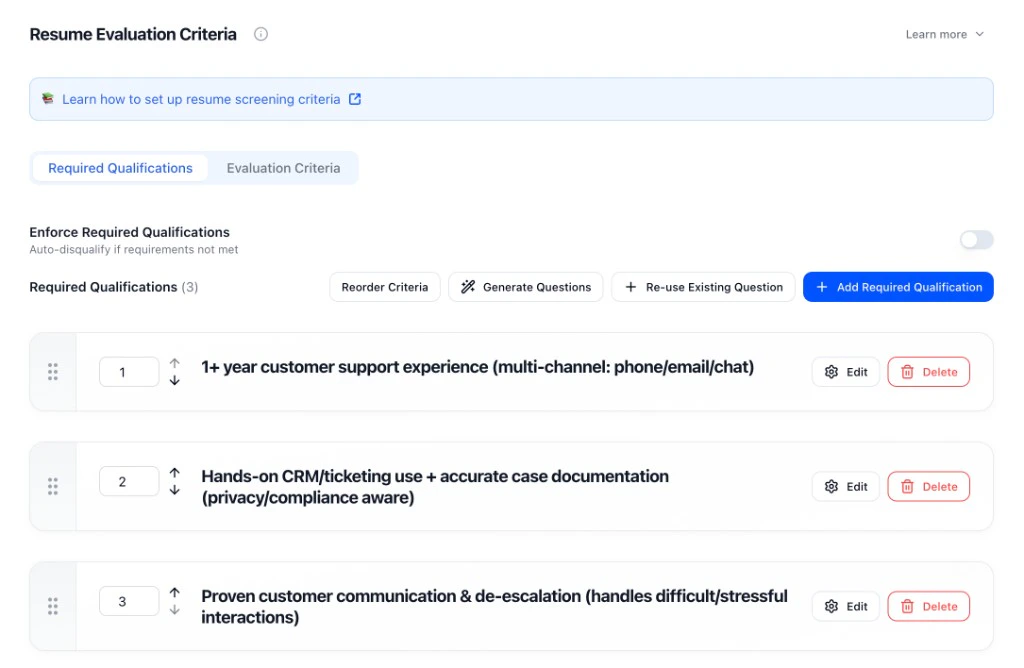 * **Required Qualifications**: Add must-haves (e.g. 1+ year support experience, CRM experience, communication skills). Toggle “Enforce Required Qualifications” to auto-disqualify when not met.
* **Evaluation Criteria**: Scored items for relevance, depth of experience, role fit.
* **Reorder / Generate / Re-use**: Reorder criteria, generate with AI, or re-use from another interviewer.
## Application Form
Form questions collect structured answers and can enforce eligibility before candidates move on. Use **Enforce Criteria** so candidates who don’t meet requirements don’t advance.
* **Required Qualifications**: Add must-haves (e.g. 1+ year support experience, CRM experience, communication skills). Toggle “Enforce Required Qualifications” to auto-disqualify when not met.
* **Evaluation Criteria**: Scored items for relevance, depth of experience, role fit.
* **Reorder / Generate / Re-use**: Reorder criteria, generate with AI, or re-use from another interviewer.
## Application Form
Form questions collect structured answers and can enforce eligibility before candidates move on. Use **Enforce Criteria** so candidates who don’t meet requirements don’t advance.
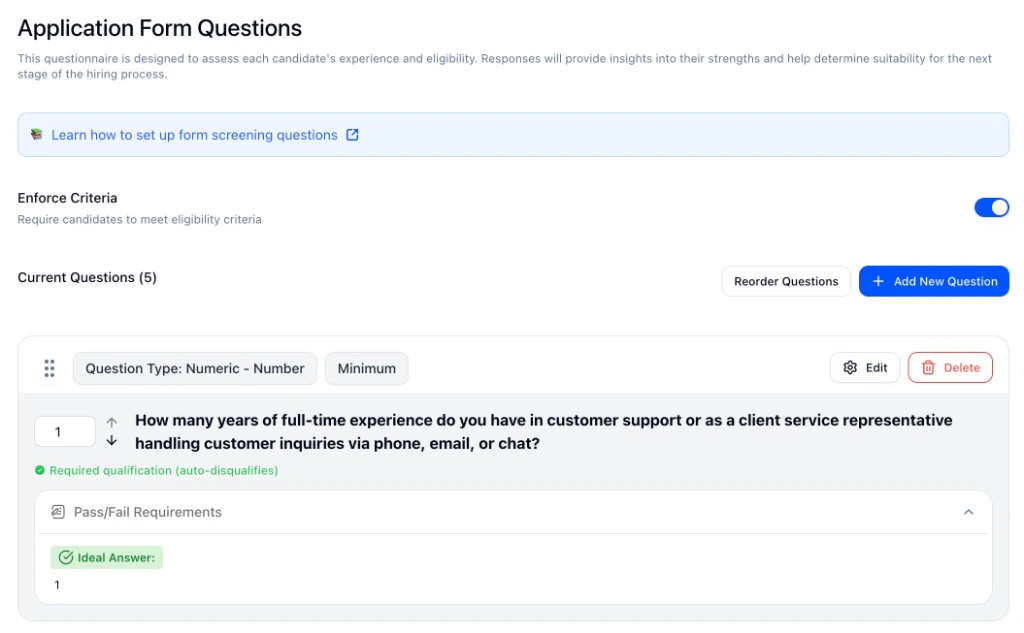 * **Question types**: Short answer, numeric (min/slider), multiple choice, date, file upload.
* **Required qualification (auto-disqualifies)**: Mark questions as dealbreakers with pass/fail requirements (e.g. minimum years of experience, ideal answer “1”).
* **Reorder / Add**: Reorder questions or add new ones.
## SMS Screening
SMS is built for quick eligibility checks. Use **Enforce Required Qualifications** so candidates who don’t meet your pass/fail answers are auto-disqualified.
* **Question types**: Short answer, numeric (min/slider), multiple choice, date, file upload.
* **Required qualification (auto-disqualifies)**: Mark questions as dealbreakers with pass/fail requirements (e.g. minimum years of experience, ideal answer “1”).
* **Reorder / Add**: Reorder questions or add new ones.
## SMS Screening
SMS is built for quick eligibility checks. Use **Enforce Required Qualifications** so candidates who don’t meet your pass/fail answers are auto-disqualified.
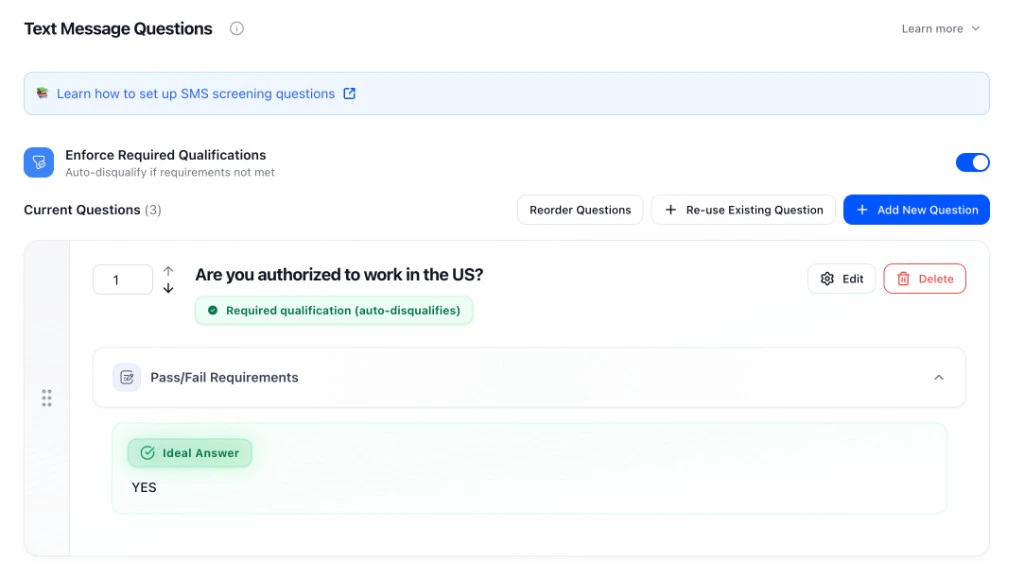 * **Question types**: Yes/no, numeric, pass/fail.
* **Required qualification (auto-disqualifies)**: Set the ideal answer (e.g. “YES” for work authorization). Candidates who don’t match don’t advance.
* **Reorder / Re-use / Add**: Reorder, re-use existing questions, or add new ones.
## Voice/Video Interview
For voice and video, you define **evaluation criteria** for each question: what a strong answer looks like (score of 5) and what a weak answer looks like (score of 1). Set weight and how many follow-ups the AI can ask.
* **Question types**: Yes/no, numeric, pass/fail.
* **Required qualification (auto-disqualifies)**: Set the ideal answer (e.g. “YES” for work authorization). Candidates who don’t match don’t advance.
* **Reorder / Re-use / Add**: Reorder, re-use existing questions, or add new ones.
## Voice/Video Interview
For voice and video, you define **evaluation criteria** for each question: what a strong answer looks like (score of 5) and what a weak answer looks like (score of 1). Set weight and how many follow-ups the AI can ask.
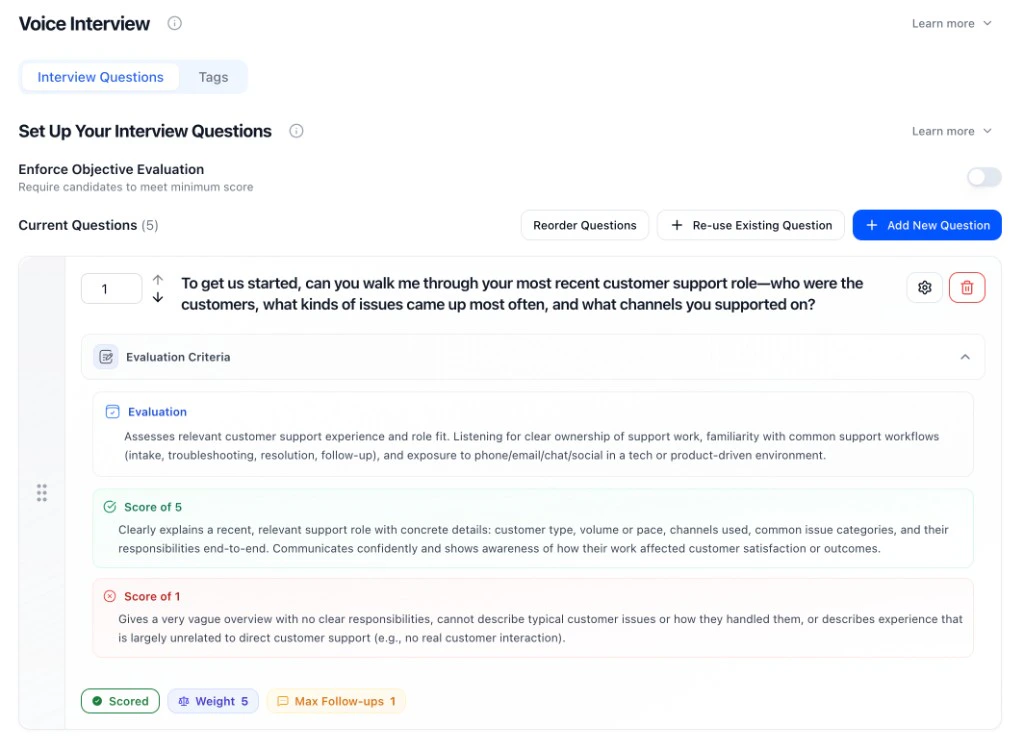 * **Evaluation criteria**: Describe what you’re listening for; define Score of 5 (strong) and Score of 1 (weak).
* **Weight**: How much the question affects the overall score (e.g. 1–10).
* **Max follow-ups**: How many follow-up questions the AI can ask to probe for more detail.
* **Enforce Objective Evaluation**: Optional: require candidates to meet a minimum score to pass.
* You can mix **scored questions** (1–5), **structured** (pass/fail, multiple choice), and **informational** (no score impact). See [Question Library](../../interviews/interviews/question-library).
## AI Scenario Assessment
For AI Scenario Assessment stages, configuration works differently — instead of setting questions and rubrics manually, you provide a task background and HeyMilo generates the full scenario, deliverable, and scoring rubric automatically.
* **Evaluation criteria**: Describe what you’re listening for; define Score of 5 (strong) and Score of 1 (weak).
* **Weight**: How much the question affects the overall score (e.g. 1–10).
* **Max follow-ups**: How many follow-up questions the AI can ask to probe for more detail.
* **Enforce Objective Evaluation**: Optional: require candidates to meet a minimum score to pass.
* You can mix **scored questions** (1–5), **structured** (pass/fail, multiple choice), and **informational** (no score impact). See [Question Library](../../interviews/interviews/question-library).
## AI Scenario Assessment
For AI Scenario Assessment stages, configuration works differently — instead of setting questions and rubrics manually, you provide a task background and HeyMilo generates the full scenario, deliverable, and scoring rubric automatically.
 * **Task background**: Describe the task the candidate will work through. HeyMilo uses this plus the job description to generate the scenario.
* **Assessment style**: Standard (collaborative) or Test AI Error Detection (candidate identifies AI mistakes).
* **Conversation behavior**: Toggle whether the AI sends a greeting first and whether it invents missing details to keep the scenario flowing.
* **Time limit and rounds**: Set how long candidates have and how many back-and-forth exchanges before the assessment ends.
* **Passing score**: Optional threshold — candidates below this won't advance.
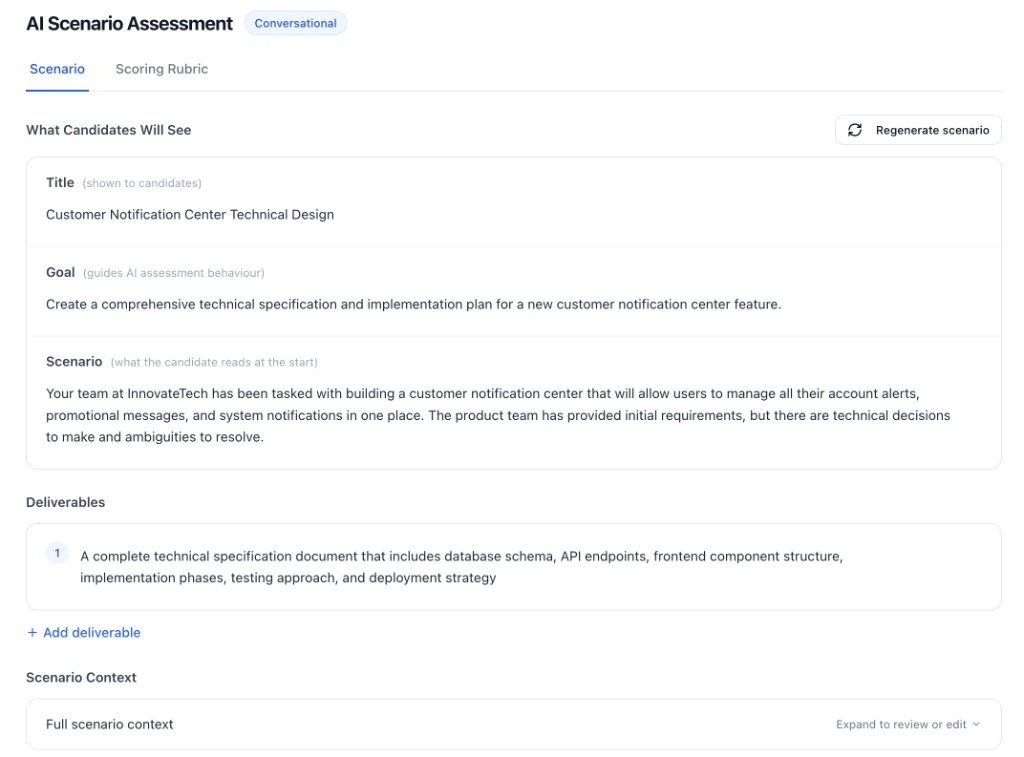
After saving, HeyMilo generates the scenario title, goal, description, deliverable, and rubric. You can regenerate or edit any of these before activating. See [AI Scenario Assessment](../../../ai-scenario-assessment) for full details.
### Dealbreakers vs scoring
* **Dealbreakers** = eligibility (work authorization, certifications, availability, hard minimums). Use required qualifications / enforce criteria so candidates who don’t meet them don’t advance.
* **Scoring** = quality (judgment, communication, depth of experience). Use evaluation criteria and weights so stronger answers rank higher.
Use both so you filter on must-haves first, then rank by fit.
### Other settings
* **Tags** (optional): Extract extra details from responses (e.g. years of experience, tools) without affecting the score. Tags appear in reports for filtering and review. See [Interview Tags](../../interviews/interviews/interview-tags).
* **Test before you launch**: Run through as a candidate to check wording, follow-ups, and scoring before you activate.
* **Multilingual Support**: [Languages and voices](../../interviews/interviews/multilingual-support). **Cheat Detection** — [Interview Integrity](../../tools/ai-settings/interview-integrity).
## Settings tab
Open the **Settings** tab (next to **Integrations** and **Analytics**). What you can **edit** vs **view**:
**Editable**
* **Root Level Configuration**: Edit language, interviewer name; under **Advanced**: Days to Complete, Scheduling URL, Redirect URL; **Additional Context** (company overview, job overview, interview process, instructions).
* **Workflow Steps**: Click a step (e.g. Resume, Video Interview) to edit that step’s questions, evaluation, and **Enabled Features** (turn video or phone on/off for that step, tags). Phone and video are **per step**, not one global toggle.
* **Communication Channels**: Set email template group, phone/messaging, and candidate intake fields (reusable fields candidates fill out at registration — see [Creating an Interviewer](creating-an-interviewer#candidate-intake-fields)).
* **Customizations**: Set design template group (branding).
* **Advanced Settings**: Turn **Cheat Detection**, **Test Posting**, **Deployed**, **Allow SMS**, **Email Report to Candidate**, and **retakes** on or off.
**View only (or set elsewhere)**
* **Sourcing**: See what’s assigned; configure in Sourcing.
* **Job Description**: Shown to candidates; edit the description where you created the posting.
* **Agent Mascot**: Name and status (e.g. Live) are shown; created/updated time and deadline (e.g. "6 days remaining") are displayed here.
To give **one candidate** a retake without changing the rule for everyone: **Candidates** → open that candidate’s profile → **Allow Retake**.
## Next steps
* [How Scoring Works](how-scoring-works) — How scores are calculated and what appears on reports
* [Question Library](../../interviews/interviews/question-library) — Reusable questions and AI generation
* [Reviewing Candidates](reviewing-candidates) — Use score reports to advance or decline
* **Task background**: Describe the task the candidate will work through. HeyMilo uses this plus the job description to generate the scenario.
* **Assessment style**: Standard (collaborative) or Test AI Error Detection (candidate identifies AI mistakes).
* **Conversation behavior**: Toggle whether the AI sends a greeting first and whether it invents missing details to keep the scenario flowing.
* **Time limit and rounds**: Set how long candidates have and how many back-and-forth exchanges before the assessment ends.
* **Passing score**: Optional threshold — candidates below this won't advance.
After saving, HeyMilo generates the scenario title, goal, description, deliverable, and rubric. You can regenerate or edit any of these before activating. See [AI Scenario Assessment](../../../ai-scenario-assessment) for full details.
### Dealbreakers vs scoring
* **Dealbreakers** = eligibility (work authorization, certifications, availability, hard minimums). Use required qualifications / enforce criteria so candidates who don’t meet them don’t advance.
* **Scoring** = quality (judgment, communication, depth of experience). Use evaluation criteria and weights so stronger answers rank higher.
Use both so you filter on must-haves first, then rank by fit.
### Other settings
* **Tags** (optional): Extract extra details from responses (e.g. years of experience, tools) without affecting the score. Tags appear in reports for filtering and review. See [Interview Tags](../../interviews/interviews/interview-tags).
* **Test before you launch**: Run through as a candidate to check wording, follow-ups, and scoring before you activate.
* **Multilingual Support**: [Languages and voices](../../interviews/interviews/multilingual-support). **Cheat Detection** — [Interview Integrity](../../tools/ai-settings/interview-integrity).
## Settings tab
Open the **Settings** tab (next to **Integrations** and **Analytics**). What you can **edit** vs **view**:
**Editable**
* **Root Level Configuration**: Edit language, interviewer name; under **Advanced**: Days to Complete, Scheduling URL, Redirect URL; **Additional Context** (company overview, job overview, interview process, instructions).
* **Workflow Steps**: Click a step (e.g. Resume, Video Interview) to edit that step’s questions, evaluation, and **Enabled Features** (turn video or phone on/off for that step, tags). Phone and video are **per step**, not one global toggle.
* **Communication Channels**: Set email template group, phone/messaging, and candidate intake fields (reusable fields candidates fill out at registration — see [Creating an Interviewer](creating-an-interviewer#candidate-intake-fields)).
* **Customizations**: Set design template group (branding).
* **Advanced Settings**: Turn **Cheat Detection**, **Test Posting**, **Deployed**, **Allow SMS**, **Email Report to Candidate**, and **retakes** on or off.
**View only (or set elsewhere)**
* **Sourcing**: See what’s assigned; configure in Sourcing.
* **Job Description**: Shown to candidates; edit the description where you created the posting.
* **Agent Mascot**: Name and status (e.g. Live) are shown; created/updated time and deadline (e.g. "6 days remaining") are displayed here.
To give **one candidate** a retake without changing the rule for everyone: **Candidates** → open that candidate’s profile → **Allow Retake**.
## Next steps
* [How Scoring Works](how-scoring-works) — How scores are calculated and what appears on reports
* [Question Library](../../interviews/interviews/question-library) — Reusable questions and AI generation
* [Reviewing Candidates](reviewing-candidates) — Use score reports to advance or decline